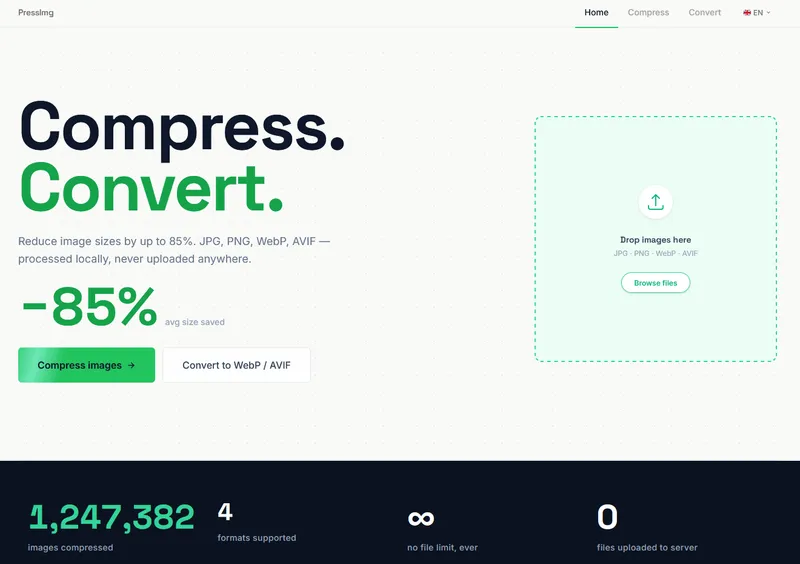
PressImg is a free, browser-based image compressor and converter that shrinks JPG, PNG, WebP, and AVIF files by up to 85% — with no uploads, no accounts, and no watermarks.
What is PressImg?
PressImg is a free, browser-based image compressor and converter. It takes JPG, PNG, WebP, and AVIF images as input and outputs compressed versions in the same or a different format, including conversion to WebP or AVIF. Everything runs locally in your browser, so files never leave your device. The tool requires no installation and no account.
Key Features
- Local processing — All compression and conversion happens in your browser; the page states that 0 files are uploaded to a server.
- Multi-format support — Accepts JPG, PNG, WebP, and AVIF; can convert between these formats, including to AVIF which delivers 50–90% better compression than JPEG.
- Batch processing — Drop multiple files at once; there is no file count limit ("∞ no file limit, ever").
- ZIP download — Download all processed files as a single ZIP archive, or save each file individually.
- EXIF removal — Automatically strips GPS coordinates, camera model, and other metadata from photos.
- No account required — Works for free without registration, watermarks, or file size caps.
- Works on mobile — The interface works on mobile devices and supports batch ZIP downloads.
Who should use PressImg?
- Freelancers and designers — Compress client images before delivery and zip them up for handoff, as noted by photographer Dmytro V. in the testimonials.
- Frontend developers — Optimize images before deploying to production; developer Marcus T. switched from TinyPNG because he didn't want files going to third-party servers.
- UX designers — Improve PageSpeed scores by compressing images and using AVIF output, as Sarah K. did to go from 61 to 94.
- Anyone handling sensitive images — Process photos locally to avoid sending them to external servers, preserving privacy.
What can you do with PressImg?
- Compress photos: Shrink JPG or PNG files by up to 85% with no visible quality loss, using lossy JPEG compression or lossless PNG indexing for screenshots and logos.
- Convert to AVIF/WebP: Turn JPG or PNG files into AVIF or WebP formats for smaller file sizes and better web performance.
- Batch convert and zip: Process multiple images at once and download them as a ZIP archive for quick delivery to clients.
- Strip EXIF metadata: Remove GPS coordinates, camera model, and other hidden data from images automatically.
How does PressImg work?
Drop your images onto the tool, click Compress (or choose Convert), and the browser processes each file locally using WebAssembly. Results appear in under a second, and you can save files individually or as a ZIP archive. No files are uploaded at any stage.
Pricing
PressImg is completely free — no account, no watermarks, no file limits, and no hidden charges. All processing happens on your device.
Alternatives
- TinyPNG — a popular online compressor, but it uploads files to its servers, unlike PressImg's local processing.
- Squoosh — an open-source Google tool that also runs in the browser, but it lacks batch ZIP download and EXIF stripping.
- Compressor.io — an online compressor that requires uploads and has file size limits.
FAQ
Are my images uploaded to a server?
No. PressImg runs entirely in your browser. Files are processed locally and never leave your device, which is confirmed by the tool's "0 files uploaded to server" counter.
Does compression reduce visible quality?
No. PressImg uses lossy compression algorithms that discard visual detail the eye won't notice. At common quality settings (80–85%), files are 60–80% smaller with no perceptible loss, and lossless PNG compression preserves every pixel exactly.
What is AVIF and why is it better than WebP?
AVIF is a modern image format based on the AV1 video codec, delivering 50–90% better compression than JPEG at identical visual quality. It's supported in Chrome 85+, Firefox 93+, and Safari 16+. WebP, Google's format, delivers 25–35% smaller files than JPEG but is older and less efficient than AVIF.
Does PressImg remove EXIF data?
Yes. The tool automatically strips GPS coordinates, camera model, and other metadata from every photo it compresses, so you don't need to worry about privacy leaks.
How many images can I process?
There is no file limit. The page states "∞ no file limit, ever", and batch processing with ZIP download is supported on mobile and desktop.