
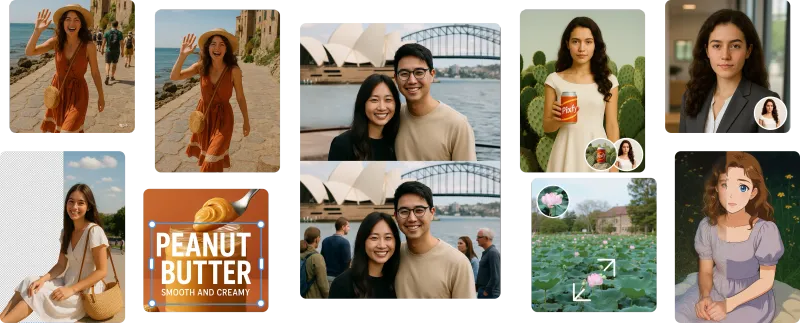
Pixfy AI is an all-in-one AI image editor that lets you edit photos by describing changes in natural language, supporting tasks like background removal, object erasure, image enhancement, and AI generation.
What is Pixfy AI?
Pixfy AI is an all-in-one AI image editor that edits photos based on text descriptions. Upload an image and describe the desired change (e.g., "remove the background" or "make it sharper"), and the AI performs the edit. It runs as a web application and offers a suite of tools including background removal, object removal, image enhancement, clothes and hairstyle changing, and an AI image generator. The product is developed by Pixfy.
Key Features
- Conversational Editing — Describe any edit in natural language; the AI interprets and applies the change without sliders or menus.
- Background Remover — Instantly erase backgrounds with one click, producing transparent cutouts for products or portraits.
- Object & People Remover — Remove unwanted objects or photobombers from photos.
- AI Image Enhancer — Improve quality, sharpen blurry images, and restore old photos.
- Hairstyle & Clothes Changer — Virtually try on new hairstyles or outfits by uploading a portrait and describing the look.
- AI Image Generator — Generate original images from text descriptions, then further edit them using other tools.
- Background Changer — Replace backgrounds with new scenes, with AI automatically adjusting lighting and shadows.
Who is it for?
- E-commerce businesses — Create product photos with clean backgrounds, remove reflections, and ensure a professional catalog.
- Social media content creators and influencers — Change backgrounds for engaging posts, try new hairstyles, and erase unwanted elements from photos.
- Photographers and designers — Quickly edit portraits, restore old images, and generate custom backgrounds or assets.
- Casual users — Enhance personal photos, have fun changing outfits or hairstyles, and remove photobombers.
What can you do with Pixfy AI?
- Product photography for online stores: Remove background, replace with a studio backdrop, and adjust lighting automatically for consistent product images.
- Social media content creation: Change photo backgrounds to match a theme, try new hairstyles for profile pictures, or erase distractions.
- Personal photo restoration: Unblur old family photos, enhance quality, and remove scratches or blemishes.
- Creative experimentation: Generate unique images from text prompts and then edit them further with the full toolset.
FAQ
What is Pixfy AI?
Pixfy AI is an all-in-one AI image editor that uses natural language to make photo editing simple. It can remove backgrounds, erase objects, enhance quality, change hairstyles and clothes, and generate new images.
How do I edit a photo with Pixfy?
Upload a photo, describe the edit you want in plain English (e.g., "remove the person in the background"), and the AI performs the edit in seconds.
Is Pixfy free to use?
Pixfy offers a free tier with free credits and a commercial license. You can start editing for free; details on premium plans are available on the site.
Can I use Pixfy to improve old or blurry photos?
Yes, Pixfy includes an AI image enhancer that can restore and sharpen old or blurry photos, making them clearer.
Does Pixfy have an AI image generator?
Yes, Pixfy includes an AI image generator that creates images from text descriptions, seamlessly integrated with the editor.


