PikNova — Free Online Image Tools That Respect Your Privacy
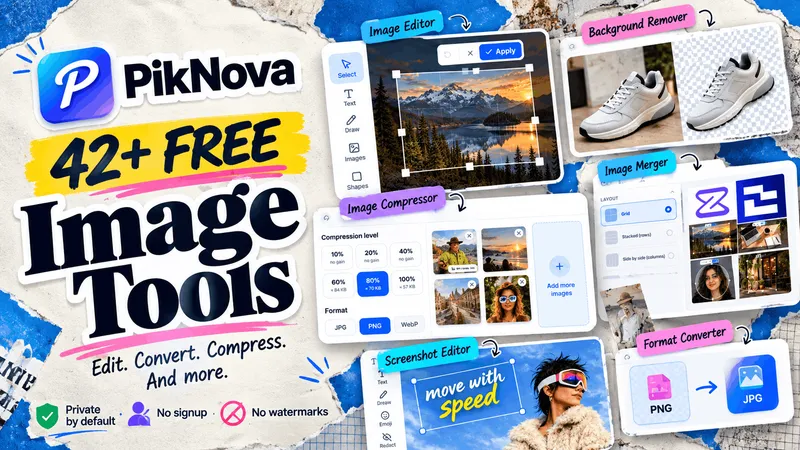
PikNova brings 42+ free image tools into one browser-based workspace. Remove backgrounds with on-device AI, process images in bulk, edit screenshots, compress files to exact sizes, and create social-media-ready visuals — all without an account, watermarks, or software installation.
What is PikNova?
PikNova is an all-in-one image toolkit for creators, marketers, developers, and businesses who want to get image-related tasks done quickly. Each tool is designed for a specific job: upload or paste an image, make your changes, and export the result without navigating a complicated editor.
Most image processing happens directly in your browser, keeping your files on your device by default. Optional cloud processing is available for supported tools when you choose it.
What makes PikNova different?
- Privacy-first AI background removal: Remove backgrounds locally in your browser and export transparent PNGs or replace backgrounds with solid colours.
- Bulk image processing: Process multiple images efficiently, compare images in bulk, and simplify repetitive editing tasks.
- Exact-size image compression: Target file sizes such as 20 KB, 50 KB, or 100 KB instead of guessing with a quality slider.
- Powerful screenshot editor: Annotate screenshots with text, arrows, and shapes, then redact sensitive information using blur, pixelation, solid boxes, and other effects. Device and browser mockups, along with 3D tilt effects, are planned enhancements.
- Precise image transformations: Split images into numbered grids, merge images, resize using pixels or physical units, convert formats, and more.
- High-quality exports: Download your results without watermarks, arbitrary resolution caps, daily download limits, or mandatory sign-ups.
PikNova also includes dedicated YouTube tools for downloading available video thumbnails, channel profile pictures, and banner artwork.
Who is PikNova for?
- Content creators: Prepare Instagram carousels, resize social-media graphics, edit screenshots, and create polished visuals.
- E-commerce sellers: Remove product backgrounds, prepare white-background images, and compress files to meet marketplace size requirements.
- Developers and marketers: Convert images to modern formats, optimise assets, and prepare graphics for websites and campaigns.
- Writers and teams: Annotate screenshots, redact sensitive details, and prepare images for tutorials, documentation, and presentations.
How does PikNova work?
- Choose a tool that matches your task.
- Upload or paste your image and adjust the available settings.
- Download your result in the desired format.
Most tools process images directly in your browser, with no account required. Tools offering cloud processing clearly indicate when an image will be sent to a server.
Pricing
PikNova offers free access to its tools without watermarks, download limits, or resolution caps. Optional paid cloud processing is available for supported workflows that benefit from server-based processing. Core editing and export capabilities do not require a subscription.
Alternatives
iLoveIMG, Canva, Picsart, PineTools, Adobe Express, TinyPNG, and remove.bg.
Frequently asked questions
Is PikNova free?
Yes. Its tools offer free usage paths with no account requirement, watermarks, or download limits.
Do my images leave my device?
Not by default. Most editing and transformation tools process images locally. Cloud processing is optional where available, while YouTube tools use server requests to retrieve public image information.
Can I compress an image to a specific file size?
Yes. The Image Compressor lets you set a target, such as 50 KB or 100 KB, for supported formats including JPG, PNG, and WebP.
Can I remove backgrounds without credits?
Yes. The on-device Background Remover creates transparent cutouts or lets you choose a replacement background without a per-image credit system.