
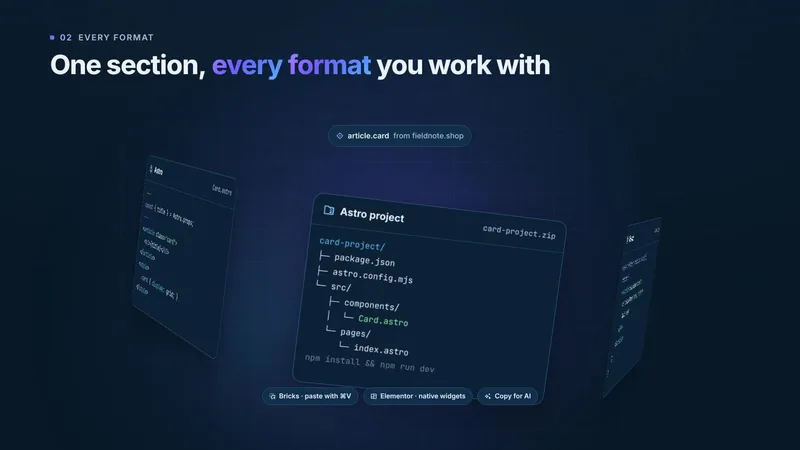
Pickode is a browser extension that lifts a section out of any live web page and hands it back as editable code — React, Tailwind CSS, Vue, Astro, Bricks, Elementor, WordPress/WooCommerce or Webflow — and audits the same page for WordPress details, speed, accessibility and AI-search readiness.
What is Pickode?
Pickode takes a live web page as input and produces two things: component code in one of 9 export formats, and audit data with an HTML client report. It runs as a browser extension on Chrome, Edge, Brave, Opera, Arc, Comet and Firefox 140+, opened with the Alt+I shortcut. The site is written in the first person by a solo developer rather than a named company, and it states that inspection, export and audits execute locally in the browser with no Pickode server involved.
What makes Pickode stand out?
- Authored CSS, not computed CSS — Pickode reads the site's original stylesheets instead of the browser's resolved values, so a card that DevTools reports as 32+ computed properties comes out as roughly 11 lines with the author's media queries, hover states and variables intact.
- 9 export formats — React, Tailwind CSS, Vue, Astro, Bricks, Elementor, WordPress, WooCommerce and Webflow. Bricks and Webflow keep the original fonts by default; Elementor inherits the fonts of the site you paste into and requires Flexbox Containers, which is on by default.
- CSS fidelity details — every
@media,@supportsand@containerrule is kept as written, parent-scoped states like.card:hover .titlesurvive, and::before/::afterpseudo-elements ship with variables resolved to the site's actual values. Browser defaults and universal resets are dropped. - Copy for AI — one click copies a Markdown brief for Claude, ChatGPT, Cursor or v0 containing the component code, structure, breakpoints, states, the site's design tokens and the assets it uses, limited to facts found on the page.
- Design token extraction — colors sorted by role (primary, secondary, accent, success, error, background, text, border), gradients, a spacing scale with 4/8px grid detection, type scale, radii and shadows, exportable as CSS variables, Tailwind v4
@theme,tailwind.config.js,globals.cssfor shadcn, WordPresstheme.jsonor JSON. - Four audit panels — WordPress/WooCommerce (core version, theme and child theme, 14-plugin listing, builder detection, checkout type, currency, REST namespaces), Performance (LCP, CLS, INP, FCP, TTFB, LCP element, render-blocking resources, third parties, long tasks), Accessibility (axe-core WCAG 2.2 AA with highlighted nodes and a contrast map that suggests the nearest passing color) and GEO (16 AI crawlers checked, robots.txt rules per crawler, llms.txt draft, sitemap, structured data).
- Client-ready report — a single HTML file with a screenshot, scores, prioritized fixes, your header and colors, in English or Italian, printable to PDF.
- Utility panels in the same extension — grid overlay with Bootstrap, Tailwind and Bricks presets, saved CSS per domain, page fonts panel with loaded @font-face rules, annotated screenshots, a responsive view across 27 devices, asset ZIP download, WebP/AVIF image re-encoding at displayed size, and a component library synced to a Pickode folder in your own Google Drive.
Who should use Pickode?
- Bricks and Elementor builders — copy a section from a reference site and paste it with ⌘V into the Bricks canvas or import the template into Elementor as native, editable headings, text, images, buttons and icons.
- Freelancers doing pre-sales calls — run the audit pass before the first conversation and send a one-file HTML report with scores and prioritized fixes.
- Agencies on retainer — the Team/Agency plan covers 5 people across 3 browsers each and adds client reports carrying the agency logo.
- Front-end developers using AI assistants — pull a site's real design tokens and component structure into Claude, ChatGPT, Cursor or v0 instead of describing the layout by hand.
What can you do with Pickode?
- WordPress and WooCommerce consultants: read the exact core version, child theme, plugin list with versions, builder and checkout type, then check cache headers and REST namespaces before touching a client site.
- Designers rebuilding a competitor's layout: export a pricing card to React plus Tailwind with its breakpoints and hover states preserved, rather than retyping values from DevTools.
- SEO and AI-search work: see which of 16 AI crawlers robots.txt blocks, generate rules and an llms.txt draft, and check whether the page's text is server-rendered.
- Media collection: zip every image, SVG, font, video and audio file by folder, or re-encode images to WebP/AVIF at the size they actually display.
How does Pickode work?
The workflow is three steps. Open Pickode on any page with Alt+I and pick a section with the inspector; choose the export format; then press ⌘V in Bricks or the Webflow Designer, import the template in Elementor, or drop the code into your project or AI tool.
Pricing
Pickode is freemium. The Free tier is €0 forever and includes the inspector, colors, fonts, contrast map, SEO, tech stack, screenshots, design tokens in every format and 5 HTML plus CSS exports per week. Pro costs €6/month, €29/year (about €2.42/month) or a €49 one-time launch price for the first 300 buyers, then €59, covering 3 browsers per license. Team/Agency is €129/year or €249 one-time for 5 people. A 7-day Pro trial needs no card, and there is a 30-day refund policy; prices exclude VAT.
FAQ
Is Pickode free?
Yes, there is a permanent free tier with the inspector, colors, fonts, SEO, tech stack, screenshots, the contrast map and design tokens in every format. It caps HTML and CSS exports at 5 per week, and the full code of every export format is a Pro feature.
What does "only authored CSS" mean?
Pickode reads the site's original stylesheets rather than the values the browser computed. You get the author's own values, media queries and hover states instead of hundreds of resolved pixel properties, which is why exported components stay short and readable.
Does the Elementor export work with free Elementor?
Yes. The Elementor export needs Flexbox Containers, which is enabled by default in recent versions of the free plugin. Fonts come from the site you paste into, unlike Bricks and Webflow exports, which keep the original fonts by default.
Can I download any video?
No. Streaming tools only handle streams you have the right to save, such as your own videos or licensed content. YouTube and DRM-protected video are not supported, and HLS/DASH streaming capture is a Pro feature.
Which browsers does Pickode support?
Chrome, Edge, Brave, Opera, Arc and Comet on Chromium, plus Firefox 140 and newer. The Side Panel layout appears in Chrome, Edge and Brave; other browsers get a floating panel instead.


