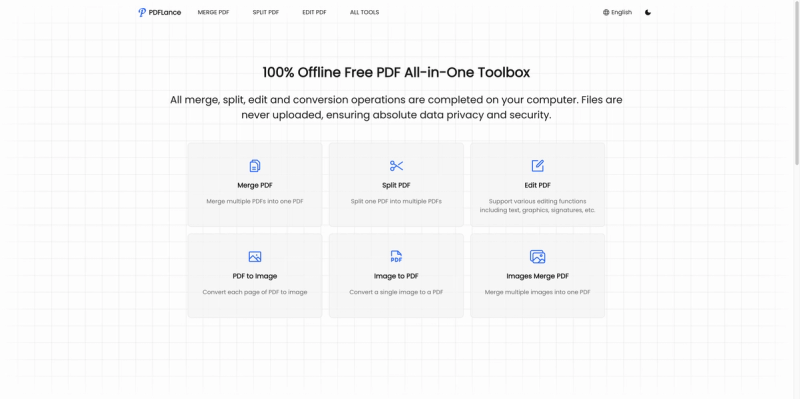
PDFLance is a free, 100% offline PDF all-in-one toolbox that runs entirely in your browser, allowing you to merge, split, edit, and convert PDFs without ever uploading your files.
What is PDFLance?
PDFLance is a browser-based PDF utility that performs all operations locally on your device. It takes PDF files (or images for conversion) as input and produces merged, split, edited, or converted PDFs and images as output. No server-side processing occurs, ensuring your documents never leave your computer. The tool is developed by an unknown entity (no maker listed), but it's freely accessible at pdflance.com.
Key Features
- Merge PDF — Combine multiple PDFs into a single document with drag-and-drop simplicity (Merge PDF).
- Split PDF — Divide a large PDF into separate files by page or range (Split PDF).
- Edit PDF — Add or modify text, graphics, signatures, and more directly in the browser (Edit PDF).
- PDF to Image — Convert each page of a PDF into an image format like PNG or JPEG (PDF to Image).
- Image to PDF — Turn a single image (e.g., JPG, PNG) into a PDF document (Image to PDF).
- Images Merge PDF — Combine multiple images into one PDF file, ideal for scanning or receipts (Images Merge PDF).
- 100% Offline Processing — All operations run locally in your browser; files are never uploaded, ensuring complete data privacy and security.
- Multilingual Support — Interface available in 19 languages including English, Chinese, Korean, Japanese, Spanish, French, German, Arabic, and more.
- No Registration or Download — Use immediately in any modern browser without signing up or installing software.
Who should use PDFLance?
- Small business owners who need to manage contracts, invoices, and receipts without exposing confidential data to third-party servers.
- Marketing managers like Mrs. Chen who require quick PDF merges and edits for presentations and reports while maintaining client confidentiality.
- Project managers such as Mr. Wang who oversee teams with varied technical skills and appreciate the intuitive multilingual interface.
- Privacy-conscious individuals who want to handle sensitive documents (legal, medical, financial) entirely offline with no upload risk.
What can you do with PDFLance?
- Merge multiple PDFs into a single document for unified report submission or archiving.
- Split a large PDF into separate pages or sections to share only relevant parts.
- Edit PDF content by adding text, annotations, signatures, or graphics directly in the browser — no extra software needed.
- Convert PDF pages to images for easy embedding in web content or presentations.
- Convert single images to PDF for standardized document formats.
- Combine multiple images (e.g., scanned photos) into one PDF file for organized storage.
How does PDFLance work?
PDFLance uses client-side JavaScript to process files entirely within your browser. When you select a PDF or image, the data is read locally and operations are performed without any server communication. The tool employs client-side encryption for added security, and once processing is complete, you can download the result directly. No files are ever transmitted over the internet.
Pricing
PDFLance is completely free to use. No registration, account creation, or payment is required. All features — merge, split, edit, conversion — are available at no cost. There are no usage limits or watermarks.
Frequently Asked Questions
Why do I sometimes see error messages?
Error messages may appear if the file is corrupted or encrypted. If corrupted, try re-uploading the file. If encrypted, decrypt it first before using PDFLance.
Why does loading feel slow sometimes?
Large files or many files may take longer to process because all operations occur locally on your device. Performance depends on your computer's capabilities; please be patient during heavy operations.
Is my data secure?
Yes. Files are never uploaded to any server. All processing happens offline in your browser, ensuring your documents remain private and secure. The tool also uses client-side encryption for added protection.
Is it free to use?
Yes, all features are free. No registration or download is necessary. Simply visit the website and start using the tools directly in your browser.