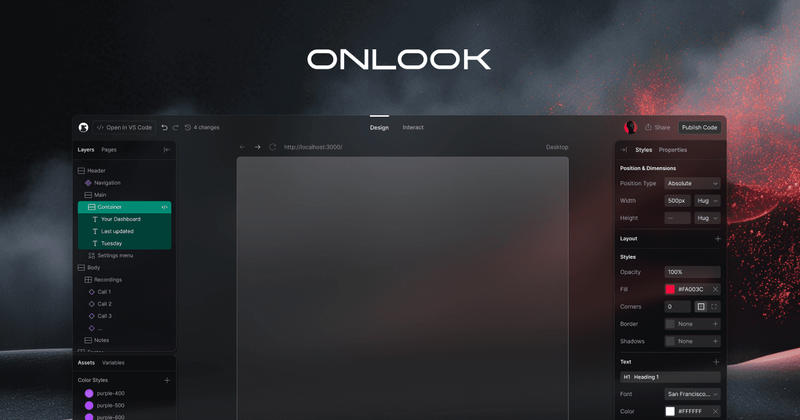
Onlook is an open-source visual editor for React codebases that lets designers edit websites directly in their real code, writing changes back to source code in real-time.
What is Onlook?
Onlook is a visual editor for React websites and webapps. It takes a React codebase as input and provides a live, editable preview where changes are instantly written back to the underlying code. The tool runs as a web application optimized for larger screens and is developed by the Onlook team. It is free to self-host via GitHub (26.1k stars) and also available as a hosted cloud version by booking a demo.
Key Features
- Visual editing — Drag-and-drop, rearrange, and scale elements directly in the editor, with changes reflected in the code immediately.
- Real-time code synchronization — Every visual edit writes back to the React source code, keeping the codebase as the single source of truth.
- Reusable components — Create and customize components that can be swapped across pages and projects.
- Revision history — Track every change with versioned history and revert to any previous state.
- AI Chat — Get instant design help and feedback from an AI assistant integrated into the workflow.
- Brand compliance — Define and enforce brand colors, fonts, and styles across the project.
- Layers panel — Select and manage elements with a familiar layers interface for precision control.
- Import existing codebase — Bring your own React project and start editing visually without losing any work.
Who is it for?
- Designers who want to edit React apps visually without needing to write code themselves.
- Developers who need to maintain design-system consistency and collaborate with designers on the same codebase.
- Teams seeking a single tool that bridges design and development, reducing handoff friction.
- Open-source contributors interested in a design tool built with community-driven development.
What can you do with Onlook?
- Design a new React website from scratch — Use the visual editor and AI chat to create a full site without touching the code directly.
- Edit an existing React project — Import your codebase, make visual changes, and have them automatically reflected in your source files.
- Collaborate with your team — Share a live project link, work together in real-time, and track versions for accountability.
How does it work?
- Connect your React codebase (or start from a blank project).
- Edit visually using drag-and-drop, direct manipulation, and AI assistance.
- Changes are written back to your source code automatically in real time.
- Publish your site with a custom domain or export the code.
Pricing
Onlook is free to self-host as an open-source project on GitHub. A hosted cloud version is available; requests can be made through booking a demo.
Alternatives
- Figma — Primarily a design tool that exports designs to code but does not edit existing codebases directly.
- v0 by Vercel — AI-powered UI generation with React code output, but lacks direct visual editing of existing projects.
- Webflow — Visual web design tool that produces HTML/CSS and limited React export, but not native React code.
FAQ
Is Onlook free?
Yes, Onlook is open-source and free to self-host. The cloud-hosted version requires contacting the team.
What frameworks does Onlook support?
Onlook is built for React codebases. It allows you to visually edit React websites and webapps.
Can I use Onlook with my existing React project?
Yes, you can import your existing React codebase and start editing visually without losing any previous work.
Do I need coding knowledge to use Onlook?
No, Onlook is designed for designers to edit visually. However, it produces real React code that developers can further refine.
Can I export or publish my work?
Yes, you can publish your site with a custom domain or export the code to your local machine.