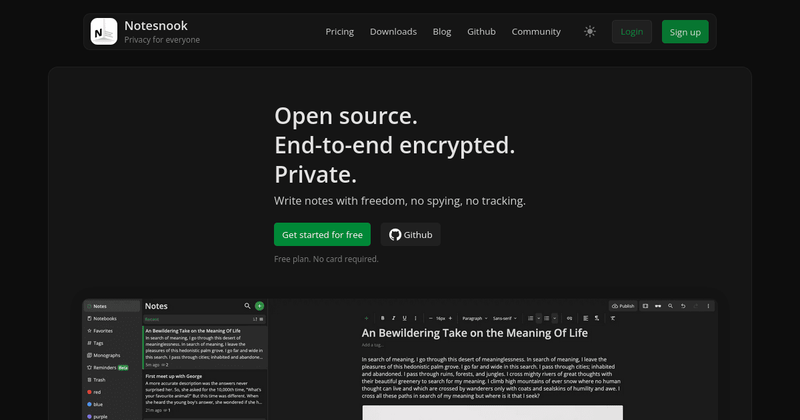
Notesnook is a private, end-to-end encrypted note-taking app that gives you a secure workspace for your personal and professional notes across all devices.
What is Notesnook?
Notesnook is a zero-knowledge, encrypted note-taking application that stores all your notes with end-to-end encryption before they leave your device. It accepts text, images, files, and links as input and produces encrypted notes, notebooks, and shared notes with optional password protection. Available on Windows, macOS, Linux, iOS, Android, and the web, Notesnook is developed by Streetwriters (an independent company) and is fully open source.
Key Features
- End-to-end encrypted syncing — All notes are encrypted on your device before syncing to the cloud, ensuring no one (not even Notesnook) can read them while in transit or at rest.
- Encryption at rest — Notes stored on your device and in the cloud remain encrypted with XChaCha20-Poly1305 and Argon2, so even if your device is lost or stolen, your data stays secure.
- App lock — Lock the Notesnook app with a PIN or password to prevent unauthorized access when your device is unattended.
- Notes vault — Password-protect individual notes for an extra layer of security, stored encrypted even on your device.
- Bidirectional note linking — Create links between notes to easily navigate related ideas, similar to a personal wiki.
- Rich text editor — Supports basic formatting, task lists, tables, outlines, math formulas (LaTeX), codeblocks with syntax highlighting, image/file embeds, and Markdown.
- Web Clipper — Free and open-source browser extension to save webpages and articles directly to Notesnook while preserving privacy.
- Reminders and notifications — Set one-time or repeating reminders for notes (e.g., daily, weekly, monthly) with push notifications on all platforms.
- Open source — All client apps, sync server, web clipper, and importer are publicly available on GitHub under the GPL-3.0 license, allowing independent security audits and self-hosting.
Who is it for?
- Privacy-conscious individuals — Anyone who wants a note-taking app that doesn't track, spy, or sell their data, with verifiable zero-knowledge encryption.
- Students and educators — Keep lecture notes, research, and assignments organized with notebooks, tags, and bidirectional links, all encrypted and accessible offline.
- Professionals and remote workers — Securely store work notes, meeting minutes, and project plans across devices, with the ability to share password-protected notes with colleagues.
- Journalists and activists — Protect sensitive information with end-to-end encryption and app lock, ensuring notes remain confidential even if a device is compromised.
What can you do with Notesnook?
- Save and organize web content — Use the open-source Web Clipper to snap webpages and articles directly into Notesnook for offline reading and annotation.
- Collaborate securely — Share notes with others via an encrypted link, optionally protected by an additional password, so only intended recipients can access them.
- Keep track of tasks and deadlines — Create notes with task lists and set reminders for recurring events (e.g., gym sessions, bill payments) to stay on top of daily responsibilities.
- Build a personal knowledge base — Use bidirectional note linking to connect related ideas, creating a network of notes that grows with your research or learning.
How does Notesnook work?
Notesnook encrypts your data locally using the XChaCha20-Poly1305 cipher with Argon2 key derivation before syncing to its servers. You can verify encryption with the open-source tool Vericrypt, which works offline using real data from your account. The app is available on all major platforms, and you can start for free without a credit card.
Pricing
Notesnook offers a free tier and a Pro subscription. The free plan includes unlimited notes, notebooks, and tags with full encryption, while Pro adds features like sharing, more storage, and priority support. No credit card is required to start.
FAQ
Is Notesnook really private?
Yes. Notesnook encrypts all your data on your device before it leaves, using XChaCha20-Poly1305 and Argon2. They have no access to your notes, and you can verify this using their offline tool Vericrypt.
Can I use Notesnook offline?
Absolutely. The desktop and mobile apps work fully offline. Changes sync automatically when you reconnect to the internet.
Is Notesnook open source?
Yes. All components — including the client apps, sync server, web clipper, and importer — are open source on GitHub under the GPL-3.0 license.
What platforms are supported?
Windows, macOS, Linux, iOS, Android, and the web. There are also portable versions for Windows and macOS, and direct APK downloads for Android (no Google Play Services required).
Can I share notes with non-users?
Yes. Notesnook lets you share any note via a public encrypted link. You can also set an additional password on the shared note for extra security.