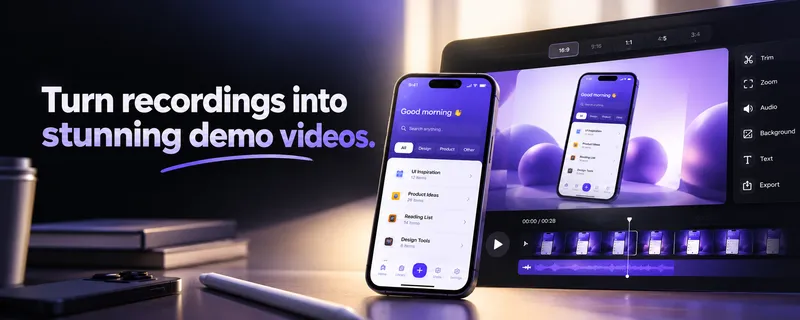
MobileStudio is a mobile app that converts raw mobile screen recordings into framed, share-ready product demo videos by layering on device mockups, backgrounds, smooth zoom effects, and a chosen aspect ratio. Android users can install it from Google Play; the iOS version is listed as coming soon on the App Store.
What is MobileStudio?
MobileStudio takes a screen recording of a mobile app as its input and outputs a finished product video with the recording placed inside a device frame over a background. The page describes the workflow as recording the app first, then applying framing, zooms, and a background before exporting a video for sharing. It is a mobile app distributed through Google Play, with an App Store release marked as coming soon and no date given.
What makes MobileStudio stand out?
MobileStudio keeps the recording itself untouched and changes only the presentation around it, which the site sums up as "the app stays the same, the recording stays the same" while the framing does the work. The visible feature set is small and specific:
- Device mockups — recordings are placed inside a device frame; the site uses an iPhone frame asset as the example of the framing step.
- Backgrounds — the framed recording sits on a background image rather than a flat empty canvas.
- Zoom effects — smooth zooms are applied to the recording to guide attention through the demo.
- Aspect ratio control — output aspect ratio is selectable, so one recording can be reframed for different destinations.
- In-app recording — the first step named on the page is recording the app inside MobileStudio itself.
- Share-ready export — the end result is a product video described as ready to share, not a project file.
Who should use MobileStudio?
- Indie app developers: produce a promo clip for a Play Store or App Store listing without opening a desktop video editor.
- App marketing teams: reframe one screen recording into different aspect ratios for social posts and store pages.
- Product designers: present a flow inside device frames and a branded background so screenshots read as a finished demo.
- Freelancers and agencies: turn a client's app walkthrough into a presentable video for a pitch or launch announcement.
What can you do with MobileStudio?
- Store listing videos: record a walkthrough of the app, wrap it in a device frame, and export a clip for the app's store page.
- Social promotion: pick the aspect ratio that fits the feed and add zooms to highlight the parts of the interface worth showing.
- Launch announcements: drop a recording onto a background image so the demo matches the campaign artwork instead of showing a bare screen capture.
FAQ
Which platforms is MobileStudio available on?
MobileStudio is on Android through Google Play. The iOS release is announced as coming soon on the App Store, with no date published, so iPhone users cannot install it yet.
Does MobileStudio record my screen or only edit existing recordings?
Both steps are described: the page tells you to record your app, then add frames, backgrounds, and zooms. It also states the recording itself stays the same when you change the framing, so editing is non-destructive to the footage.
Can I change how my demo looks without re-recording?
Yes. The page's central claim is that the app and the recording stay identical while the mockup, background, and framing change, producing a different-looking product demo from the same capture.
What can I customize in a MobileStudio video?
The site lists four customization controls: mockups (device frames), background, zoom effects, and aspect ratio. Together these determine how the recording is framed and what shape the exported video takes.