
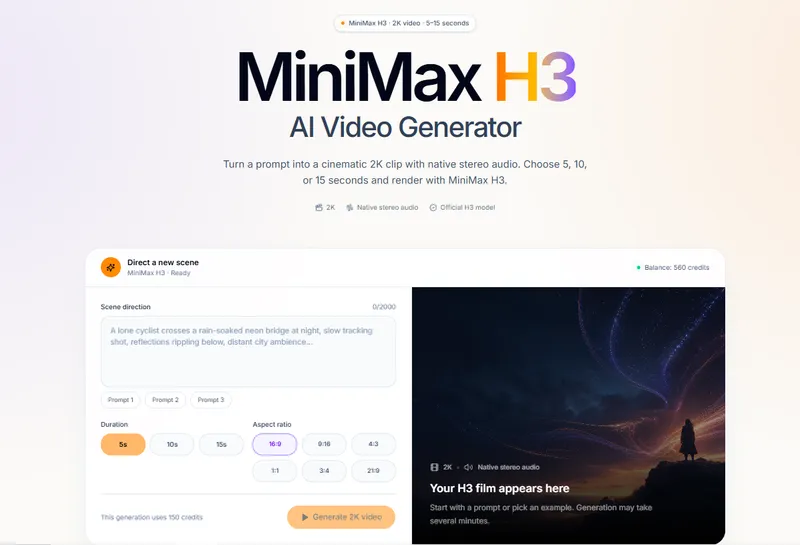
MiniMax H3 Video Generator is a web-based AI tool that converts text prompts into 2K-resolution video clips with native stereo audio, supporting 5, 10, and 15-second durations.
What is MiniMax H3 Video Generator?
MiniMax H3 Video Generator is a web application built around the official MiniMax H3 model. It takes a text description (up to 2,000 characters for scene direction) as input and generates a video clip at 2K resolution with synchronized stereo audio. The tool supports six aspect ratios: 16:9, 9:16, 4:3, 1:1, 3:4, and 21:9. The output is an MP4 file that can be previewed and downloaded. The platform runs entirely in the browser and requires a signed-in account to generate.
Key Features
- Native 2K output — Every render produces a 2K-resolution video with selectable duration of 5, 10, or 15 seconds.
- Stereo audio included — MiniMax H3 generates native stereo audio with the clip, so sound and visuals are created from the same prompt.
- Six cinematic aspect ratios — Choose from widescreen 16:9, vertical 9:16, square 1:1, classic 4:3, portrait 3:4, or ultrawide 21:9.
- Prompt library — 56 production-ready prompts organized by categories like Cinematic, Nature, People, Product, Food, Travel, Sci-fi, and Fantasy & animation, with one-click copy.
- Predictable credit costs — A 5-second render uses 150 credits, 10-second uses 300, and 15-second uses 450; failed provider tasks automatically restore credits.
- Private workspace — Prompts and outputs are tied to your account and never appear in a public gallery.
- Daily rewards and referrals — Daily check-ins accumulate up to 33 credits over a seven-day cycle, and referral bonuses give both accounts extra credits.
Who is it for?
MiniMax H3 Video Generator is for creators who need quick, high-quality AI video clips without complex editing.
- Content creators — Generate immersive backgrounds or b-roll for YouTube, social media, or presentations in minutes by describing a scene in natural language.
- Filmmakers — Use the prompt library to explore cinematic shots or create concept visuals for storyboards before committing to a full production.
- Marketers — Produce product videos in multiple aspect ratios—like vertical 9:16 for TikTok or square 1:1 for Instagram—from a single prompt.
- Hobbyists — Experiment with AI video generation using 5-second clips, which require only 150 credits and don't need a credit card to register.
What can you do with MiniMax H3 Video Generator?
- Create atmospheric nature scenes — Generate clips like "Jellyfish in the abyss" or "Flight above geometric flower fields," each with detailed camera movement and sound design descriptions.
- Design product showcases — Render a "Levitating ceramic speaker" or similar prompts to visualize products in stylized settings without a physical shoot.
- Develop sci-fi and fantasy content — Bring concepts like "Mechanical hummingbird" or "Waterfall flowing into the moon" to life for game art, videos, or creative writing.
- Produce social media videos — Pick a vertical aspect ratio and a 5-second duration to quickly generate visuals for short-form platforms.


