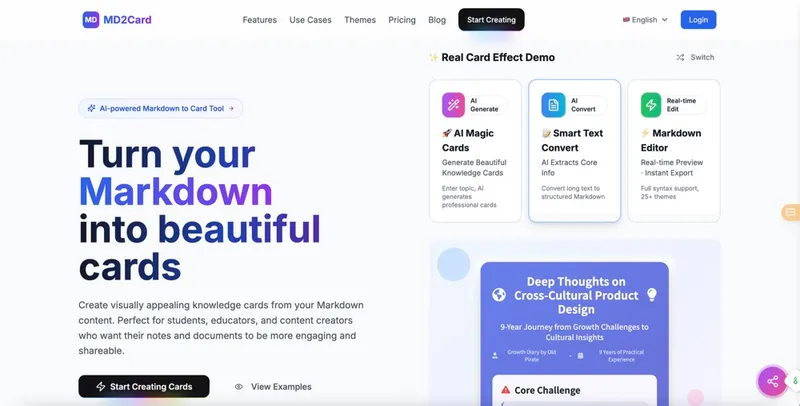
MD2Card is a web-based tool that transforms Markdown documents into visually designed knowledge cards, offering over 30 themes, AI-powered generation, and one-click export to multiple formats.
What is MD2Card?
MD2Card is an online tool that converts Markdown text into styled visual cards suitable for sharing, studying, or presenting. It takes Markdown input and produces cards as PNG, SVG, JPEG, or PDF files. The platform runs entirely in the browser with no installation required, and is developed by an unnamed team behind md2card.online.
Key Features
- 30+ Themes — Includes Glassmorphism, ByteDance Style, Art Deco, Pop Art, Spiral Notebook, Apple Notes, and over 25 other professionally designed themes, many updated with new additions.
- AI Magic Cards — Uses Claude 4.0 AI to generate a complete card from any topic input; creates unique layouts and visual designs automatically.
- AI Text Conversion — Analyzes long text or web content, extracts core information, and converts it into structured Markdown for card formatting.
- Real-time Preview — Shows card appearance instantly as you edit Markdown, with full syntax support including LaTeX math, code highlighting, tables, and images.
- Multi-format Export — Export cards as PNG, SVG, JPEG, or PDF; also supports copy to clipboard and high-quality printing.
- Multi-language Support — Interface and card content support 8 languages including English, Chinese, and RTL text.
- Multi-card Splitting — Use three dashes (
---) within Markdown to split content into multiple separate cards automatically.
Who is it for?
- Students — Convert study notes, flashcards, and research summaries into visually engaging cards for review and sharing.
- Educators — Transform lesson plans and course materials into handouts or visual aids that students find more engaging.
- Developers — Turn README files, API documentation, or code explanations into polished tech cards for demos or social sharing.
- Content Creators — Convert blog posts, social media captions, or article highlights into shareable image cards for platforms like Twitter, LinkedIn, or Instagram.
What can you do with MD2Card?
- Create AI-generated cards from topics — Input a topic like "quantum computing" and receive a fully designed card with structured content, ready to download.
- Convert long articles into structured cards — Paste a URL or long text; MD2Card’s AI extracts key points and formats them into a Markdown-based card.
- Design social media visuals — Use any of the 30+ themes to turn quotes, tips, or summaries into branded graphics for social posts.
- Build study materials — Use multi-card splitting to create a deck of flashcards or a series of lesson cards from one Markdown file.
Pricing
MD2Card operates on a freemium model with a free tier and three paid plans:
- Free — 10 AI Magic Cards per month, 30 text conversions per month.
- Basic ($4.99/month) — 100 magic cards, 200 text conversions, all themes, high-quality export, email support.
- Pro ($9.99/month) — 250 magic cards, 500 text conversions.
- Ultimate ($19.99/month) — 600 magic cards, 1000 text conversions.
FAQ
What markdown syntax does MD2Card support?
MD2Card supports full Markdown including headings H1-H6, bold, italic, strikethrough, highlights, links, images, ordered/unordered lists, code blocks with syntax highlighting, tables, blockquotes, and LaTeX math formulas. It also supports colored text via :red{...}, :blue{...}, etc.
Can I customize the appearance of cards?
Yes, you can choose from over 30 themes. Each theme includes pre-set fonts, colors, and layouts. Customization beyond theme selection is not available from the page, but themes cover many styles (business, artistic, tech, classical).
How do I export my cards?
Click the export button and choose PNG, SVG, JPEG, or PDF format. You can also copy the card image to clipboard for quick pasting into other apps.
Is MD2Card free?
Yes, MD2Card has a free tier with limited monthly usage (10 AI magic cards, 30 text conversions). Paid plans start at $4.99/month for higher limits and priority support.