Map to GPS is a focused tool for turning a Google Maps route into a GPX track that you can use with compatible GPS devices and mapping apps. It is designed for people who plan a route in Google Maps but need a portable track file for navigation, planning, sharing, or later reference.
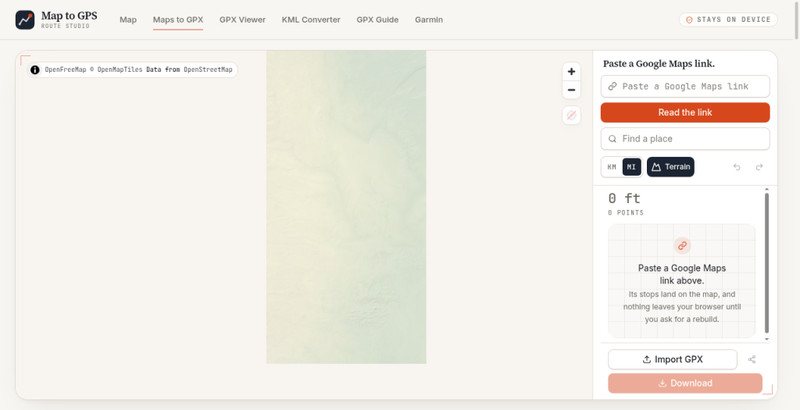
To get started, open the Google Maps to GPX page and paste a Google Maps link into the route field. Select Read the link and Map to GPS will load the route information into the workspace. The map view gives you a clear place to review the route, while the route panel shows the current track information and point count. This keeps the main conversion flow simple: bring a route link, review the result, and export a GPX file when it is ready.
Map to GPS is useful for route planning, outdoor preparation, travel research, and anyone who wants to move a route from a familiar web map into a GPS-friendly format. You can use a route you created yourself or a route that was shared with you, as long as the Google Maps link can be read by the page. The interface also includes a place search so you can find a location while working with the map. Map controls make it possible to zoom and inspect the displayed area before downloading.
The tool supports practical map review options, including kilometer and mile units and a terrain view. These controls help you check distances and understand the surrounding area in the way that best fits your planning process. If you already have a GPX file, the page also provides an Import GPX option so you can bring a track into the same workspace for inspection or continued use. When you are satisfied with the route, use Download to save the resulting track.
Map to GPS is made for a straightforward, browser-based workflow. There is no need to rebuild a route point by point when a Google Maps link already describes it. Paste the link, read the route, inspect the map, and download the GPX track for your next step. The product page is intended to keep route conversion approachable for hikers, cyclists, travelers, and other map users who need their routes in a widely supported GPS format.
For best results, use a complete Google Maps route link and review the loaded map before exporting. Map to GPS helps bridge the gap between planning a route online and taking that route into a GPS device or application that works with GPX tracks.