AI Low Fade & Taper Fade Generator (https://lowfade.app/) is an AI-powered web tool that lets users visualize low fade, taper fade, and low taper fade haircuts on their own photos before visiting a barber. It offers a selection of hairstyles and hair colors, generates a realistic preview, and allows users to download the result for reference.
What is AI Low Fade & Taper Fade Generator?
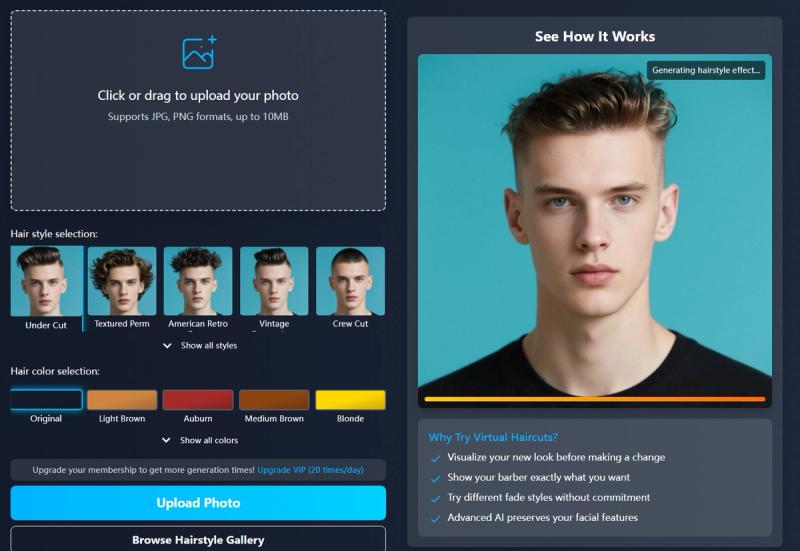
AI Low Fade & Taper Fade Generator is a browser-based AI tool that takes a user-uploaded photo (JPG or PNG, up to 10 MB) and generates a virtual preview of the user with various fade haircuts. The platform provides multiple hairstyle options—such as under cut, textured perm, American retro perm, vintage pompadour, and crew cut—and hair colors ranging from original and light brown to platinum blonde and copper red. Users can see how a low fade, taper fade, or low taper fade would look on them without any commitment.
Key Features
- Photo Upload — Upload a front-facing photo in JPG or PNG format under 10 MB. The AI works best with clear, front-facing images.
- Hairstyle Selection — Choose from styles like crew cut, under cut, textured perm, American retro perm, and vintage pompadour, with more available when clicking "Show all styles."
- Hair Color Selection — Select a hair color from options including original, light brown, auburn, medium brown, blonde, platinum blonde, dark brown, ash blonde, gray/silver, and copper red, with more via "Show all colors."
- AI Processing — The AI analyzes facial features and generates a realistic image of the selected fade haircut. Processing takes about 30 seconds.
- Download & Regenerate — Download the generated image, generate a new preview with different settings, or upload a new photo.
- Guest Quota — Free users get 1 generation per day. Login to unlock more generations.
Who is it for?
- Men considering a fade haircut — Preview how a low fade, taper fade, or low taper fade looks on their own face before making a decision.
- Barbers and stylists — Show clients exactly what styles are possible and get a visual reference for the desired look.
- Fashion-conscious individuals — Experiment with different hairstyles and colors without risk, and save the results for future reference.
What can you do with AI Low Fade & Taper Fade Generator?
- Visualize new hairstyles: Upload a selfie and see yourself with a low fade haircut in seconds.
- Compare multiple styles: Generate multiple results with different hairstyle and color combinations (within your daily quota).
- Show your barber: Download the preview image and bring it to your barber to communicate exactly what you want.
- Test hair colors: See how your face looks with blonde, silver, or copper red hair before dyeing.
How does AI Low Fade & Taper Fade Generator work?
The process is simple: 1. Upload a photo (front-facing, JPG/PNG, <10 MB). 2. Select a hairstyle and hair color. 3. Click "Generate Low Fade & Taper Fade" and wait about 30 seconds for the AI to process. 4. View the result and download it. You can also regenerate with different settings or upload a new photo.
Pricing
The tool is freemium. Guest users can generate 1 image per day. Logging in (free account) provides additional generation times, though exact limits for logged-in users are not specified on the page.
FAQ
Is the AI Low Fade & Taper Fade Generator free?
Yes, you can try it for free with a daily limit of 1 generation. Logging in may increase the limit.
What photo formats are supported?
JPG and PNG, up to 10 MB.
How long does processing take?
About 30 seconds. You can leave the page and check results later in "My Hairstyles."
Do I need to create an account?
Not for your first generation, but creating an account allows more generations and access to your history.
Can I use the generated images for commercial purposes?
The page does not specify usage rights; it is intended for personal visualization.