LiveSwapAI is a browser-based real-time AI face swap tool that maps a single reference portrait onto moving camera footage for livestreams, video calls, and character performances — currently shipped as reference demo clips plus a local-only camera preview, with live AI processing still in development.
What is LiveSwapAI?
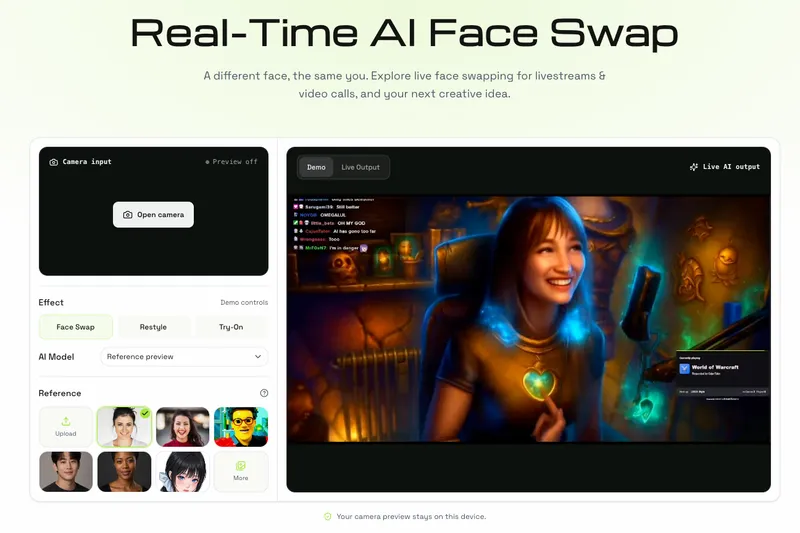
LiveSwapAI is a web app for live face swapping: it takes one reference portrait and, in its intended live mode, applies that face to moving camera footage rather than to a finished photo or video. On the current page you can play reference clips, upload a JPEG, PNG, or WebP portrait up to 10 MB, pick an effect, and open your own camera preview without installing anything. The demos run in a current browser with camera support over HTTPS, and the camera preview stays on your device. Live AI processing and virtual-camera output are not connected yet, so sending a swapped face into OBS Studio, Zoom, or Google Meet is not available on this page.
What makes LiveSwapAI stand out?
- Three effect modes — Face Swap, Restyle, and Try-On sit in the demo controls, so one camera setup can be used for a face transfer, a style change, or a try-on look.
- Selectable AI model — a model picker lists Xmax X2.1 alongside other options, letting you compare output from different face models against the same reference.
- Local-only camera preview — Camera input opens only after explicit browser permission; the feed never leaves your device, and stopping it or leaving the page releases the camera.
- Portrait upload with hard limits — one reference image per session, accepted as JPEG, PNG, or WebP up to 10 MB.
- Reference gallery — preset portraits and pre-rendered clips (character sets, streaming scenes, framing and movement tests) are shown before you commit your own image.
- No install for the preview — the demos and camera check run in a current browser over HTTPS with no download.
Who should use LiveSwapAI?
- Streamers and VTubers: test whether a fixed character face holds up under their own lighting and framing before committing to a recurring channel persona.
- Podcast and series hosts: plan a consistent visual identity that carries across episodes of a recurring show.
- Comedy and character creators: sketch a cast of characters and shift the mood of a scene by changing faces.
- Meeting and presentation participants: check camera setup for a creative on-camera look in calls and collaborative sessions.
What can you do with LiveSwapAI?
- Recurring streaming persona: choose one front-facing portrait, check framing in the camera preview, then watch the demo clips to judge whether the persona reads consistently on camera.
- Sketch comedy cast: rotate through several faces inside one camera setting to play multiple characters in the same scene.
- Look try-ons: use Try-On and Restyle modes to preview a look instead of a full face replacement.
- Pre-stream readiness check: the preparation path (clear portrait, even lighting, one well-framed face) works as a setup test before going live, even while live processing is unfinished.
How does LiveSwapAI work?
- Choose one clear, front-facing portrait of yourself or a person whose image you have permission to use.
- Allow camera access in the browser, check your lighting, and keep your face comfortably inside the frame.
- Compare the example clips and decide how a new persona fits your next stream, call, or performance.
FAQ
Is live face swap actually working on LiveSwapAI right now?
No. The page provides reference demo clips, a local camera preview, and portrait upload; live AI processing and virtual-camera output are still in development.
Can I send a swapped face into Zoom, OBS Studio, or Google Meet?
Not yet. Those apps need a compatible virtual-camera input, and LiveSwapAI's virtual-camera integration is not connected on this page.
What photo should I upload?
A sharp portrait of one person facing the camera with an unobstructed, well-lit face, uploaded as JPEG, PNG, or WebP up to 10 MB. Use your own image or a portrait you are authorized to use.
Does my camera feed leave my device?
The browser preview stays local. You must grant permission to turn the camera on, and stopping the preview or leaving the page releases the camera.
What affects the quality of a live swap?
Lighting, camera angle, movement, the reference portrait, and the connection all affect the live result, so check your setup before a stream or call.