List Bulb is a curation-focused directory where builders submit AI tools and startups, and users discover them without clutter.
What is List Bulb?
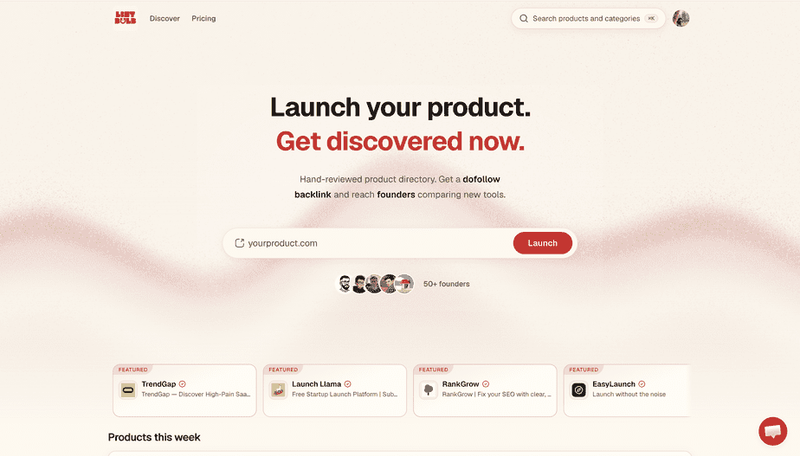
List Bulb is a web-based directory platform designed to surface real AI tools and startups by minimizing noise. Builders submit a product URL, and List Bulb publishes a listing featuring the tool's name, logo, short description, and category (e.g., SaaS & Marketing, Dev & Workflow, Small Accounts & MVPs). The platform supports English and is free to use for both submitters and visitors. It is built by a small independent team focused on quality over quantity.
Key Features
- One-click submission — Submit your tool by entering its public URL and clicking "Launch"; no lengthy forms or account required.
- Featured product slots — Select tools receive a "Featured" badge and prime placement on the homepage (e.g., RankGrow, Launch Llama, EasyLaunch, ClimbX).
- Weekly rotation — A "This week products" section highlights recently submitted tools, giving new listings immediate visibility.
- Categorized browsing — Tools are organized into three main categories (SaaS & Marketing, Dev & Workflow, Small Accounts & MVPs) plus tags like Beginner, Freemium, Web, AI.
- Clean, ad-free interface — No pop-ups, banners, or affiliate clutter; each listing shows only essential details: name, tagline, logo, category, and tags.
Who is it for?
- AI startup founders — Launch your tool to an audience of early adopters and get feedback without paying for promotion.
- Indie developers — Showcase your side project in the "This week" section to gain initial traction.
- Product discovery enthusiasts — Browse featured and recent tools to find hidden gems before they go mainstream.
- Growth marketers — Scan categories like SaaS & Marketing for tools that can improve your marketing stack.
What can you do with List Bulb?
- Submit a tool: Paste your product's URL and click Launch; your listing appears in the directory within days, reaching users who actively browse new tools.
- Discover this week's arrivals: Visit the "This week products" section to see a curated list of recently added tools (e.g., DepthSight, Learn Farsi, Storelane) with their categories and tags.
- Explore featured picks: Check the homepage's featured section for tools that have been handpicked for visibility, such as RankGrow (SEO) or Launch Llama (startup platform).
- Filter by category or tag: Use the category links (SaaS & Marketing, Dev & Workflow, Small Accounts & MVPs) or tags (Freemium, No-code, Self-hosted) to narrow down tools for your specific needs.