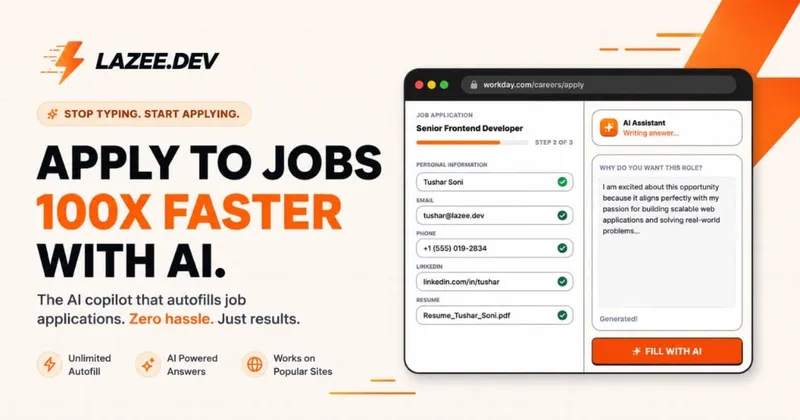
lazee.dev is a browser extension for Chrome, Firefox, Edge and Brave that fills job application forms from a saved profile and writes AI answers to open-ended application questions.
What is lazee.dev?
lazee.dev is a job-application autofill extension that detects form fields on career portals and populates them from a single stored candidate profile — contact details, notice period, CTC, experience, education and links. It also generates written answers to open-ended questions using your saved work history plus the pasted job description. The output is a completed form you review and submit yourself. It works on 100+ portals including Greenhouse, Lever, Ashby, Workday, Taleo and BambooHR, and ships as a Chrome extension, a Firefox add-on, and works on Edge and Brave.
Key Features
- One-click profile autofill — free and unlimited; contact details, CTC, notice period, experience, education and links are mapped to form fields via deterministic DOM schema detection on Greenhouse, Lever, Ashby, Workday and custom forms.
- AI Fill — answers a single open question in the exact format the form requests (for example splitting a package into Fixed, Variable and ESOPs with currency conversion) at 2 credits per answer, or 0 with your own AI key; answers are editable and saveable.
- Express AI Fill (Pro) — lists every detected text field with its type (text, number, textarea), lets you untick the ones you want to write yourself, then generates the rest in one run at 2 credits per field.
- Saved Q&A library — stores questions and answers from the AI Fill window, searchable by question or answer text, insertable into the active field with one click.
- Resume versions — free accounts hold 1 resume PDF, Pro holds up to 10; pick a version inside the extension and it attaches to the upload field.
- Cold DM Generator (Pro) — drafts a short recruiter email in Gmail compose or an X DM from recipient and company details, with four tones (Professional, Casual, Friendly, Gen Z).
- Bring your own AI — connect OpenAI GPT models, Anthropic Claude, Google Gemini, xAI Grok, or a local Ollama / LM Studio / OpenAI-compatible endpoint; keys stay in browser extension storage and AI features cost 0 credits.
- Public profile — a shareable lazee.dev/u/ page listing work history and projects, with 3 project screenshots on the free plan and 10 on Pro.
Who should use lazee.dev?
- Engineers in an active interview search: applying to dozens of Greenhouse, Lever, Ashby and Workday postings and needing to skip retyping employment history, links and notice period on each one.
- Candidates facing CTC and compensation fields: someone who needs a paste-in instruction like a previous package figure turned into the Fixed / Variable / ESOPs breakdown a form demands, in the requested currency.
- Applicants who keep hitting the same questions: people who reuse saved answers to prompts such as "What is the hardest problem you solved?" instead of rewriting them per application.
- Candidates doing outreach: job seekers who want a three-sentence note to a hiring manager drafted inside Gmail or X rather than written from scratch.
What can you do with lazee.dev?
- High-volume applicants: fill and submit a form in under 30 seconds per the site's own benchmark, moving from roughly 1 to 3 applications a day to 15 to 30.
- Multi-track job seekers: keep separate resume PDFs for backend, full-stack and founding-engineer roles and swap the attached file inside the extension before submitting.
- Long application forms: run Express Fill over every open question on the page at once, untick the fields you want to write yourself, then review everything before it is applied.
- Recruiter outreach: scrape the job post, pick a tone, and generate a Gmail or X message that references a specific line from your profile.
How does lazee.dev work?
You install the extension, fill your profile once (profile details, resume PDFs and custom AI directives), then open any supported job application. Lazee detects the form schema and maps fields to your record; you verify contact details, switch resume versions if needed, generate answers for open questions, and submit the application yourself.
Pricing
lazee.dev is freemium. The Community plan is free forever with unlimited profile autofill, 200 AI credits refreshed every 30 days, 1 resume PDF, single-question AI Fill, the Saved Q&A library and a public profile. Pro costs $9 per month plus local taxes and adds Express batch fill, the Cold DM generator, 10,000 AI credits per month, up to 10 resume versions, 10 project screenshots and three profile photo changes per 30 days. Credit costs with Lazee AI are 2 per AI Fill answer, 2 per Express Fill field, 6 per Cold DM and 6 extra for job description matching — all 0 with your own API key.
FAQ
Is lazee.dev free?
Core profile autofill is free and unlimited with no credit card required, and the free Community plan includes 200 AI credits per month refreshed every 30 days. AI features beyond that — Express Fill, the Cold DM generator and job description matching — require the $9 per month Pro plan, Pro Passes, or your own AI API key.
Which job portals and ATS platforms are supported?
The extension advertises support for 100+ career portals, with named support for Greenhouse, Lever, Ashby, Workday, Taleo and BambooHR plus custom forms. The vendor's portal list also includes Glassdoor, Wellfound, Y Combinator, Notion, Airtable, ClanX, Superteam and Google/Gmail.
What are AI credits and what do features cost?
Credits are the metering unit for Lazee-hosted AI. AI Fill costs 2 credits per answer, Express Fill 2 credits per field, Cold DM 6 credits, and job description matching adds 6 credits. Profile autofill never uses credits, and every AI feature costs 0 credits when you supply your own API key.
Can I use my own OpenAI, Claude or local model key?
Yes. Lazee accepts an OpenAI API key, an Anthropic key for Claude, a Google AI Studio key for Gemini, an xAI key for Grok, and any OpenAI-compatible endpoint including Ollama or LM Studio running locally. Keys are stored in the browser's extension storage and never sent to Lazee servers.
How many resume versions can I store?
The free Community plan stores 1 resume PDF. Pro raises the limit to 10 versions, which you select from inside the extension so the matching file is attached to the form's upload field.