
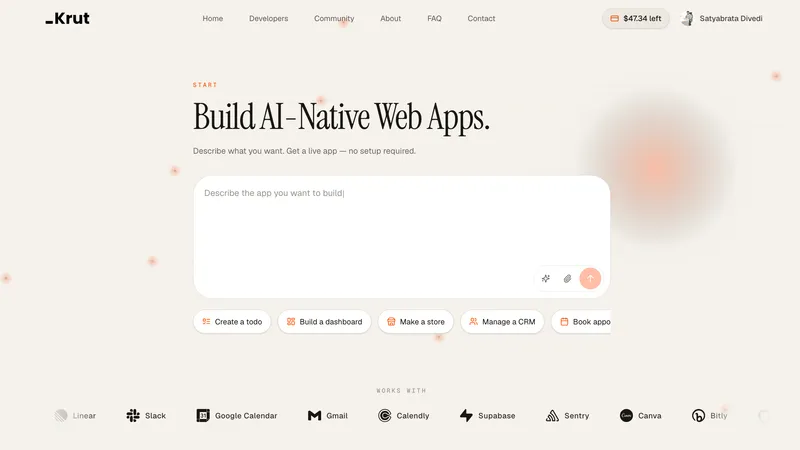
Krut AI is an AI-powered app builder that turns a plain-English description into a working web app with a shareable live URL. You type what you want to build — a store, booking page, CRM, blog, invoices, or dashboard — and Krut designs the screens, connects the flows, and stands up the app in the browser. No coding, cloud accounts, or downloads are required.
What is Krut AI?
Krut AI is a browser-based tool that builds web applications from conversational input. You describe the app you want in a chat box, optionally attach a screenshot for visual reference, and Krut generates the screens, data flows, and a live URL you can open on a phone or send to a client. The platform supports common app patterns such as online stores, booking systems, CRMs, blogs, invoice managers, and dashboards, and it connects to services including Notion, Linear, Slack, Google Calendar, Gmail, Calendly, Supabase, Sentry, Canva, Bitly, GitHub, PostgreSQL, Redis, Docker, Vercel, Anthropic, OpenAI, Figma, and Stripe. The page names the product Krut AI; the maker is not stated.
Key Features
- Conversational app generation — Type a description of the app you want, such as "build a dashboard" or "make a store," and Krut builds the screens and flows from that input.
- Screenshot-supported references — Attach a screenshot if you have a specific look in mind, and Krut uses it as a visual reference for the generated app.
- Live URL output — Krut produces a real URL you can open on a phone, share with a client, or keep editing; you do not download a zip file or manage hosting.
- Prebuilt app types — Ready-made patterns for online stores (products, cart, checkout), bookings (calendar, services, confirmations), CRM (leads, pipeline, follow-ups), blog (stories, categories, articles), invoices (clients, bills, paid status), and dashboards (metrics, charts, activity).
- Design templates — Six starting looks: Editorial Portfolio (minimalist, typography-driven personal site), Magazine Blog (editorial blog with featured posts and rounded article cards), Fashion Store (ecommerce homepage with search header and hero carousel), Coastal Restaurant (hospitality site with menu cards and table booking CTA), CRM Full Stack (pipeline kanban, contacts, deals, notes, team dashboard), and Wellness Studio (booking site with class cards and next-available times).
- Third-party integrations — Connects with Notion, Linear, Slack, Google Calendar, Gmail, Calendly, Supabase, Sentry, Canva, Bitly, GitHub, PostgreSQL, Redis, Docker, Vercel, Anthropic, OpenAI, Figma, and Stripe.
- Iterative editing — After the first build, you can keep chatting to tweak copy, layout, and features without starting over.
- Human help — If something is off or the idea is more complex, people are on standby to help you finish.
How does Krut AI work?
Krut AI follows a three-step flow. First, you describe what you need in plain English — "a store, a booking page, a CRM, a blog" — and attach a screenshot if you have a look in mind. Second, Krut designs the screens, connects the flows, and stands up a working app while you can keep chatting to adjust copy, layout, and features. Third, you get a live link you can open on your phone, send to a client, or keep refining, with no downloads or hosting setup.
Who is it for?
- Non-technical founders: Describe a store, dashboard, or CRM in plain English and get a live URL to test with early users without hiring a developer.
- Small business owners: Build a booking page, invoice tracker, or online store from a template and share the link with customers.
- Freelancers and agencies: Create a portfolio, blog, or client CRM and iterate on the design by chatting instead of coding.
- Content creators: Launch an editorial blog or magazine-style site with featured posts and trending stories from a prebuilt template.
What can you do with Krut AI?
- Launch an online store: Generate product pages, a cart, and checkout, then connect Stripe for payments and share the live URL with shoppers.
- Set up bookings: Build a calendar-and-services flow with confirmations, connect Google Calendar or Calendly, and let clients book sessions from a link.
- Run a CRM: Create a pipeline kanban with contacts, deals, notes, and a team dashboard, and connect Slack or Gmail for follow-ups.
- Publish a blog or portfolio: Start from the Magazine Blog or Editorial Portfolio template, add articles and categories, and publish a live site without coding.
- Track invoices and metrics: Build an invoice manager with client bills and paid status, or a dashboard with charts and activity feeds.
FAQ
What is Krut AI?
Krut AI is an AI app builder that turns a plain-English description into a working web app with a live URL. You type what you want to build, optionally attach a screenshot, and Krut generates the screens and flows in your browser.
Does Krut AI require coding?
No. Krut AI is designed for plain-English input; you describe the app the way you would tell a friend, and the platform designs the screens, connects the flows, and stands up the app. You can then keep chatting to tweak copy, layout, and features.
What integrations does Krut AI support?
Krut AI lists integrations with Notion, Linear, Slack, Google Calendar, Gmail, Calendly, Supabase, Sentry, Canva, Bitly, GitHub, PostgreSQL, Redis, Docker, Vercel, Anthropic, OpenAI, Figma, and Stripe. These let generated apps connect to calendars, databases, payment processing, and AI models.
Can I start from a template?
Yes. Krut AI offers six website templates: Editorial Portfolio, Magazine Blog, Fashion Store, Coastal Restaurant, CRM Full Stack, and Wellness Studio. You can pick a look as a reference and then make it yours with follow-up notes.
Do I get a live URL?
Yes. Krut AI produces a real URL you can open on your phone, send to a client, or keep editing. The page states you get a live site, not a zip file, with no downloads and no hosting homework.


