KontextChat is a web-based AI image editing tool that lets you modify any uploaded image by typing natural language commands, powered by Flux Kontext AI technology.
What is KontextChat?
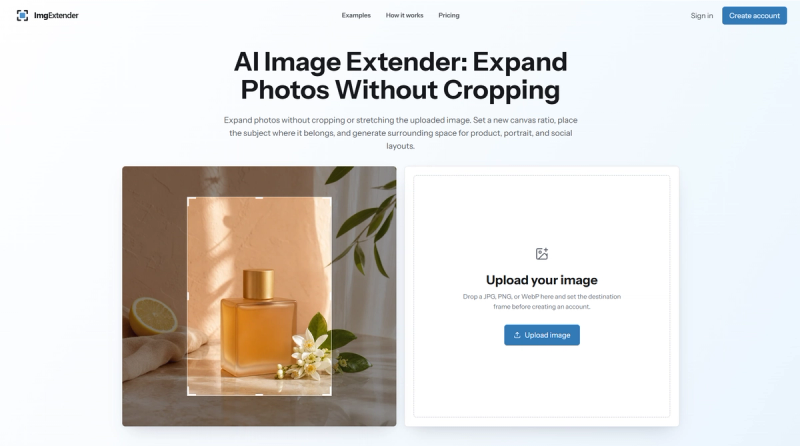
KontextChat is an AI-powered image editing tool that runs in the browser and converts natural language descriptions into image edits. You upload a JPG, PNG, or WebP file, type what you want changed, and receive a modified image, with a before/after comparison. Built for users without design skills, it uses Flux Kontext AI to understand both the visual content and your text prompt, enabling context-aware changes like background replacement or lighting adjustments. Because it works through conversation, you can issue follow-up commands to refine the edit iteratively.
Key Features
KontextChat packs several features that make AI-driven editing approachable and fast.
- Natural language editing — Describe changes in plain English (e.g., 'make the background transparent') and the AI applies them automatically.
- Context-aware AI — Flux Kontext processes both the image and the prompt together to understand what to change and what to preserve.
- Format support — Accepts JPG, PNG, and WebP input files for editing.
- Before/after comparison — View the original and edited versions side by side to evaluate the result.
- Fast processing — Most edits complete in 5–20 seconds, suitable for quick turnarounds.
- Web-based — No software installation needed; everything runs in a standard browser.
Who is it for?
KontextChat is aimed at users who need quick, flexible image edits without a steep learning curve.
- E-commerce sellers — Need quick product image edits like background removal or color adjustments for listings.
- Social media managers — Create engaging image variations for posts and ads without design skills.
- Photographers — Enhance portraits, adjust lighting, or experiment with creative styles.
- Creative professionals — Explore new visual directions and apply transformative edits through conversation.
- Any non-designer — Anyone who needs image editing but finds traditional tools too complex.
What can you do with KontextChat?
With KontextChat, you can replace backgrounds, retouch portraits, and apply creative style changes by typing instructions.
- Product photography: Remove or replace backgrounds on product shots to create clean e-commerce images.
- Portrait enhancement: Adjust skin tone, lighting, or facial expressions for polished portraits.
- Creative transformations: Change the setting, style, or subject of an image for artistic or marketing purposes.
- Iterative refinement: Issue follow-up commands to fine-tune an edit based on the previous result.
How does KontextChat work?
KontextChat's workflow is: upload an image, type a change, then review the result. The AI returns an edited image that you can compare with the original. You can then issue additional prompts to refine the outcome, making the process conversational.
Pricing
KontextChat uses a freemium pricing model with a free trial. The product description mentions flexible subscription plans.
FAQ
Is KontextChat free?
KontextChat has a free trial, indicating a freemium business model. After the trial, you must subscribe to a flexible paid plan.
What image formats does KontextChat support?
KontextChat supports JPG, PNG, and WebP formats for image editing. These formats cover common use cases for web and e-commerce images.
Do I need design experience to use KontextChat?
No, KontextChat is designed for users without design skills. You edit images by writing natural language instructions, and the AI handles the technical changes.
How long does an edit take?
Most edits are processed in 5 to 20 seconds, making it suitable for rapid image iteration and content production.