
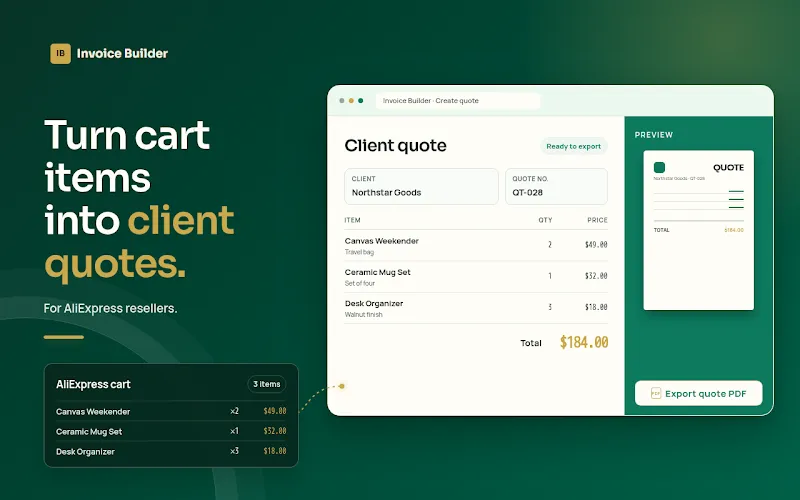
Invoice Builder helps sellers, resellers, and dropshippers quickly convert order data into a document ready to be sent directly to a client. Simply open the extension, load items from a supported store, adjust the amounts and customer details, and export a professional-looking PDF.
This tool is ideal for those who frequently prepare similar documents and want to avoid starting from scratch every time. Instead of manually transferring data to a separate file, you can use the existing order information, edit the necessary fields, and complete the entire process in one seamless workflow.
With this tool, you can:
- Import line items from supported shopping carts and orders
- Review and correct customer information
- Adjust prices, quantities, and markups
- Save drafts locally
- Export PDFs for sharing or record-keeping
The process is straightforward:
- Open your store page or order page
- Launch Invoice Builder
- Load the items and prices
- Adjust the invoice details
- Review the final layout
- Export as a PDF
Who is this for:
- Resellers and dropshippers who evaluate products from marketplaces for their clients
- Small businesses that send quotes and invoices without using accounting software
- Freelancers and personal shoppers who make purchases on behalf of clients
- Anyone who prefers a neat PDF document over a spreadsheet
Typical use cases:
- Calculating the total for a client’s AliExpress shopping cart before placing an order
- Sending a price quote first, then converting it into an invoice once the client agrees
- Keeping a PDF copy of every document for your own records
- Tracking the status of documents—identifying which are still drafts, which have been sent, and which have been paid


