Newsletter
Join the Community
Subscribe to our newsletter for the latest news and updates
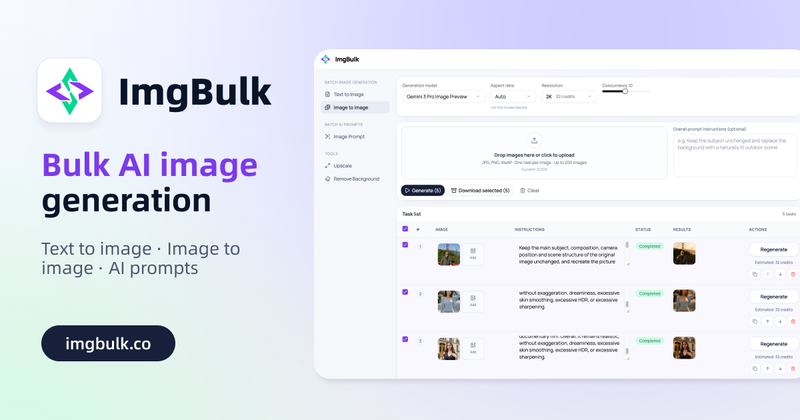
ImgBulk is a batch AI image editing tool specifically designed for handling large quantities of images. You can create tasks such as text-to-image, image-to-image, or prompt-generation from images.
Submit your own product to reach creators and founders looking for the next tool to try.
ImgBulk is a batch AI image generation and editing platform built for people who need to create more than one image at a time. Instead of repeating the same workflow image by image, users can organize dozens or hundreds of image tasks in one structured workspace, configure the batch, start generation, monitor progress, retry failed tasks, and download completed results together.
Most AI image generators are designed around a simple one-prompt, one-result workflow. That works well for occasional image creation, but it quickly becomes inefficient when a user needs 20 product images, 50 ad variations, 100 social media assets, or an entire spreadsheet of prompts processed at once. ImgBulk is designed specifically for this type of high-volume work.
As a Bulk AI image generator, ImgBulk allows users to manage up to 200 tasks in a single batch. Each task can contain its own Prompt and requested image quantity, making it possible to generate completely different images without creating a separate project for every prompt. Users can manually add tasks one by one, paste multiple prompts, or import structured jobs from CSV or Excel when working with larger datasets.
This makes ImgBulk particularly useful for ecommerce teams, marketers, content creators, designers, agencies, and anyone who regularly works with large numbers of AI-generated images.
Batch Text-to-Image Generation
The batch text-to-image workflow is designed for users who already know what images they want to create and need an efficient way to turn many prompts into finished assets.
Each task can use a different Prompt. For example, an ecommerce business could create one row for a skincare product on a white studio background, another row for the same campaign in a summer lifestyle scene, and another row for a promotional advertising visual. Instead of submitting each prompt manually, all tasks can be prepared and generated as one batch.
Users can also specify how many results should be generated for each task. A task can request one image when only a single result is needed, while another task can request several variations when more creative options are useful.
Model, aspect ratio, and resolution can be configured at the batch level so that a large production job remains easier to manage and produces more consistent output dimensions.
For teams with existing prompt spreadsheets, CSV and Excel import can significantly reduce repetitive setup work. A structured list of prompts can be turned into image generation tasks without copying and pasting every instruction manually.
Batch Image-to-Image Editing
ImgBulk also works as an AI batch photo editor for workflows that begin with existing images rather than text prompts.
Users can upload multiple source images and describe how those images should be changed. A shared instruction can be applied across a batch, while individual images can still receive their own editing requirements when necessary.
This makes the platform useful for tasks such as replacing backgrounds, changing environments, adjusting clothing, creating new product scenes, modifying lighting, exploring visual styles, or producing multiple creative versions from existing images.
For example, an ecommerce team could upload a collection of product photos and request a consistent white-background treatment across the entire batch. A marketing team could use the same workflow to place different products into campaign-specific environments. A designer could upload multiple visual references and create alternative compositions or styles without processing each image separately.
Because the workflow is organized around multiple tasks rather than a single editing canvas, ImgBulk can function as a batch AI photo editor, bulk AI image editor, and batch image editing workspace for production-oriented use cases.