
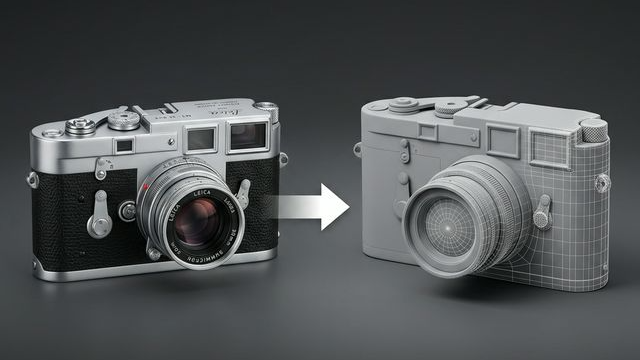
ImageTo3D is an AI-powered web platform that converts a single 2D image—such as a photo, sketch, or concept art—into a high-fidelity, textured 3D model for game development, 3D printing, product design, and AR/VR experiences. The platform runs entirely in the browser, generating production-ready files in minutes.
What is ImageTo3D?
ImageTo3D is an online AI converter that takes one 2D image and outputs a fully textured 3D mesh. It supports multiple export formats including GLB, STL, PLY, and USDZ, making it compatible with Blender, Unity, Unreal Engine, and slicer software for 3D printing. The service is offered by Vismint (vismint.com) and uses deep learning to infer geometry and surface details from a single viewpoint.
Key Features
- AI Photo to 3D Model — Converts clear photos, sketches, and concept art into detailed 3D models with AI-reconstructed geometry.
- High-Fidelity Texturing — Generates PBR materials and detailed textures from a single input image.
- Multi-Format Exports — Download textured GLB files or export to STL (3D printing), PLY (point cloud), and USDZ (Apple AR Quick Look).
- Fast Generation — Produces textured 3D assets in 30–90 seconds.
- Commercial License — All generated models on paid plans can be used commercially in games, animations, and marketing.
- Credit-Based Pricing — Purchase credit packs (Starter 800 credits for $9.90, Pro Standard 3,000 for $29.90, Max Value 8,000 for $69.90) with no subscription required.
Who is it for?
- Game developers — Rapidly generate props, environment assets, and placeholder geometry from concept art.
- 3D printing enthusiasts — Convert 2D images into watertight STL files ready for slicing and fabrication.
- Product designers — Turn early sketches into interactive 3D concepts for client review and iteration.

- AR/VR creators — Quickly populate virtual environments with lightweight, textured 3D assets.
What can you do with ImageTo3D?
- Game Development — Instantly create detailed props and assets for prototypes, saving days of manual modeling.
- 3D Printing & Fabrication — Convert 2D concepts into STL files for slicing with Cura, PrusaSlicer, or Bambu Studio.
- Product Design — Accelerate industrial design by converting product sketches into interactive 3D concepts.
- AR / VR Experiences — Populate virtual environments with textured 3D assets generated directly from 2D references.
How does ImageTo3D work?
- Upload a clear image (photo, sketch, or concept art) with a plain background and good lighting.
- The AI analyzes visual cues such as shading, edges, and perspective to predict 3D geometry and texture.
- After 30–90 seconds, download the result as a GLB file (or choose STL, PLY, or USDZ).
Pricing
ImageTo3D uses a credit-based pricing model with three tiers:
- Starter: 800 credits for $9.90 (~8 generations, ~$1.24 per 100 credits)
- Pro Standard: 3,000 credits for $29.90 (~30 generations, ~$1.00 per 100 credits)
- Max Value: 8,000 credits for $69.90 (~80 generations, ~$0.87 per 100 credits)
Credits are valid for up to one year. No subscription required. Commercial license is included in all paid plans.
Pros and Cons
Pros:
- Fast generation (30–90 seconds)
- Multiple export formats (GLB, STL, PLY, USDZ)
- Commercial use allowed on paid plans
- No subscription; credits expire after one year
Cons:
- No free tier available
- Not suitable for transparent or highly reflective surfaces, extremely thin structures, cluttered scenes, or low-resolution images
FAQ
What is the best image to 3D model AI?
ImageTo3D is an advanced AI image-to-3D converter that uses modern generative pipelines to reconstruct detailed 3D assets with textured surfaces from clear image references.
Do I need a paid plan to convert a 2D image to a 3D model?
Yes, generating high-quality 3D models with AI is computationally intensive. Paid credit packs help cover the GPU resources needed for reliable generation.
What types of images work best?
Clear photos or concept art with a plain background, good lighting, and a single subject produce the highest quality textured GLB models.
How long does it take?
Most images are converted into fully textured 3D models within 30 to 90 seconds.
Can I use the generated models commercially?
Yes, all 3D models generated from images using a paid tier can be used for commercial projects, including games, animations, product visualizations, and marketing materials.






