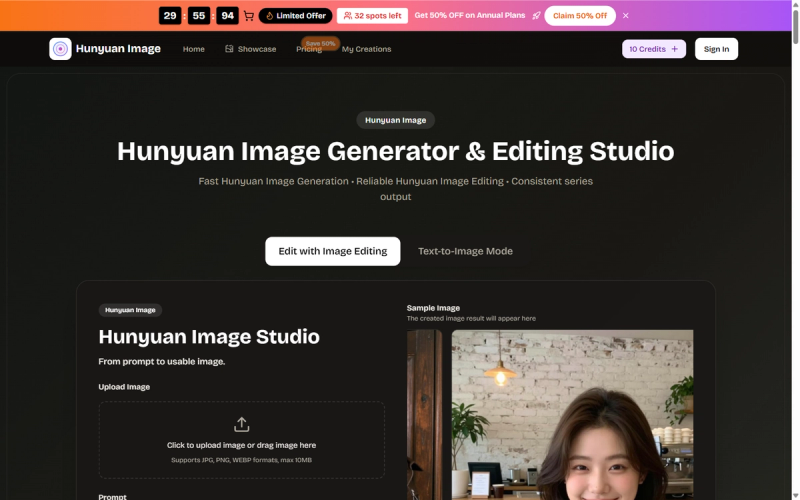
Hunyuan Image is an AI image generator and editing studio that combines text-to-image generation, natural-language image editing, and access to Hunyuan Image 3.0, 4.0, and Pro models in a single web-based workflow on Hunyuan Image's website.
What is Hunyuan Image?
Hunyuan Image is a production-focused AI image generator and editor. It accepts text prompts (up to 500 characters) and optional image uploads (JPG, PNG, WEBP, under 10 MB) and outputs generated or edited images in PNG and JPEG formats. It runs entirely in the browser on desktop and mobile devices and is developed by the Hunyuan Image team.
Key Features
- Character Consistency — Keep faces and outfits aligned across a series of images using repeatable prompts and identity-preserving edits.
- Fast Revisions — Edit backgrounds, scenes, and details with simple natural-language instructions while the subject stays intact.
- Style Control — Reuse a visual recipe (palette, character recipe) across campaigns to maintain a cohesive brand look.
- No Watermark — Available on annual plans (Basic, Professional, Enterprise) for clean exports.
- Commercial Use License — Included with all paid plans for marketing, products, and thumbnails.
- AI Image Enhancer & Background Remover — Built-in tools for polish and isolation.
- Priority Generation Queue — Higher tiers (Professional, Enterprise) reduce wait times during peak usage.
- Unlimited Downloads — All paid plans allow unlimited downloads of generated images.
Who is it for?
- Illustrators and character artists — Keep characters on-model across frames using generation and targeted editing.
- Filmmakers and directors — Block keyframes and storyboard beats quickly, then refine composition and lighting.
- Designers and creators — Generate concept boards and social graphics, then edit details without restarting.
- Marketers and teams — Produce catalog renders, ads, and banners at scale while maintaining brand consistency.
What can you do with Hunyuan Image?
- E-commerce product shots — Match catalog and ads with consistent lighting; batch options via generation, fix details via editing.
- Photo repair and enhancement — Restore photos by fixing background and contrast with targeted editing.
- Campaign and concept mockups — Preview layouts before a shoot; generate multiple options and keep the best directions.
- Background and scene swaps — Swap backgrounds while keeping the subject sharp using editing.
- Ads, banners, and thumbnails — Explore with generation, then refine layout and brand details with editing.
- Characters and avatars — Keep characters consistent across poses with repeatable prompts and editing.
How does Hunyuan Image work?
- Define what you want to make (product, character, thumbnail, ad).
- Upload an image or write a prompt (up to 500 characters) to generate a first frame.
- Apply edits — Use natural-language prompts to iterate backgrounds, lighting, and style.
- Finalize and export — Download PNG or JPEG files and reuse the same setup for the next asset.
Pricing
Hunyuan Image is freemium with free credits to start. Paid tiers include Basic, Professional, and Enterprise (annual and monthly billing, with a 50% flash sale on annual plans). All paid plans offer permanent image history, commercial use, and access to Hunyuan Image 3.0 & 4.0 & Pro models.
FAQ
Is Hunyuan Image free?
Yes — you start with free credits to try both generation and editing before committing to a paid plan.
What image formats can I download?
You can download generated and edited images in PNG and JPEG formats.
Does Hunyuan Image support mobile?
Yes — the web interface adapts to mobile browsers, and your credits and workflow follow you across devices.
Is there a limit on images per month?
Free credits cap monthly generation; paid plans offer up to 50 (Basic), 200 (Professional), or 600 (Enterprise) images per month with annual billing.
Does Hunyuan Image add watermarks?
Annual plans include a no-watermark option; free and monthly plans may retain watermarks (not explicitly stated, but annual plans list "No Watermark" as a benefit).