
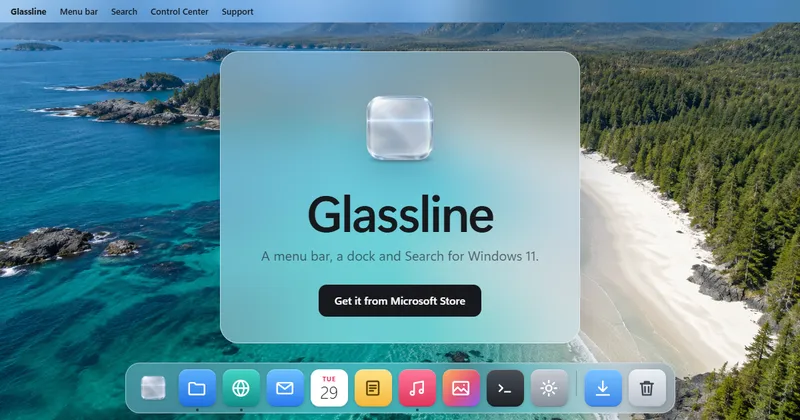
Glassline is a Windows 11 desktop shell replacement that swaps the standard taskbar and Start menu for a macOS-style menu bar, dock, Launchpad app grid, and Windows-key Search. It runs on Windows 11 version 22H2 or later and is distributed through the Microsoft Store.
What is Glassline?
Glassline is a Windows 11 desktop customization app that replaces the taskbar and Start menu with a menu bar, a dock, a Launchpad app grid, and a Search panel. It takes over desktop navigation and produces an app launcher, live window previews, unread notification counts, system controls, weather, screenshots, and search results for apps, files, and settings. Glassline requires Windows 11 version 22H2 or later and is available in English, Spanish, German, Polish, French, and Brazilian Portuguese.
What makes Glassline stand out?
Glassline stands out by rebuilding Windows 11 navigation around a macOS-style menu bar, dock, Launchpad, and Windows-key Search, then adding screenshots, system controls, weather, and per-display behavior. It keeps the taskbar and Start menu recoverable the moment the app quits or is uninstalled.
- Menu bar and glass that follow the desktop — The menu bar takes the color of the window beneath it and can hide itself; menus, Search, Control Center, and Settings take the color of what is behind them; the glass keeps up with Wallpaper Engine and Lively wallpapers; the dock slides away to free space.
- Dock with live previews, stacks, and launch options — Pinned and running apps show a running dot and unread notification count; hovering over a running app shows live windows; folders dragged from File Explorer open as stacks; icon size, dock style, magnification, margins, hiding, custom icons, and per-app Launch Options are adjustable.
- Launchpad app grid — Every installed app appears page by page, with type-to-find, drag-to-reorder, and app-on-app folder creation.
- Search from the Windows key — Search finds apps, files, and settings, performs sums, converts units and currencies, translates phrases offline on the PC, and sends other queries to the web; with Everything installed, files across drives appear as you type, and Ctrl Space or Space in File Explorer opens a large preview.
- Drag screenshots — Alt Shift 4 captures a region, Alt Shift 3 captures the whole screen, holding Ctrl copies instead of saving, a corner preview opens the file, and capture works over games.
- Control Center and notification placement — Wi-Fi, Bluetooth, media playback, brightness, and sound sit in one panel; switches cover Do Not Disturb, dark mode, airplane mode, and hotspot; a Hardware page reports processor, memory, and graphics load and temperature; Classic, Aurora, and Deck skins change the look; notifications can appear where Windows puts them or at the top right under the menu bar.
- Weather and calendar in the menu bar — Current temperature and a painted sky icon sit beside status icons; clicking opens hourly and 7-day forecasts, humidity, wind, UV index, sunrise, and sunset, with data credited to MET Norway; the clock opens notifications and events from subscribed calendars.
- Multi-display and game behavior — Each display gets its own menu bar; the dock can follow the pointer, stay on one display, or show on all displays; dragging an icon between docks moves the app windows when each dock shows apps on its own display; the menu bar and dock step aside for full-screen games, and the Windows key can bring the dock back over a game.
Who should use Glassline?
Glassline suits Windows 11 users who want macOS-style desktop navigation, multi-monitor users who need per-screen docks and menu bars, keyboard-first users who launch apps and files through Search, and gamers who want the desktop shell to disappear during full-screen play.
- Windows 11 users coming from macOS: get a menu bar, dock, Launchpad, and Search layout while staying on Windows; the menu bar and dock replace the taskbar and Start menu until Glassline is quit.
- Multi-monitor desk workers: give each display its own menu bar, choose whether the dock follows the pointer, stays on one screen, or appears on all, and drag dock icons between displays.
- Keyboard-first users: press the Windows key to search apps, files, and settings, run sums and unit or currency conversions, translate phrases offline, and preview files with Ctrl Space.
- Gamers and screen-capture users: let the menu bar and dock step aside for full-screen games, bring the dock back with the Windows key, and capture regions with Alt Shift 4 or full screens with Alt Shift 3.
What can you do with Glassline?
Glassline is used to replace Windows 11 taskbar navigation with a menu bar, dock, Launchpad, and Search, and to add screenshots, Control Center, weather, and multi-display behavior. The app can be quit to restore the standard taskbar and Start menu.
- Windows 11 users who prefer macOS navigation: replace the taskbar and Start menu with a menu bar, dock, Launchpad, and Search; quit Glassline to restore the taskbar and Start menu exactly as they were.
- Multi-monitor desk workers: give each display its own menu bar and configure the dock to follow the pointer, stay on one display, or show on all displays; drag icons between docks and move app windows across displays.
- Gamers and capture-focused users: hide the menu bar and dock during full-screen games, bring the dock back over a game with the Windows key, and take region or full-screen screenshots with a preview and optional copy.
- Keyboard-first power users: search apps, files, and settings from the Windows key, do math and unit or currency conversions, translate phrases offline, and preview files without opening their apps.
How does Glassline work?
Glassline runs as a Windows 11 desktop shell: it displays a menu bar, dock, Launchpad, and Search in place of the taskbar and Start menu while it is active. It is distributed through the Microsoft Store, and quitting it restores the taskbar and Start menu exactly as they were. If Glassline closes unexpectedly or is uninstalled, the taskbar and Start menu return on their own.
Pricing
Glassline is free for 7 days. The page states there is no subscription, and every update is free.
FAQ
Is Glassline free?
Glassline is available as a 7-day free trial. The product page states there is no subscription and every update is free. It does not list a recurring price or a subscription tier; users start through the Microsoft Store listing.
Does Glassline replace the Windows 11 taskbar?
Glassline replaces the Windows 11 taskbar and Start menu with a menu bar, dock, Launchpad, and Search while it is running. Quitting Glassline from the logo menu or by right-clicking the bar brings the taskbar and Start menu back exactly as they were; an unexpected close or uninstall also restores them.
What Windows version does Glassline require?
Glassline requires Windows 11 version 22H2 or later. The page lists support for English, Spanish, German, Polish, French, and Brazilian Portuguese, and the download is distributed through the Microsoft Store rather than as a standalone installer on the site.
Can Glassline use different docks on multiple monitors?
Glassline gives each display its own menu bar. The dock can follow the pointer, stay on one display, or show on all displays; dragging an icon from one dock to another moves the app, and when each dock shows apps on its own display, the app windows move across with it.
Does Glassline work with full-screen games?
Glassline steps the menu bar and dock aside when a game starts so the game runs full screen. The Windows key can bring the dock out over a game, and the screenshot shortcuts Alt Shift 4 and Alt Shift 3 work over games as well.


