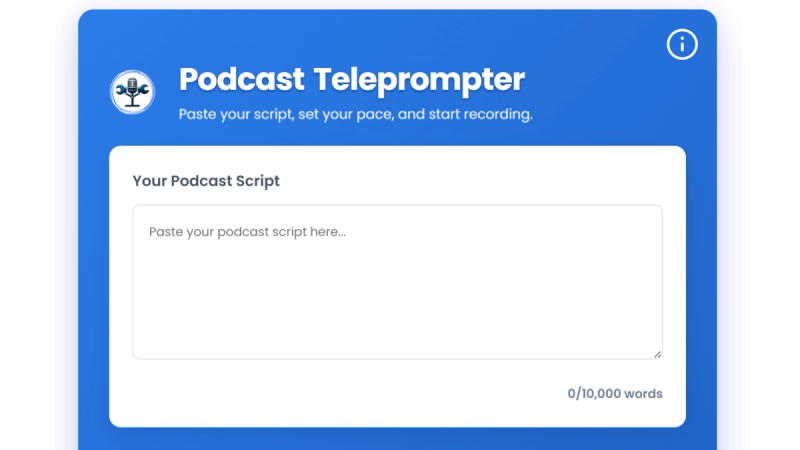
Free Podcast Teleprompter is a privacy-focused, browser-based teleprompter that allows podcasters and content creators to deliver polished scripts without memorization or expensive software.
What is Free Podcast Teleprompter?
Free Podcast Teleprompter is a web-based autocue tool that transforms a pasted script into a scrolling, full-screen display. It runs entirely in the browser on any modern device—desktop, laptop, tablet, or smartphone—without requiring downloads, registration, or account creation. Developed by Tools Podcasting, it processes all text locally to ensure complete privacy.
Key Features
- No registration required — Start using immediately without creating an account or downloading any software.
- Adjustable scrolling speed — Set pace from 90 to 210 words per minute using the on-screen slider or arrow keys during recording.
- Real-time word count and reading time — Displays word count and estimated duration based on selected WPM for precise episode planning.
- Keyboard shortcuts — Control play/pause with spacebar, restart with R, adjust speed with up/down arrows, and exit full-screen with Escape.
- Full-screen mode — Maximizes text readability with large, high-contrast fonts for focused recording.
- Supports scripts up to 10,000 words — Enough for a 60-minute podcast episode, with color-coded warnings at 8,000 and 10,000 words.
- Privacy-first design — All script processing occurs locally in your browser; no data is uploaded to servers.
- Educational pacing guidance — Built-in tips on sense pauses, transition pauses, emphasis pauses, and dramatic pauses to improve delivery.
Who is it for?
- Podcasters – Maintain script adherence while preserving a conversational tone for intros, outros, sponsor reads, and complex topic explanations.
- YouTube creators – Maintain eye contact with the camera while reading scripts, reducing editing time and retakes.
- Business presenters – Deliver polished presentations in virtual meetings, webinars, or online courses without reading off-screen.
- Educators and trainers – Ensure accuracy in recorded lectures or training videos while keeping students engaged.
What can you do with Free Podcast Teleprompter?
- Streamlined recording – Paste your script, set speed, and start recording. The full-screen display helps maintain eye contact with your camera, reducing retakes by 60-70%.
- Real-time pace adjustment – Use arrow keys to speed up or slow down mid-recording, matching your natural delivery without pausing.
- Multi-device recording – Works on any device with a modern browser, from smartphones to multiple-monitor studio setups, and is compatible with OBS Studio, Zoom, and other recording software.
How does it work?
Paste your script (up to 10,000 words) into the text area. Adjust the scrolling speed between 90 and 210 WPM using the slider. Click “Start Teleprompter” to enter full-screen mode with automatic scrolling. Use keyboard shortcuts for hands-free control: spacebar to pause, arrow keys to adjust speed, R to restart, and Escape to exit.
Pros and cons
- Pros: Completely free, no signup required, privacy-focused (local processing), works on all devices and browsers, includes educational delivery tips.
- Cons: Script limit of 10,000 words, no voice-activated scrolling (manual control only), no built-in recording.
Pricing
Free forever. No premium tiers, subscriptions, watermarks, or upgrade prompts. All features are accessible indefinitely without payment.
Alternatives
- PromptSmart – $9.99/month with voice-activated scrolling and cloud features.
- Teleprompter Pro – $59.99/year, includes in-app recording and cloud storage.
FAQ
Is Free Podcast Teleprompter really free with no hidden costs?
Yes, this teleprompter is 100% free with no trials, premium tiers, watermarks, or upgrade prompts. All features are accessible indefinitely without any payment or account.
What devices and browsers are supported?
It works on all modern devices: desktops, laptops, tablets, and smartphones. Compatible browsers include Chrome, Firefox, Safari, Edge, Opera, and Brave. No apps or plugins are needed.
Do I need to download software or create an account?
No downloads or account creation are required. The tool runs entirely in your web browser and does not store data on external servers. Your scripts remain private and never leave your device.
How long can my script be?
Scripts up to 10,000 words are supported, which is approximately 60-70 minutes of spoken content at 150 WPM. Warnings appear at 8,000 words (orange) and 10,000 words (red).
Can I adjust scrolling speed while recording?
Yes, real-time speed adjustment using the up and down arrow keys lets you match your natural delivery pace without stopping recordings. You can also pause with the spacebar at any time.