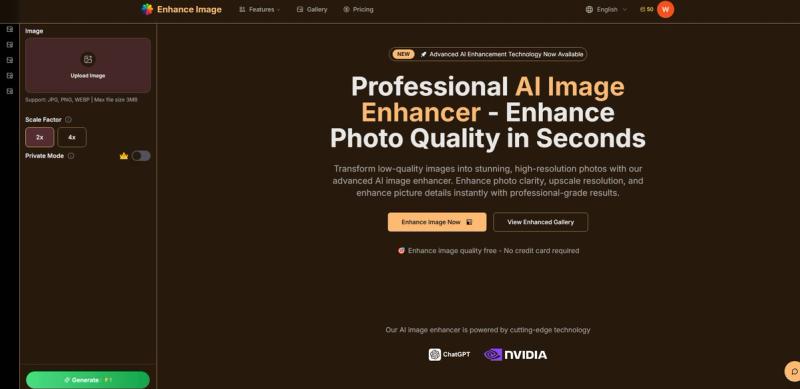
Enhance Image is a free, browser-based AI image enhancer that improves photo quality, sharpens detail, and upscales images to HD or 4K in seconds.
What is Enhance Image?
Enhance Image is an AI-powered web app that enhances image quality by automatically analyzing blur, softness, and weak details. It accepts JPG, PNG, and WEBP files up to 20MB and outputs cleaner, sharper JPG images at up to 32MP (for maximum enhancement level). The service runs entirely in the browser, so there is no software to install, and uploads are encrypted and automatically deleted from servers within 24 hours.
Key Features
- AI image quality enhancement — Automatically improves clarity, sharpness, and detail on everyday photos, product images, text-heavy graphics, and old pictures.
- 4K upscaling — Upscales images to HD or 4K using four enhancement levels: Standard (up to 4MP), HD (up to 8MP), Print (up to 16MP), and Maximum (up to 32MP).
- Batch processing — Upload and enhance up to 10 images in one go via the Batch Mode toggle.
- Specialized workflows — Includes dedicated tools for unblurring, old photo restoration, HD conversion, and 4K enhancement, plus a text/graphic clarity mode.
- Detail and realism controls — Toggles for "Enhance Details" (sharpen fine textures) and "Enhance Realism" (improve overall realism for AI-generated images).
- Secure and private — Photos are encrypted during upload, automatically deleted within 24 hours, and never used to train AI.
- API access — Developer-friendly API support lets you integrate the enhancement workflow into your own applications.
- Multi-language interface — The platform is available in 10+ languages, including English, Spanish, French, and Japanese.
- Fast processing — Most enhancements complete in seconds (typically 5–15 seconds), according to the platform.
Who is it for?
Enhance Image serves a wide range of users who need better-looking images quickly without a heavy editing workflow. Concrete roles include:
- Professional photographers who want to improve soft client photos and deliver clearer final images.
- E-commerce managers who need polished product photos for listings and ads with sharper detail.
- Real estate agents who use the enhancer to make property images look more professional and appealing.
- Marketing directors who clean up campaign visuals, social assets, and screenshots before publishing.
- Individuals restoring old family photos or improving personal pictures.
What can you do with Enhance Image?
- Photographers: enhance soft client photos and prepare high-res deliverables without complex editing.
- E-commerce teams: polish product shots for retail listings to improve clarity and sales appeal.
- Real estate agents: improve dark, blurry, or low-resolution property photos to attract more buyers.
- Marketing professionals: quickly clean up screenshots, social assets, and campaign visuals for a more finished look.
- Home users: restore damaged or faded old photographs with the dedicated old photo restoration workflow.
How does Enhance Image work?
- Upload a JPG, PNG, or WEBP image (max 20MB), or batch upload up to 10.
- Choose an enhancement level (Standard, HD, Print, Maximum) and toggle options like Enhance Details or Enhance Realism.
- Let the AI analyze blur, detail, texture, and clarity; processing typically takes 5–15 seconds.
- Preview the result and download the enhanced image as a JPG.
Pricing
Enhance Image follows a freemium model. You can start free and upgrade for higher-resolution downloads, watermark-free exports, and more credits. Each enhancement costs 2 credits; specific plan pricing is shown on the pricing page.
FAQ
Can I improve image quality online free without Photoshop?
Yes. Enhance Image runs in the browser and offers a free tier, so you can upload images and get improved quality without installing any software.
The enhancer accepts JPG, PNG, and WEBP files up to 20MB. The output format is JPG, and enhancement levels support output sizes up to 32MP (Maximum level).
Is my data secure when using the AI image enhancer?
Photos are encrypted during upload and automatically deleted from the servers within 24 hours. The service does not use your images to train AI.
The enhancer improves general clarity and detail. The upscaler focuses on increasing resolution, the unblur tool targets motion or focus blur, and the old photo restoration tool revives faded, scratched, or damaged vintage photos.
Can I use the enhanced images commercially?
The page states that professional-grade results are suitable for commercial use, and the service includes free and paid tiers with watermark-free exports on upgraded plans.
Pros and Cons
Pros
- Free tier with no credit card required
- Browser-based, no software to install
- Batch processing for up to 10 images
- Output up to 32MP (4K-ready)
- Secure data handling with auto-deletion
Cons
- Input limited to JPG, PNG, and WEBP (no TIFF or RAW)
- Output format is JPG only
- Free tier likely includes watermarks; watermark-free exports require an upgrade
- Each enhancement consumes credits