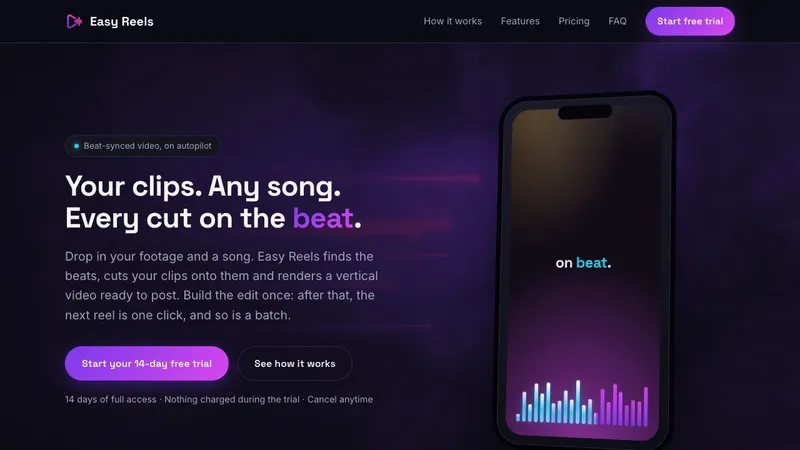
Easy Reels is a web app that slices your own clips and photos onto the detected beats of a song and renders a 9:16 vertical MP4 reel you can post to Reels, TikTok and Shorts.
What is Easy Reels?
Easy Reels is a browser-based video editor that builds beat-synced vertical reels from footage you already own. You add an audio track plus clips and stills, the app detects the track's beats and places every cut on them, and it exports a 1440×2560 MP4 — a 9:16 vertical 2K master — up to 60 seconds long. Each edit is saved as a reusable template, so the next video is one click, and batch generation produces 10 videos at a time on Pro or 50 on Ultra. Pricing starts at $19 a month after a 14-day free trial.
What makes Easy Reels stand out?
- Automatic beat detection — every uploaded track is analysed and cut points are placed on real beats rather than on a fixed interval.
- Cut styles and waveform editor — choose Smart, every beat, every second beat or downbeats, then add, drag or delete individual markers on the waveform or re-detect.
- Smart clip assignment — clips and slices are auto-assigned across the whole edit, and any single one can be swapped, trimmed or re-rolled.
- Photos as clips — stills and video mix freely; a section can be backed by either.
- Templates — song, filter, text design, folders and beat markers are saved as one reusable recipe, so only the footage changes between renders.
- Copy pools — hooks and captions are written once in the template and each render draws one it has not used lately to avoid repetition.
- Batch generation — queue 10 videos per batch on Pro, 50 on Ultra; each render pulls different clips and slices from the chosen folders.
- Brand spaces, fonts and LUTs — Pro includes one brand space and 5 GB storage; Ultra adds unlimited brand spaces, 20 GB, uploads of .ttf/.otf fonts and .cube LUTs, plus Ultra-only fonts and filters.
Who should use Easy Reels?
- Daily short-form creators: turn raw phone clips into one on-beat Reel or TikTok per day without rebuilding the same edit in a timeline editor.
- Faceless theme pages: run hooks and captions from a copy pool over rotating footage so consecutive posts do not look identical.
- Agencies and freelancers: keep each client's footage, fonts and templates in a separate brand space — unlimited on Ultra — and batch-render a week of content at once.
- Product and location marketers: sort clips into folders per product or place so a template pulls from the right pile instead of everything in the library.
What can you do with Easy Reels?
- Faceless Instagram and Threads accounts: feed a folder of clips plus one song into a saved template and generate a batch of vertical reels with rotating captions, download each with its cover, and post it anywhere.
- Agencies running several clients: give each client a brand space with their own fonts, LUTs and templates, then batch 50 videos at a time on Ultra.
- Small brands keeping a fixed look: apply one colour filter with an intensity slider and reusable text overlays (title, handle, hook, CTA) so every render carries the same grade and typography.
How does Easy Reels work?
The workflow runs in six steps: add your music (the track sets the video length and where cuts land), set the cuts by picking a cut style and adjusting markers on the waveform, add footage into folders, build the one-layer template (music, a clip source for every beat, text and image layers), optionally write a copy pool of hooks and captions, then hit generate. Only the last step repeats after setup.
Pricing
There is no free tier. Every account starts with a 14-day free trial with full access; cancel before it ends and you pay nothing. Pro is $16/month billed annually at $190/year and includes one brand space and 5 GB of storage. Ultra is $33/month billed at $390/year with unlimited brand spaces, 20 GB, own fonts and LUTs, and 50-video batches. Foundation is a one-off $279 purchase limited to 500 units, charged immediately but refundable within the same 14 days. Scheduled auto-posting to Instagram, Facebook and Threads is listed as coming soon on Ultra.
FAQ
Do I need any video editing skills?
No. You upload footage, pick a song and press generate; Easy Reels handles beat detection, clip selection, slicing and rendering. The waveform editor and clip re-rolls exist if you want to fine-tune, but the page states editing is never required.
Is Easy Reels an AI video generator?
No. It does not invent footage. It finds the beats in your song and cuts the clips and photos you uploaded onto them, then applies your grade and text — so what you post is your own material.
What formats and length does Easy Reels output?
It renders a vertical 1440×2560 (9:16) MP4, a 2K master that Reels, TikTok and Shorts each downsize to their own 1080×1920. The song, up to 60 seconds, sets the length, and you download the video plus its cover.
What footage works best?
Raw clips and photos. Footage that is already edited or has transitions baked in gets sliced again on the beat and can look choppy. Long videos can be split into clips inside the library before use.
Can I use any song?
Any audio file you upload. Its beats set the cuts and its length sets the video's duration, but as with any editor you need the rights to the music you use.