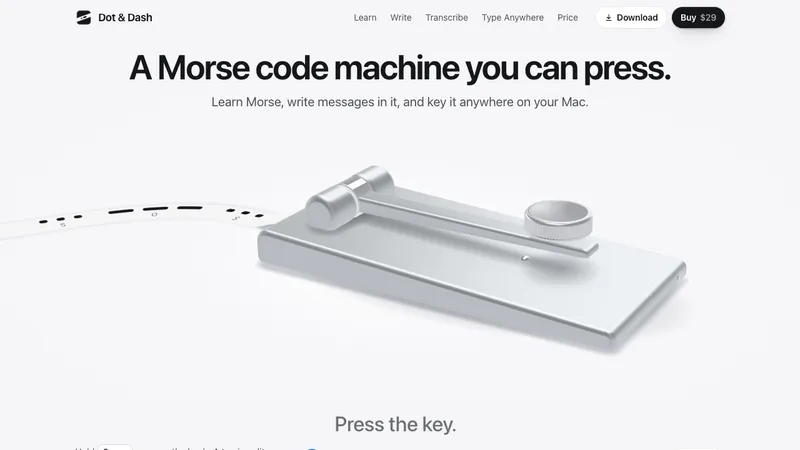
Dot & Dash is a Morse code machine for the Mac that you can press. Hold Space or press the knob: a tap is a dit, a hold is a dah, and the tape prints as you key.
Learn Morse by keying it
Twenty short chapters take you from E and T to the whole alphabet, the figures, everyday punctuation and the common prosigns. A lesson takes two or three minutes: meet a letter by its rhythm, key it, then key real words with it. A five-minute daily review brings back the characters that need it most, and a quiet map of the alphabet shows what you know and how fast you key it.
Write messages in Morse
Type a message and the machine sends it: the lever moves, the tone plays and the tape prints. Or key it yourself and watch it decode as you go. Set the speed from 5 to 40 WPM and add Farnsworth spacing while you learn. The Library saves what you send so you can replay it and share it later.
Turn Morse into text, and back
Type or paste dots and dashes and the message appears as you go. Or write the message and get its Morse, ready to copy or to play on the machine.
Key Morse in any app
Switch on Type Anywhere in the menu bar, hold Right Option as your key, and what you key is typed into the app in front.
Share the tape
Send a message as an image of its printed tape, as audio, or as a square or vertical video of the machine printing it.
Details
- Straight key or paddles (iambic A or B); USB keys and keyers that type a key work too
- Seven finishes
- Works offline, no account
- Free for 24 hours, then $29 once for up to 3 Macs
- macOS 14 or later, Apple silicon and Intel