Dessi AI is an AI image creation and editing toolkit that runs in the browser at dessi.website and as a Telegram bot, turning text prompts or uploaded photos into generated and edited visuals.
What is Dessi AI?
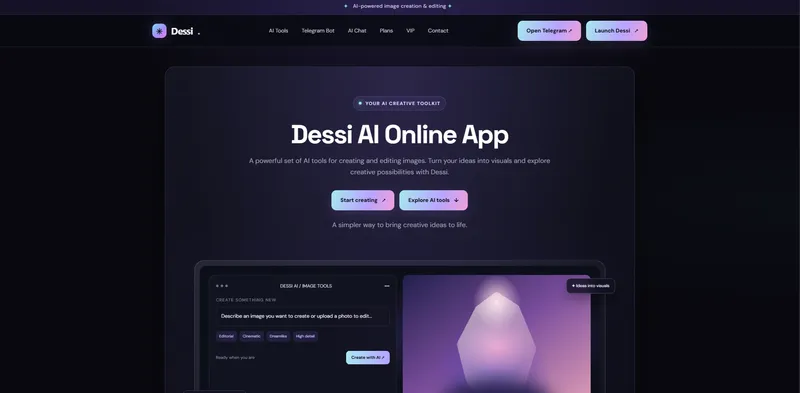
Dessi AI is a web app built around two tasks: generating an image from a written description, and editing a photo you upload. The create panel accepts either a text prompt or an image file, and returns a visual in whichever style preset you select. Beyond the image tools, the site hosts an AI Chat workspace and lists several upcoming tools (Prompt Studio, AI Voice, Creative Playground). Access is gated behind an account created at the site's create-account page, and the same toolkit is reachable through a Telegram bot. The page does not name the company or team behind the product.
What makes Dessi AI stand out?
- Prompt-or-photo input — the main create box takes a typed description of the image you want or an uploaded photo to edit, so generation and retouching share one entry point.
- Four style presets — Editorial, Cinematic, Dreamlike, and High detail are offered as quick style choices next to the prompt field.
- Telegram bot — the same image workflows are available inside a chat interface; the site marks this tool as available now.
- AI Chat — a separate conversational workspace for bringing questions and ideas into a thread, also listed as available now.
- Prompt Studio (coming soon) — a dedicated space for shaping and refining prompts before generating.
- AI Voice (coming soon) — an audio-oriented tool the site lists without further detail.
- Creative Playground (coming soon) — an area for experimenting with emerging AI workflows.
- Two entry platforms — everything is reachable from a desktop or mobile browser, or from Telegram without opening the site.
Who should use Dessi AI?
- First-time AI image users: someone who has an image idea in words and wants to see it rendered without learning a node editor or prompt-syntax system — they type a sentence, pick a preset, and look at the result.
- Telegram-first users: people who already live in chat apps and prefer to generate or edit an image from inside a Telegram conversation rather than a separate website tab.
- Photo editors with a specific reference: anyone with an existing photo who wants a stylized variant — they upload the image instead of describing it.
- Prompt experimenters: users who want to iterate on wording before committing, which the in-development Prompt Studio is aimed at.
What can you do with Dessi AI?
- Concept exploration: describe a scene and generate it in Editorial, Cinematic, or Dreamlike styling to see a direction before committing to a design.
- Photo restyling: upload a photo and apply an AI edit pass rather than rebuilding the image from scratch.
- On-the-go generation: open the Telegram bot and produce or refine an image without leaving the chat app.
- Idea development in chat: move between the image tools and the AI Chat workspace to talk through what to make next.
How does Dessi AI work?
The site lays out three steps. First, choose your tool — open Dessi on the web or jump into the Telegram experience. Second, bring an idea — describe what you have in mind or upload a photo and explore the available creative workflow. Third, make it yours — experiment, refine the direction, and review the output.
FAQ
What platforms does Dessi AI run on?
Dessi AI runs as a web app at dessi.website and as a Telegram bot. Both give access to the image creation and editing workflows; the Telegram version works inside a chat thread rather than a standalone editor page.
Do I need to upload a photo to use Dessi AI?
No. The create box accepts a text description of the image you want, so generation works from a prompt alone. Uploading a photo is the alternative path, used when you want to edit an existing image instead of generating a new one.
What image styles can I pick in Dessi AI?
Four presets appear beside the prompt field: Editorial, Cinematic, Dreamlike, and High detail. They act as quick directions for the output rather than separate tools.
Which Dessi tools are available right now?
The Telegram Bot and AI Chat are marked "Available now." Prompt Studio, AI Voice, and a Creative Playground are marked "Coming soon," so they cannot be used yet.
Do I need an account for Dessi AI?
Yes. Every call-to-action on the page — Start creating, Launch Dessi AI, Discover Dessi — points to the create-account page, so an account is the entry point for the web app.