
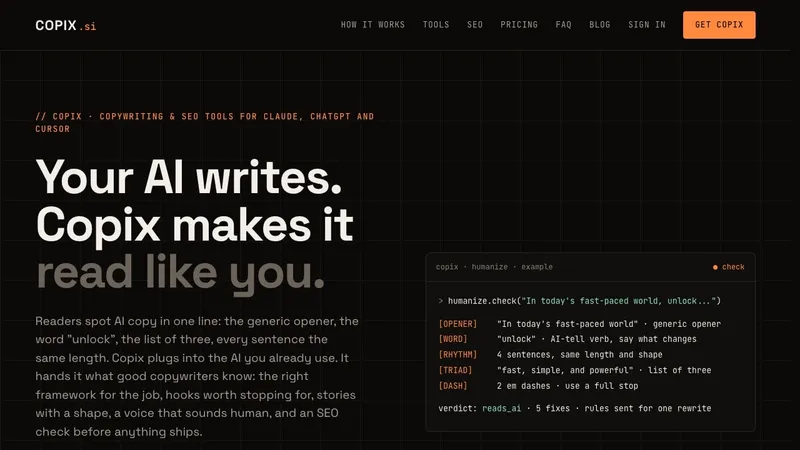
Copix is an MCP server that plugs copywriting and SEO tools into AI assistants you already use — Claude, ChatGPT, Cursor, VS Code and Claude Code — so the model picks a framework, pulls hook patterns, checks its draft for AI tells and runs an SEO check while it writes.
What is Copix?
Copix is a Model Context Protocol server that supplies copywriting and SEO tooling to an AI assistant on demand. You connect it once with an account key, keep asking your assistant in chat as usual, and the assistant calls Copix's 10 copy tools — frameworks, hooks, storytelling, humanize, persuasion, offer, claims, headlines, ad copy and email — plus the Complete-only SEO engine. Copix does not write the copy itself: it hands the model structure, patterns and review rules, and the model produces the draft. It is a one-time purchase from copix.si with a 14-day full refund.
What makes Copix stand out?
- 10 copy tools with no usage cap — because the assistant does the writing, frameworks, hooks, storytelling, humanize, persuasion, offer, claims, headlines, ad copy and email are all listed as unlimited.
- Concrete AI-tell detection — humanize flags exact phrases, rhythm patterns, triads and em dashes rather than giving generic style advice, backed by a library of 22 AI tells.
- Built-in content library — 11 frameworks (AIDA, PAS, BAB, 4Ps, QUEST, PASTOR and more), 12 hook families and 10 story structures including origin, epiphany bridge and case study.
- Platform-specific ad rules — ad_copy carries each field's visible and hard character limits plus editorial rules for Meta, Google, TikTok, LinkedIn, YouTube, X and Pinterest.
- Claims and offer checks — flags unsourced stats, superlatives and guaranteed results, and review mode points out vague guarantees and bare prices before publish.
- SEO engine (Complete only) — ranks up to 12 target queries, checks a draft against its query, audits live pages for AI-citation readiness, and crawls sites up to 25 or 100 pages.
- Live page tools — page_review grades a live sales page section by section for persuasion, claims, voice and structure, and compare sets your page against a competitor's.
- Four assistant setups documented — Claude.ai and desktop as a connector, ChatGPT connectors in settings, Cursor and VS Code via one MCP settings block, and Claude Code with a single add command.
Who should use Copix?
- Freelance copywriters — run drafts through humanize and copy_framework inside the ChatGPT or Claude chat they already work in, instead of switching to another writing app.
- Founders writing their own launch emails and sales pages — use offer, claims and email to package a promise, guarantee, price and sequence, with stop rules so nobody receives the wrong email.
- SEO content writers — Complete's seo tool picks and ranks target queries, then checks whether the draft actually answers them before anything ships.
- Paid ads and social managers — hooks and ad_copy produce first lines with slots and limits plus per-platform field rules before assets are uploaded.
What can you do with Copix?
- Rewrite AI-sounding drafts: paste the flagged lines back into the same chat and ask for a rewrite; the documented Ledgerly run removed a triad, an intensifier and a lesson banner and ended the post on a concrete line.
- Fix SEO gaps on a draft: seo check_draft on the case-study blog post moved on-page checks from 4/10 to 10/10 and the audit from 45% to 64%, adding a three-bucket table, 5 FAQ questions, 6 question headings and 4 internal links.
- Improve weak hooks: hooks scores clear, specific, tension, voice and fit out of 5 and names the failing criterion to fix — the example Instagram hooks moved from 13/15 to 14/15 in two passes.
- Structure an email or sales letter: copy_framework maps a draft to PASTOR beats (Problem, Amplify, Story, Transformation, Offer, Response) for a problem-aware reader.
How does Copix work?
- Connect Copix to Claude, ChatGPT, Cursor, VS Code or Claude Code using the key from your account — no code required.
- Ask your assistant as you normally would, for example "write a launch email for my course" or "give me ten hooks for this reel".
- The assistant calls Copix on its own: it picks the framework, pulls hook patterns, checks the draft for AI tells and, on Complete, runs the SEO check.
- Review modes report findings on a draft so you know which beats or criteria are missing.
Pricing
Copix is a one-time purchase with lifetime updates, sold at founding prices that step up every 100 sales. Copix Basic is $17 at the founding price (listed regular $37) and covers every copy tool but not the SEO engine. Copix Complete is $47 (listed regular $67) and adds the SEO engine, page_review and compare, plus 5,000 SEO credits. Upgrading from Basic to Complete costs the difference ($30 at the time of writing), and Complete owners can add 5,000 SEO credits for $19 or 15,000 for $47. Each tier carries a 14-day refund.
FAQ
Which AI assistants does Copix work with?
Claude (claude.ai and the desktop app, added as a connector), ChatGPT (added as a connector in settings), Cursor and VS Code (one block in the MCP settings file) and Claude Code (one command to add the server). Any assistant that supports MCP connectors can use it; setup steps per assistant are in your account.
Does Copix write the copy for me?
No. Your AI writes; Copix supplies the framework, hook patterns, story structure and voice rules, then checks the draft and reports fixes. Because the model does the writing rather than Copix generating text, the copy tools carry no usage limit.
What is the difference between Basic and Complete?
Basic includes all 10 copy tools, unlimited. Complete adds the SEO engine with 5,000 included credits and every paid tool released later. Basic owners can upgrade at any time by paying only the difference, which is $30 at the current founding prices.
Are there limits on the SEO tools?
Yes. SEO actions fetch pages and run Jev, so each one spends credits: 2 credits to choose and rank up to 12 target queries, 2 to check a draft against its query, 3 to audit a live page, 4 to review a sales page, 6 to compare against a competitor, 10 to crawl up to 25 pages and 30 to crawl up to 100 pages. Credits never expire, and only Complete owners can buy more.
Can I get a refund?
Yes — ask for a refund within 14 days of purchase and the full amount is returned, per the refund policy. Requests go through the support form, which routes questions by reason such as payment or billing, refund request, sign-in problems, connecting Copix to an AI, or SEO credits.


