Calculeaf is a free, web-based engineering calculation worksheet that performs unit-aware math, generates plots, and creates reusable technical documents — all in your browser without sign-up. Start a worksheet →
What is Calculeaf?
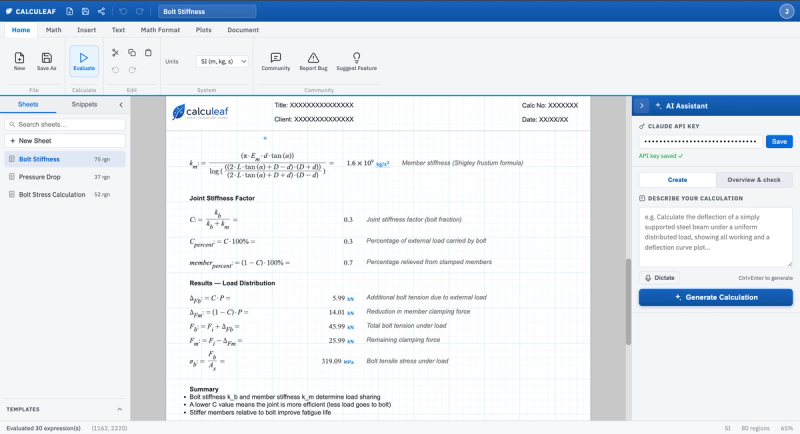
Calculeaf is an online engineering calculation worksheet for unit-aware math, calculation notes, plots, templates, and shareable technical work. It takes formulas, text, and unit definitions as input and produces evaluated worksheets with results, plots, and printable pages. It runs entirely in the browser on any modern device with no installation required. Calculeaf is developed by an independent team focused on making engineering calculations more accessible.
Key Features
- Unit-aware math — Evaluate formulas with SI, USCS, and CGS units, including automatic conversions and derived units.
- Document-style worksheets — Combine math regions, text, plots, pictures, headers, and printable calculation pages in a single sheet.
- Reusable calculations — Save worksheets, create templates and snippets, and share copies of calculation sheets.
- Engineering functions — Use constants, statistical functions, matrices, vectors, comparisons, and iterative calculations.
- Plots and outputs — Add line, area, and scatter plots directly alongside the equations that produce them.
- AI-assisted authoring — Draft calculations from a prompt and run worksheet overviews to check the flow of a sheet.
- Mathcad import — Import Mathcad Prime (.mcdx) and Mathcad 15 (.xmcd) files, converting regions, formulas, and units into an editable worksheet.
Who should use Calculeaf?
- Structural and mechanical engineers — Perform design checks and calculation sheets for bolted joints, beams, and load distributions with full unit tracking.
- Research scientists — Document experimental calculations with text, plots, and unit-aware formulas that can be shared with colleagues.
- Engineering educators — Create clear, step-by-step calculation examples for students that combine math, notes, and visualizations.
What can you do with Calculeaf?
- Create a bolt stiffness calculation — Use unit-aware formulas for load distribution, plot results, and export a printable design check. See an example worksheet →
- Convert and import Mathcad worksheets — Drag-and-drop .mcdx or .xmcd files into Calculeaf to continue editing in the browser.
- Draft calculations with AI — Describe the calculation you need in a prompt and let AI generate the initial worksheet structure.
How does Calculeaf work?
Worksheets are created in a browser-based editor. Math regions use the := operator to define variables, and the sheet evaluates from top to bottom, left to right on each row. Text, images, and plots can be inserted alongside equations. Once defined, worksheets can be saved, shared, or exported as printable pages. Open the app →
Pricing
Calculeaf is free to use with no sign-up required.
Alternatives
- Mathcad — A desktop-based calculation tool that requires a license; Calculeaf offers a free, browser-based alternative with Mathcad file import.
FAQ
What does Calculeaf do?
Calculeaf is an online engineering calculation worksheet for formulas, units, notes, and plots. It combines math, text, and graphics on a single page to produce clear, auditable technical documents.
Can Calculeaf handle units?
Yes. Calculeaf supports unit-aware arithmetic and conversions across SI, USCS, and CGS systems.
Is Calculeaf a spreadsheet?
No. It is closer to a calculation sheet where equations and explanations sit together on a page.
Does variable order matter?
Yes. On the body of the sheet, math and dropdown regions evaluate from the top downward, then left to right on the same row. Define a name with := above any line that uses it.
Can I import Mathcad worksheets?
Yes. Calculeaf imports Mathcad Prime (.mcdx) and Mathcad 15 (.xmcd) files, converting the regions, formulas, and units into an editable worksheet.
Is Calculeaf free?
Yes, Calculeaf is free and runs in your browser. No sign-up is needed to try it. Visit the blog →