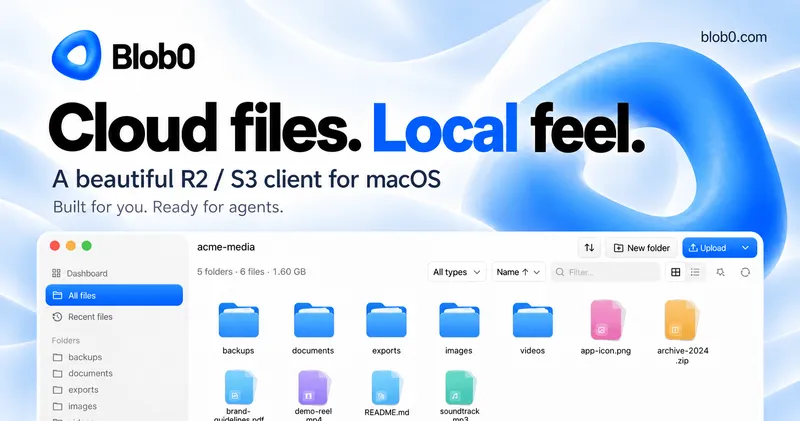
Blob0 is a macOS desktop application that browses, transfers, organizes, previews, and shares files across S3-compatible object storage — including Cloudflare R2, Amazon S3, and MinIO — through a file-manager interface instead of a web console.
What is Blob0?
Blob0 is a desktop file manager for object storage. You give it an S3-compatible bucket (the page's demo shows a bucket named acme-media on r2.cloudflarestorage.com), and it renders object prefixes as folders with per-folder file counts and byte sizes, so uploading, downloading, moving, and deleting work the way they do in Finder. Access credentials are kept in the macOS Keychain rather than in a plain config file. The macOS download is currently listed as "Coming soon," and the site also advertises a CLI plus an agent skill for Claude Code, Codex, and Cursor.
What makes Blob0 stand out?
- Object storage presented as folders — prefixes appear as folders with a size and file count in the header (the demo reads "5 folders · 6 files · 1.60 GB"), so you never translate tasks into object-storage terminology.
- Multiple S3-compatible providers — connections target Cloudflare R2, Amazon S3, and MinIO endpoints, with the active account, bucket, and endpoint host shown in the title bar.
- Grid and list views — every prefix can be viewed either way, with column sorting, search, and multi-select in place.
- File operations on selection — Download, Move, and Delete act on the objects and folders you have selected.
- Type filtering and file-type icons — an "All types" filter narrows listings, and distinct icons mark folders, archives, PDFs, video, audio, images, Markdown, and SVG files.
- Preview before transfer — objects can be previewed inside the app, alongside a stated share capability for objects.
- macOS Keychain credential storage — credentials stay in the Keychain, not in a separate credentials file.
- CLI and agent skill — a command-line interface plus an agent skill intended for Claude Code, Codex, and Cursor.
Who should use Blob0?
- Developers working with R2 or S3 buckets — upload and rearrange build artifacts, static assets, or user uploads without opening a cloud provider's web console.
- Design and media teams — store image, video, and audio assets in object storage and still browse them visually with icons and previews.
- Solo operators maintaining backups — keep dated archives (the demo shows backups, exports, and archive-2024.zip) in a bucket and move or delete old ones in bulk.
- Teams using AI coding agents — the advertised CLI and agent skill let Claude Code, Codex, or Cursor reach storage from the terminal side.
What can you do with Blob0?
- Static site maintainers: replace a folder of deployed assets in an R2 bucket by multi-selecting files, deleting, and uploading replacements, then confirming sizes in the folder header.
- Media producers: preview a demo reel or soundtrack object before downloading, then sort and filter the bucket by type to find it.
- Backup rotation: move completed exports into a dated subfolder and delete stale archives without writing CLI commands.
Alternatives
Cyberduck (open source and cross-platform), Transmit, and S3 Browser also provide desktop access to S3-style storage.
FAQ
Is Blob0 available for Windows or Linux?
No — the site offers a macOS download only, and as of this page that download is marked "Coming soon."
Which storage providers does Blob0 support?
Blob0 connects to S3-compatible endpoints, and the page names Cloudflare R2, Amazon S3, and MinIO specifically.
Where are my access keys stored?
Credentials stay in the macOS Keychain rather than in a file inside the app's folder.
Can I preview files without downloading them?
Yes — previewing objects inside the app is listed among the core capabilities alongside browsing, transferring, organizing, and sharing.
Does Blob0 have a command-line version?
The site advertises a CLI and an agent skill, with the agent skill described for use with Claude Code, Codex, and Cursor.