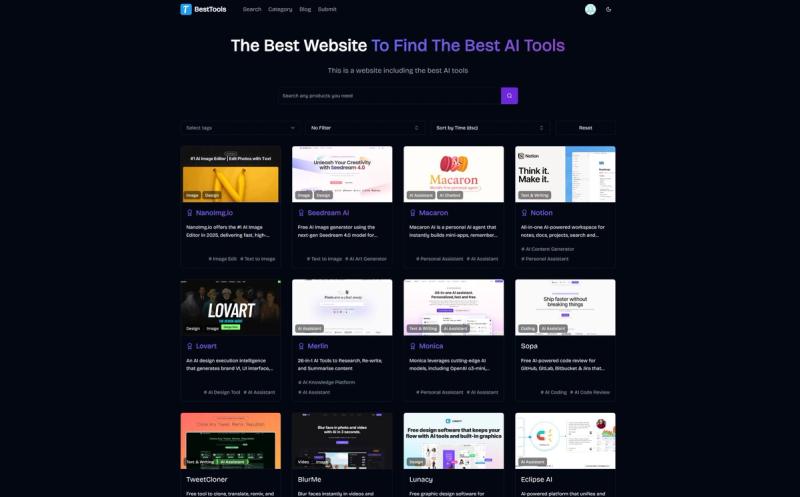
BestTools is a community-driven directory that aggregates over 1,000 AI tools across 8+ categories, enabling users to search, filter, and discover the right tool for any task—from design and writing to coding and video.
BestTools (available at besttools.pro) is a free, web-based platform that curates AI tools into categories such as AI Chatbot (72 tools), Coding (49 tools), Design (175 tools), Text & Writing (175 tools), AI Assistant (301 tools), Video (141 tools), and Image (164 tools). Each tool listing includes a description, tags, and external links. The site is built with Next.js, Tailwind CSS, and Shadcn/ui for fast, responsive performance.
Key Features
- Extensive Catalog & Filters — Browse hundreds of tools grouped by category or filtered by 20+ popular tags (e.g., AI Content Generator with 200 tools, AI Assistant with 183 tools, Text to Image with 72 tools).
- Community Contributions — Users can submit new AI tools via a form; submissions are vetted by moderators and the community for relevance and quality.
- Curated Collections — A "Featured tools" section showcases selected tools like Muset AI (AI art generator), Fuser (universal AI creative platform), and Cheaterbuster (AI-powered dating app search).
- Latest Tools Feed — Regularly updated list of newest additions, including SEO Metrics Monitor, PDF-Video converter, and AI Line Art Generator.
- Search & Tag Filtering — Instant search bar and dropdown tag filters allow narrowing results by specific functionalities (e.g., AI Image Edit, AI Writing Assistant).
- SEO & Sharing Optimized — Rich Open Graph meta tags and clean URLs for easy sharing and discovery.
Who is it for?
- Designers & Creatives — Find AI image generators, logo makers, and UI assistants to accelerate mockups (e.g., NanoImg.io, Flux AI Image Generator).
- Writers & Marketers — Discover AI content generators, SEO tools, and social media assistants for faster copy creation (e.g., Story Generator, SparkFinder).
- Developers — Locate AI code reviewers, IDE assistants, and documentation generators (e.g., Relace, n8n workflow automation).
- E-commerce Sellers — Use tools like MDZ.AI and ImageTranslate.AI to generate product photos, write listings, and translate images for global markets.
- Find an AI tool for a specific task — Filter by category or tag to locate tools for image editing, video generation, writing, coding, or automation.
- Explore trending and newly added tools — Browse the "Latest tools" section to discover recent additions like AI Line Art Generator or Apprentice (tattoo business platform).
- Submit your own AI tool — Share a tool with the community for review and listing.
- Compare tools across categories — Use the tag system to compare similar tools (e.g., multiple AI art generators under "AI Art Generator" tag with 44 tools).
Frequently Asked Questions
Yes, browsing and searching the directory is completely free. Some listed tools may have their own pricing models.
Click the Submit link in the navigation, fill out the form with tool details (name, description, category, tags, URL), and the community will review it for inclusion.
Tools are reviewed by community members and moderators for relevance and quality before being listed.
Absolutely – use the tag filter dropdown on any category page to narrow results by specific functionalities like AI SEO, AI Video Generation, or AI Website Builder.
What categories are available?
The main categories are AI Chatbot, Coding, Design, Text & Writing, AI Assistant, Video, and Image. Each category page further subdivides tools by tags.