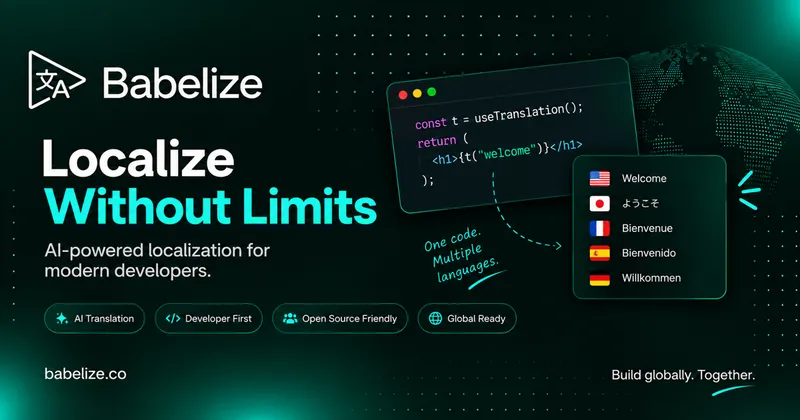
Babelize is an AI localization (i18n) platform that scans a codebase for hardcoded strings, translates them into 90+ languages, and delivers the result as a GitHub pull request or ZIP download.
What is Babelize?
Babelize is an AI-powered internationalization tool for web app developers. You give it a GitHub repository or a ZIP upload; it detects translatable strings, replaces them with translation calls, generates locale files (JSON for JavaScript projects, gettext .po catalogues plus recompiled .mo files for Django), and opens a pull request containing the diff. It runs as a hosted web app at app.babelize.co, with a CLI, an SDK, an MCP server, and a GitHub integration for CI/CD workflows.
What makes Babelize stand out?
- Context-aware AI translation — LLMs translate while preserving framework structure, interpolation variables, and brand-specific terminology, with extraction measured at 2,500+ keys per minute in the dashboard preview.
- Git-native delivery — Translations arrive as pull requests (for example a branch adding es.json with 42 new lines) or as a downloadable ZIP for projects not hosted on GitHub, so nothing merges without review.
- Framework coverage with stated limits — React (JSX/TSX, including Gatsby, Remix, and Astro), Next.js with next-intl, and Django are supported; Vue/Nuxt and static HTML/CSS/JS sites are in beta; Angular and Svelte are not supported yet.
- Django-specific handling — Babelize marks strings in Python files (models, forms, admin, views) and templates, writes gettext .po catalogues that keep existing translations, recompiles tracked .mo files, and sets LANGUAGES and LOCALE_PATHS in settings.py.
- Four integration paths — CLI (
@babelize/cli) for local-first runs from the terminal, SDK (@babelize/sdk) for runtime translation by wrapping strings with no keys or locale files, MCP server (@babelize/mcp) for AI chat clients, and the GitHub app. - Brand Voice and team features — Brand Voice, team collaboration, usage analytics, SSO/SAML, and audit logs appear on higher tiers.
- Babelize Elements — An MIT-licensed, open-source set of copy-paste React + Tailwind components (language switcher, locale picker, translation widget, country flag select, RTL wrapper, currency formatter) that drops into Next.js or Vite apps.
- Current format limits — Output is JSON locale files for JavaScript projects; YAML, XLIFF, ARB, and iOS/Android string files are not supported.
Who should use Babelize?
- SaaS startups shipping new features into multiple markets and wanting translations without slowing release cadence.
- Engineering teams that need locale files under version control and aligned with their CI/CD pipeline and pull-request review process.
- Product and design teams maintaining consistent terminology and tone across every supported language.
- Students, open-source maintainers, and side-project developers working inside the free plan's five projects and 10,000 monthly AI credits.
Use cases
- Indie React developers: connect a repo, pick Spanish, French, and German, and merge one pull request instead of hand-editing locale JSON.
- Django teams: let Babelize mark Python strings and templates, write .po catalogues, and recompile .mo files without restructuring the project.
- Agent-driven workflows: install the MCP server and trigger translations from an AI chat client rather than a browser tab.
- Frontend teams needing UI: copy the RTL-aware Babelize Elements components into a Next.js or Vite app for language switchers and locale pickers.
How does Babelize work?
The workflow is four steps: add a project by connecting a GitHub repository or uploading a ZIP (the scanner reports detected files), select target languages, run Babelize to generate structured locale files with a translated-key count, then merge the pull request or download the ZIP. Small projects finish in a few minutes; larger codebases with thousands of strings take longer, but the run is autonomous.
Pricing
Babelize is freemium, with a free tier plus Starter, Growth, and Studio plans and an annual option advertised as saving 20%. The free plan covers 5 projects, unlimited languages, 10,000 AI credits per month, 1 team member, 1 API key, and CLI plus MCP access. Paid tiers begin at $9/month (Starter), $29/month (Growth), and $79/month (Studio), with AI credit allowances rising from 50,000 to 1,000,000 per month and team seats from 3 to 25.
FAQ
What does Babelize do?
It scans a codebase for hardcoded text, converts it into an internationalized structure with context-aware AI, generates translations across 90+ languages, and delivers the changes as a GitHub pull request or ZIP download for review.
Will Babelize modify my code directly?
It does change code — replacing hardcoded strings with translation calls, adding i18n setup, and writing locale files — but only through a pull request or ZIP, so nothing reaches your repository until your team reviews the diff and merges it.
Which frameworks does Babelize support?
React (including Gatsby, Remix, and Astro), Next.js with next-intl, and Django are supported. Vue.js, Nuxt, and static HTML/CSS/JS sites are in beta. Angular and Svelte are not supported, nor are YAML, XLIFF, ARB, or iOS/Android locale formats.
Is there a free plan?
Yes. The free plan includes 5 projects, unlimited languages, 10,000 AI credits per month, 1 team member, and one API key with CLI and MCP access, and no credit card is required to start.
How long does localization take?
Most projects are processed within a few minutes of connecting a repository; the scan, string extraction, translation, and pull request preparation all run automatically. Codebases with thousands of strings take somewhat longer.