
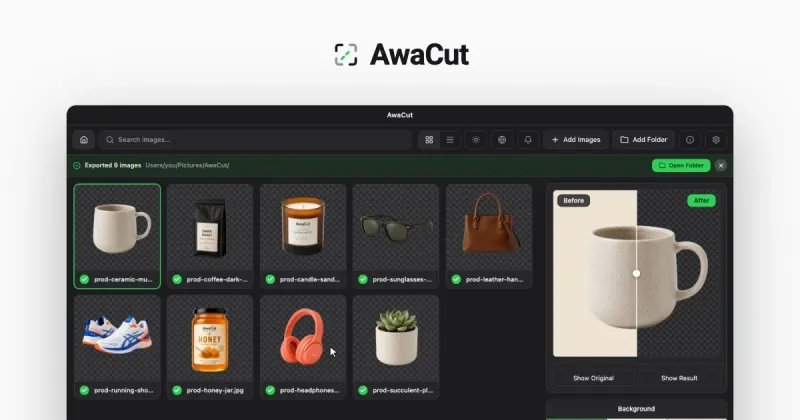
AwaCut is a desktop background-removal app for macOS, Windows and Linux that cuts the subject out of every photo in a folder on the machine itself, exporting transparent PNGs, white-background JPGs or custom-colour cutouts at full resolution.
What is AwaCut?
AwaCut is a desktop batch background remover made by AYA MIM S.R.L. It accepts a single image or an entire folder of JPG, PNG, WebP, BMP and TIFF files (plus iPhone HEIC on a Mac) and writes the cutouts back to a folder you choose, as transparent PNG or WebP, on white, or on any custom colour. It runs on macOS 13.4+ (Apple silicon), Windows 10/11 64-bit and Linux via AppImage; version 1.0.7 installers are 186 MB, 176 MB and 263 MB respectively. The BiRefNet segmentation model ships inside the app, so processing happens offline with nothing uploaded.
What makes AwaCut stand out?
- Folder-level batching — drag in hundreds of photos at once; AwaCut queues them and writes each cutout to disk as soon as it finishes, at about 1.2 seconds per phone photo on a Mac Studio with an M4 Max (roughly 10 minutes for 500 phone photos).
- No uploads and no credits — the AI model is bundled in the installer, so a whole folder can be cut with no internet connection; the only online step is a one-time licence activation, revalidated about once a day.
- Three background modes plus outlines — export Alpha (transparent), White specifically at 255, 255, 255 for Amazon and Walmart product listings, or a Custom colour, with an optional die-cut sticker outline.
- Full resolution, no watermark — every cutout is saved at the original pixel size, including the 10 free trial photos.
- Edge handling on hair and fur — the page shows unretouched portrait, pet and clothing examples produced by the bundled model.
- Companion tools in the same app — a bulk image compressor and duplicate photo finder are free with no limit, and a batch image converter handles JPG, PNG, WebP and JPEG XL output while reading AVIF and JXL.
- Signed installers — the Windows build is code-signed by AYA MIM S.R.L. with a Certum certificate and listed on the Microsoft Store; the Mac build is signed and notarized by Apple.
Who should use AwaCut?
- Marketplace and shop sellers — process a product-photo shoot in one pass and export every shot on pure white, the value Amazon and Walmart require.
- Portrait and headshot photographers — cut a client gallery's worth of portraits with clean hair edges in a single queued run, offline.
- Sticker and print designers — batch cut pets, logos and characters and add the die-cut outline needed for printed stickers.
- Anyone with a large personal photo library — clear backgrounds on phone photos without buying per-image credits or signing up for an account.
What can you do with AwaCut?
- E-commerce catalogues: drop a folder of cosmetics, shoes or clothing shots and get transparent PNGs plus a matching white-background set for listings.
- Sticker production: cut out an animal or logo and export it with a white border so the result prints the way a physical sticker is made.
- Logo cleanup: remove a white backdrop from a logo without punching holes in the white parts of the mark itself.
- Photo library maintenance: use the bundled duplicate finder and compressor on the same folders to shrink files and clear exact copies before publishing.
How does AwaCut work?
- Drag in a photo or a whole folder; hundreds of images queue at once.
- AwaCut segments each subject locally — nothing is uploaded.
- Choose Alpha, White or Custom as the backdrop, optionally add a sticker outline, and pick an output folder; each file saves at full resolution as soon as it is ready.
Pricing
AwaCut is freemium: the download and the first 10 photos are free with no account, full resolution and no watermark. After that it is $29 per year for unlimited photos, covering 2 computers, with no credits or per-image quota. A full refund is available within 14 days for any reason, and cancelling keeps the app working on the version you have.
Alternatives
remove.bg, which the page notes is closing its standalone service on 1 December 2026; Erase.bg, a browser-based pay-per-image tool the page prices at about 85 euros for 500 photos a month over a year; and rembg, a free command-line tool that requires installing Python and working in a terminal.
FAQ
Is AwaCut free?
The download and the first 10 photos are free at full resolution, with no watermark and no account. Beyond that it is $29 a year for unlimited photos. Free alternatives exist — rembg costs nothing — but require installing Python and working in a terminal.
Does AwaCut work offline?
Yes. The BiRefNet model ships inside the app, so no image is uploaded and a whole folder can be processed without a connection. The only network step is licence activation, done once and revalidated roughly once a day.
Which file formats does AwaCut support?
It reads JPG, PNG, WebP, BMP and TIFF on every platform, plus iPhone HEIC on macOS. Cutouts export as PNG or WebP with real transparency, or as JPG on a solid background, always at the original resolution.
Does AwaCut run on a phone?
No. AwaCut is a desktop application for macOS 13.4+ on Apple silicon, Windows 10 or 11 64-bit, and Linux x86-64 via AppImage. There is no iOS or Android version, so photos have to be processed on a computer.
Is the Windows installer safe to run?
The Windows build is signed by AYA MIM S.R.L. with a Certum code-signing certificate and is also published on the Microsoft Store, which checks each version before release. If SmartScreen appears, click More info to confirm the publisher name, then Run anyway.


