Ai video editing from aivideoediting.io is a web-based tool that lets you upload a short source clip, describe the edit in natural language, and generate a new edited video automatically. It is designed for short-form content teams, creators, and marketers who need faster iterations.
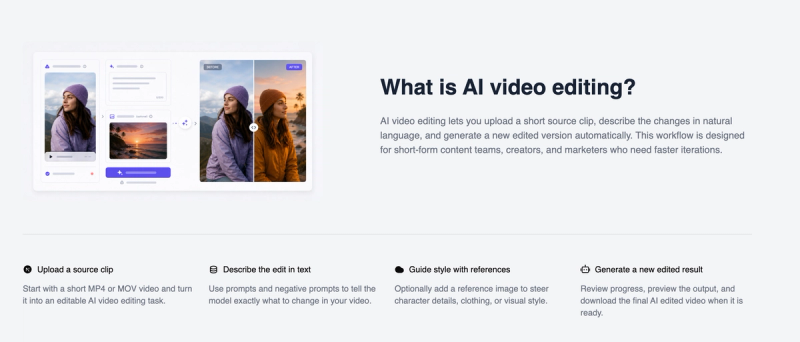
What is ai video editing?
Ai video editing is a prompt-driven AI tool that takes a short source video (MP4, MOV, or WEBM, 2–10 seconds, under 100 MB) and an editing prompt, then produces a new edited video. It runs entirely in the browser on aivideoediting.io, with optional reference images to guide visual style. The platform uses a credit-based system for task execution.
Key features
- Prompt-based editing — Describe changes in natural language (up to 2000 characters) using prompts and negative prompts to control the output.
- Reference image support — Optionally attach an image to steer character details, clothing, or visual style.
- Short-form optimized — Designed for clips 2–10 seconds, with supported formats MP4, MOV, and WEBM, and file size limit of 100 MB.
- Resolution and aspect ratio settings — Choose resolution (720p available) and aspect ratio (16:9 available) before generating.
- Credit-based usage — Each edit costs 400 credits; credits are purchased via the pricing page. Remaining credits are displayed before running a task.
- Task tracking — Monitor task status (pending to completed) and reopen outputs from the history page.
- Download-ready output — Preview the generated result in the browser and download the final AI edited video when ready.
Who is it for?
- Short-form content teams — Iterate quickly on social media clips without timeline editing.
- Creators — Generate new versions of short videos by describing desired changes in text.
- Marketers — Produce multiple video variations for A/B testing or different platforms using prompt-based edits.
What can you do with ai video editing?
- Edit visual elements in short clips — Change backgrounds, remove objects, or modify scene details by writing a prompt.
- Maintain brand style — Use reference images to ensure consistent character appearance or color palette across edits.
- Experiment with different edits — Quickly test multiple prompts on the same source video to find the best result.
How does it work?
- Upload a source video (MP4, MOV, or WEBM, 2–10 seconds).
- Write an editing prompt describing the desired changes (0–2000 characters).
- Optionally adjust resolution (720p) and aspect ratio (16:9) in advanced settings.
- Click "Generate edit" — the system deducts 400 credits and processes the task.
- Preview the output in the browser and download the result when completed.
FAQ
What video formats and length are supported?
Supported formats are MP4, MOV, and WEBM, with a duration of 2–10 seconds and a maximum file size of 100 MB.
How are credits charged?
Each edit costs 400 credits. You can purchase credits from the pricing page. Your remaining credit balance is displayed on the editor; if it reaches 0, you cannot generate edits until you buy more.
Can I preview and download the result?
Yes, after the task completes, a preview of the edited video appears in the output area. You can then download the final video directly from the browser.
Is a reference image required?
No, the reference image is optional. You can use it to guide visual style, but it is not necessary for basic edits.