What is Spritix?
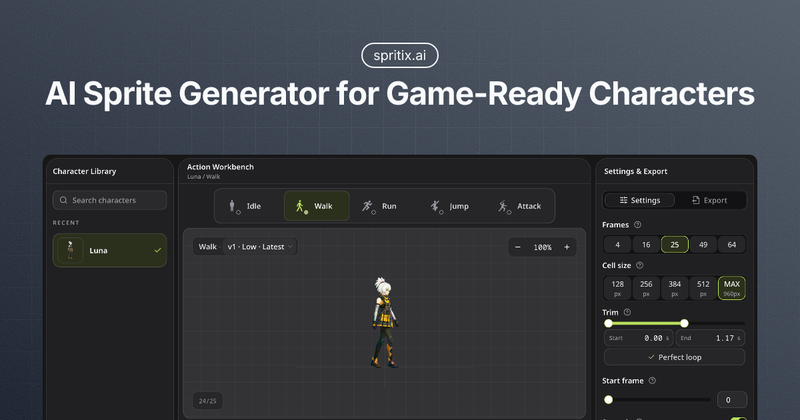
Spritix is a web-based AI sprite generator for 2D game development. You upload one prepared full-body character image (PNG, JPG, or WebP under 10 MB), and the tool generates four deliverables for each of five actions: a sprite sheet PNG, an animated GIF, an Atlas JSON with frame coordinates, and a ZIP of individual PNG frames. Everything runs in the browser, and the output files use standard formats that work with Unity, Godot, GameMaker, Phaser, Cocos Creator, Aseprite, PixiJS, and Tiled, with no proprietary runtime required.
Key Features
- Five actions per character — Generates Idle, Walk, Run, Jump, and Attack separately from the same prepared reference, preserving character identity across actions.
- Four export formats — Each approved action downloads as a sprite sheet PNG, animated GIF, Atlas JSON, and a ZIP of PNG frames, all standard formats.
- Loop repair tools — Trim rough frames with two end handles, run Perfect Loop to find the cleanest seam, rotate the start frame, toggle scaling smoothness, and set playback speed from 0.5x to 2x.
- Immutable version history — Every saved attempt becomes v1 to vN; you can switch back to any older version for free without losing newer results.
- Credit-free post-processing — Loop edits, version review, rebuilds, and downloads do not spend generation credits; credits cover only character preparation and new actions.
- Transparent costs — The exact credit price is shown before you submit, and failed generations are refunded automatically.
- Engine-ready outputs — Atlas JSON uses plain frame coordinates and timing, so code-driven playback in any engine is straightforward.
Who is it for?
- Solo developers — Generate a complete animation set for a jam or small project without hiring an animator; one character image is enough to start.
- Game jam teams — Quickly produce a looping walk cycle in under an hour by uploading a character and trimming a few rough end frames.
- 2D programmers — Import the Atlas JSON directly into custom loaders or engines like PixiJS, since the coordinates are standard and readable.
- Technical artists — Preview timing in the GIF before wiring anything into the engine, and use the individual PNG frames for touch-ups in Aseprite or other pixel editors.
How does it work?
Follow four visible steps in the Spritix Studio:
- Upload one character image (PNG, JPG, or WebP, up to 10 MB).
- Prepare the reference to anchor the character's look.
- Generate an action from Idle, Walk, Run, Jump, or Attack.
- Refine and export — apply loop edits, then download all four file types.
Pricing
Spritix is freemium. The free plan gives you 20 credits per month, standard exports, 3 Perfect Loop runs per month, and 3 downloads per month. Paid tiers start at $12/month (Starter), $29/month (Pro), and $69/month (Max), adding advanced exports, unlimited Perfect Loop runs, automatic Perfect Loop, unlimited downloads, and longer credit validity (60 days vs 30 days). Yearly billing saves 20%. Payments are handled securely by Stripe, and 1% of every payment goes to Stripe Climate.
FAQ
Which actions are available?
Spritix currently supports five actions: Idle, Walk, Run, Jump, and Attack. Each action is generated separately from the same prepared character reference, and you can generate them one at a time and export each result individually.
Do rough loops cost credits to fix?
No. Loop edits, including trimming rough frames, running Perfect Loop, and adjusting speed, are credit-free and run in your browser. Only character preparation and generating new actions consume credits.
Which files do I receive?
Each approved action exports four files: a sprite sheet PNG, an animated GIF, an Atlas JSON with frame coordinates and timing, and a ZIP containing every individual PNG frame. All are standard formats that work in common game engines.