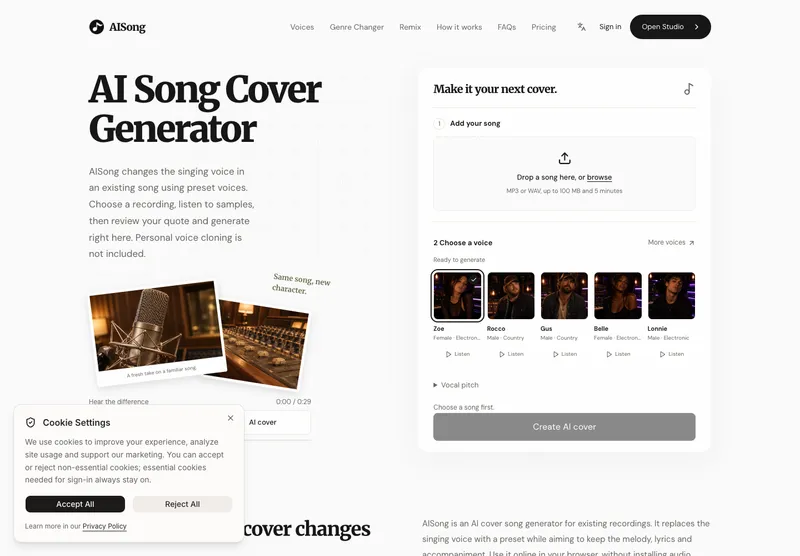
AISong is an online AI song cover generator that helps people explore a different singing voice for an existing recording. Available at aisongcover.net, it brings song upload, preset voice selection, pitch adjustment, credit review, generation, and result downloads into a browser-based workflow. The starting point is a recording the user already has permission to process. AISong changes the vocal character while aiming to retain the melody, lyrics, and accompaniment that give the original recording its identity. For songwriters, music creators, and people experimenting with their own performances, it provides a practical way to compare vocal directions using the same musical reference.
An existing song is central to the experience. Users bring the performance, words, and backing track, then choose a preset singing voice for the conversion. This makes AISong useful when the question is how a familiar recording might feel with a warmer, brighter, lighter, or heavier vocal tone. The service does not include personal voice cloning. Uploading a performance supplies the audio for that conversion; it should not be understood as training a custom voice model from the user's recording. The preset library and its available samples help users understand the choices before spending credits on a generated cover.
Getting started follows a clear sequence. A user chooses an MP3 or WAV recording, signs in to upload it privately, and lets the service check its duration. Supported source recordings run from one second to five minutes, with an input size limit of 100 MB. Those limits accommodate both short musical excerpts and complete songs within the supported duration. A creator can begin with a demanding passage to assess a voice choice, then use a longer recording when ready. The browser interface brings the relevant steps together without requiring users to install audio production software for the cover workflow.
Voice selection begins with listening. AISong presents preset singing voices with samples that users can audition before generating a result. A useful comparison considers the weight, brightness, breathiness, and range suggested by a sample, along with how those qualities might suit the source performance. Preset samples demonstrate the available voice; they are not a generated preview of the user's uploaded song. This distinction helps set a clear expectation about what can be heard before a conversion. Users can explore the available options and make a considered choice, while understanding that every new conversion of their recording uses credits. For a first comparison, keep the original pitch and listen to a short excerpt before testing another setting.
Before generation, AISong shows a credit quote so users can review the cost of the selected recording. Voice covers use 10 credits per started minute. A recording lasting exactly one minute costs 10 credits, while a recording lasting one minute and one second costs 20 credits. This rounding rule matters when planning a series of experiments or deciding which excerpt to test first. Users should review the quote before proceeding, particularly when changing the source length. Each additional conversion, including an experiment with another voice or pitch setting, is a separate use of credits.
AISong offers monthly subscriptions and one-time credit packs, with both options starting at USD 9.90. The monthly plans shown on the pricing page include Starter, Creator, and Volume, giving users different credit allowances according to how often they expect to generate covers. Monthly subscription credits expire at the end of their billing period, and subscriptions renew monthly with cancellation available. Current plan details and applicable checkout taxes should be reviewed on the pricing page and at checkout. The product should be described as a paid generation service: users can audition preset samples, but there is no free generated preview of their own song.
After generation, users can listen to the completed cover and compare it with the source recording. The aim is to explore a new vocal interpretation while maintaining the song's existing musical reference. Results should be judged across the performance, including quiet phrases, higher notes, sustained vowels, and busy sections of the arrangement. A short opening phrase may not reveal the same issues as a demanding chorus. Comparing the original and generated result at a similar listening volume helps users focus on the voice, pronunciation, and backing track instead of being distracted by a difference in playback loudness.
The source recording has a meaningful influence on what users can assess. A clear lead vocal with limited distortion is easier to evaluate than a crowded live mix with overlapping singers and heavy reverberation. When listening to a result, users can check for missing syllables, blurred consonants, unstable held notes, metallic sounds, or remnants of the original singer. They can also listen for changes to instruments and harmonies. These are practical listening considerations, not promises of automatic audio repair. Voice conversion cannot restore words that were absent from the source, and a generated cover still deserves careful review before sharing.
For creators planning an authorized cover, the same workflow can help narrow down choices before committing to another recording session. A short excerpt containing both a quieter line and a high chorus offers a useful comparison point. Using the same excerpt across a small number of voice choices makes differences easier to hear. Music fans working with their own recordings can also explore how another preset changes the character of a familiar performance. In each case, the value comes from listening to a concrete musical example and deciding whether that direction serves the song, rather than relying only on a preset name or label.
Studio brings uploads and generation history together so users can return to their recent work. Completed results can be replayed and downloaded without paying for another generation of that same result. Downloads retain the native WAV or MP3 format returned by processing; the service does not promise that every result can be exported in any format the user chooses. This gives users a clear distinction between generating a new cover and accessing a cover that already exists. If a generation fails, reserved credits are restored with their original expiry, as described in the product's published credit policy.
File availability also has a defined window. Source recordings expire seven days after upload, and completed results have their own seven-day availability period starting from completion. Users can delete files earlier or download a result before its expiry. Anyone using a cover as a creative reference should save the result they want to keep within that period. Private uploads and recent generation history support the working process, while the published storage window makes it clear that users should keep their own copies for longer-term use. The privacy policy provides further information about file handling and the service's data practices.
Permission to process the source recording remains part of using AISong responsibly. Users should upload material they own or have authorization to use and review any rights relevant to sharing or publishing a generated cover. Generating a new vocal interpretation does not itself establish permission to distribute the composition, recording, or result. For directory visitors looking for an accessible AI music tool, AISong offers a focused workflow: bring an authorized recording, audition preset singing voices, adjust pitch when helpful, confirm the credit quote, and compare the finished cover with the source. Further product information, current pricing, and access to Studio are available at aisongcover.net.