
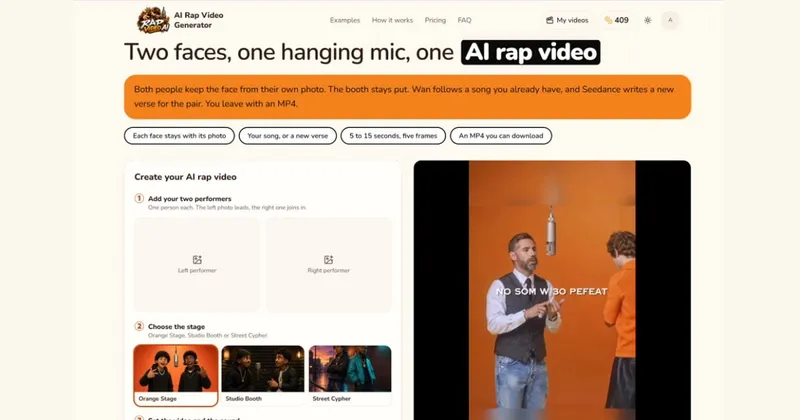
AI Rap Video Generator is a browser-based tool that turns two uploaded photos into a short side-by-side rap duet video, returning a downloadable MP4 with AI-animated lips, head nods and hand gestures.
What is AI Rap Video Generator?
AI Rap Video Generator takes one photo for a left performer and one for a right performer, keeps each person's face, hair and outfit, and places both on a chosen stage: Orange Stage, Studio Booth or Street Cypher. The web app animates mouth movement and gestures timed to a chosen sound, then outputs a 5, 8, 10, 12 or 15 second MP4. It runs on Wan 3.0 for reference-track videos and Seedance 2.0, 2.0 Mini, 2.0 Fast or 2.5 for original AI rap, with no filming or timeline editing required.
What makes AI Rap Video Generator stand out?
- Two-performer duet frame — Most talking-photo tools animate one face; this generator puts both performers in one shared frame so friends, couples and families appear together in a single clip.
- Two sound modes — Reference rap track mode uses Wan 3.0 to follow a motion clip, with your uploaded song or voice note or the built-in Hotel Lobby track; Original AI rap uses Seedance 2.0 to write and voice a short rap about your topic in English, Spanish, Portuguese, French or Chinese.
- Three fixed stages — Orange Stage, Studio Booth and Street Cypher each provide a hanging microphone and a distinct backdrop, and the orange stage keeps both faces large for phone viewing.
- Model and resolution choices — Wan 3.0 and Seedance 2.0 Mini, 2.0 Fast, 2.0 and 2.5 are available; Mini and Fast stop at 720p, while Wan 3.0, Seedance 2.0 and Seedance 2.5 also reach 1080p.
- Length and aspect-ratio controls — Every model runs 5, 8, 10, 12 or 15 seconds and exports in 16:9, 9:16, 1:1, 3:4 or 4:3 for TikTok, Instagram Reels, YouTube Shorts or group chats.
- Photo input rules — Each photo can be JPG, PNG or WebP up to 10 MB, must show one person or pet facing the camera, and should be at least 720 pixels on the short side; chest-up framing works best.
- Transparent credits — The exact credit cost appears before generation, and if the AI provider fails a job, reserved credits return to your balance automatically.
- Private storage and clean MP4 downloads — Uploads and results sit in private storage opened through short-lived signed links, with no public gallery, and finished videos download as MP4 files without a watermark.
Who should use AI Rap Video Generator?
- Friends and group chats: Load two friend photos, choose Orange Stage, and create a 5–15 second best-friend duet trading bars about an inside joke, road trip or group chat.
- Couples: Make a 12-second anniversary rap where both partners trade lines and send the MP4 instead of a card.
- Families: Put a birthday person next to their best friend for a shout-out, or create a grandma-and-grandpa rap with a reference track for the family chat.
- Pet owners: Use the Studio Booth preset with two clear, front-facing pet photos for a pet rap duo; animal results vary more than human ones, so shorter clips are safer.
What can you do with AI Rap Video Generator?
- Best-friend duet: Two friends upload one photo each, pick Orange Stage, use the built-in Hotel Lobby track or upload a song, and receive a phone-friendly rap clip.
- Couple anniversary rap: A couple uses two photos and a 12-second length to generate a playful duet with both partners lip-syncing and gesturing.
- Birthday shout-out: A user places the birthday person beside a friend and uses Original AI rap so Seedance 2.0 writes and voices a short rap that includes the birthday message.
- Pet rap duo: A pet owner uploads two pet photos, selects Studio Booth, and generates a short clip; clear front-facing pet photos improve the result.
How does AI Rap Video Generator work?
- Upload two photos: one left performer and one right performer, each JPG, PNG or WebP up to 10 MB, with one person or pet per photo.
- Pick a stage and a sound: Orange Stage, Studio Booth or Street Cypher, then choose a reference rap track with your own song or the built-in track, or an original AI rap topic.
- Set the model, moves, track, length and aspect ratio; the credit price updates as settings change.
- Generate the video, let the page check progress automatically, then download the finished MP4; provider-side failures return the reserved credits.
Pricing
AI Rap Video Generator uses paid, one-time credit packs, and credits never expire. Tiers are Single with 10 credits, Duo Pack with 50 credits, Party Pack with 200 credits, Crew Pack with 350 credits and Studio Pack with 800 credits. A 12-second 480p video with the built-in motion clip uses 11 credits; uploading your own clip costs more because it is billed as 15 reference seconds. The generator shows the exact credit total before you start.
FAQ
Is AI Rap Video Generator free?
No. Every video runs on paid AI models, so generation consumes credits from a one-time pack; there is no free tier shown on the page. The exact cost appears before you generate, and failed provider jobs are refunded automatically.
How many photos can I upload and in what formats?
You upload two photos: one for the left performer and one for the right. JPG, PNG and WebP files up to 10 MB each are supported, with one person or pet per photo facing the camera and at least 720 pixels on the short side.
What are the length, resolution and aspect-ratio limits?
Every model supports 5, 8, 10, 12 or 15 seconds and nothing longer. Mini and Fast stop at 720p; Wan 3.0, Seedance 2.0 and Seedance 2.5 reach 1080p. Export shapes are 16:9, 9:16, 1:1, 3:4 and 4:3.
What are the known limitations?
Very fast lyrics will not match every syllable, hands and fingers can blur during big gestures, and 15-second clips cost more and can drift further from the source photos. Original AI rap may change words or voice, and pet results vary more than human results.
Can I use my own song or get an original rap?
Yes. Reference rap track mode uses Wan 3.0 to follow a motion clip, with your uploaded song or voice note or the built-in Hotel Lobby track. Original AI rap uses Seedance 2.0 to write and voice a new rap in English, Spanish, Portuguese, French or Chinese.


