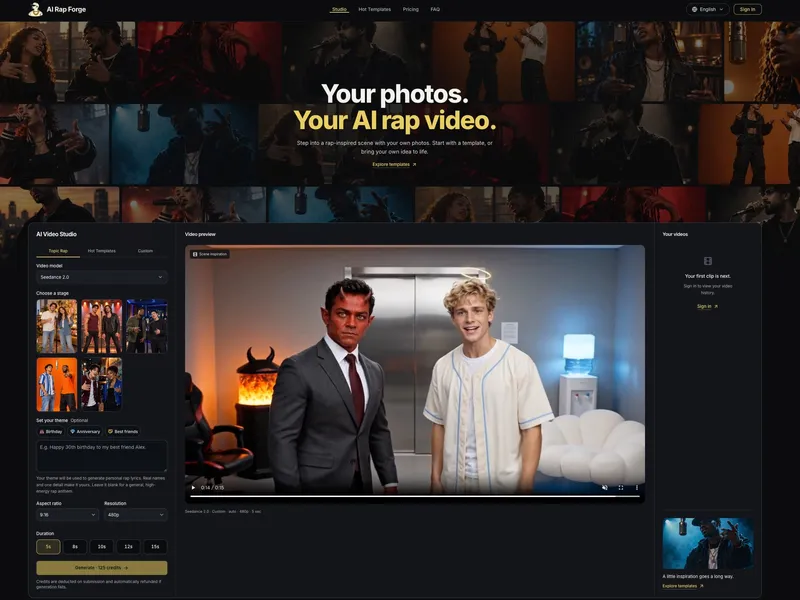
AI Rap Forge is a browser-based AI video studio that turns uploaded photos, reference videos and text prompts into short rap-themed music videos. You pick a stage or template, upload one photo per performer, optionally add a theme such as a birthday message, and the studio generates the lyrics, movement and a rendered clip. Output is a short video sized for vertical 9:16 feeds, with 16:9 landscape and square formats also offered, at resolutions from 480p up to 4k depending on the model chosen. The company behind the site is not named on the page.
What is AI Rap Forge?
AI Rap Forge is a browser-based studio that generates short rap performance videos from your own photos. Inputs are one photo per performer, an optional written theme (birthday, anniversary, best friends, or a custom line), reference videos, and video settings such as aspect ratio, resolution and duration; the output is a rendered clip of 5 to 15 seconds, extendable to 30 seconds with Seedance 2.5. Three entry modes split the workflow: Topic Rap writes lyrics around your theme, Hot Templates recreates a known scene with your cast, and Custom exposes the prompt, references and settings directly. Everything runs in the browser, and finished videos are stored in a personal video history after sign-in.
What makes AI Rap Forge stand out?
- Three creation modes — Topic Rap turns a one-line theme into personalized rap lyrics, Hot Templates swaps your photos into an existing scene such as Hotel Lobby or Migos, and Custom accepts your own prompt with reference images and video.
- Multiple video models in one studio — Seedance 2.0, Seedance 2.0 Mini, Seedance 2.0 Fast, Seedance 2.5 and MiniMax H3, each with its own credit rate per billable second.
- Cost shown before submission — the studio displays the credit cost up front, calculated as rate times output seconds plus reference video seconds, plus extra image credits.
- Failed generations are refunded — credits are deducted on submission and automatically returned if generation fails or is canceled.
- One-time credit packs, no subscription — purchased credits have no expiry date, and promotional credits carry a separate expiry shown in the account.
- Duration and framing control — 5, 8, 10, 12 or 15 second outputs (up to 30 seconds with Seedance 2.5), portrait 9:16, landscape 16:9, square and other available ratios.
- Photo privacy — uploaded photos are not published in a public gallery or sold; files are processed only by the providers needed to render the video.
- Ready-made scene starters — Hotel Lobby AI (two photos), Migos AI, an AI rap battle generator that pairs two faces, and an AI music video generator.
Who should use AI Rap Forge?
- Short-form video creators: recreate a trending scene such as Hotel Lobby with their own photos and post a 9:16 clip to TikTok or Reels.
- Independent musicians: build short visuals for a track, artist teaser or release announcement by describing mood, setting and movement in Custom mode and pairing the clip with music they hold rights to.
- Friends and family: put together a playful birthday or shared-memory clip by entering a name and one detail so the generated lyrics are personal.
- Duo and battle formats: anyone wanting a two-person scene, since the rap battle generator and several templates accept two faces at a shared mic.
What can you do with AI Rap Forge?
- Ride a trend: start from the Hotel Lobby template, upload the requested number of photos, choose settings and generate a version of the scene with your own cast.
- Make a personalized greeting: enter a birthday message or a shared memory as the theme and get a rap anthem that references the real names and detail you supplied.
- Produce release visuals: use Custom mode to describe the setting and camera movement, render a short vertical clip, and edit it against your own track.
- Stage a two-person battle: feed two faces into the AI rap battle generator to produce a back-and-forth performance clip.
How does AI Rap Forge works?
The Topic Rap path runs in four steps: pick an available stage for the performance, upload one photo per performer to match it, write a theme line or leave it blank for a general high-energy anthem, then generate and preview the result in your video history. Before submitting you choose the video model, aspect ratio, resolution and duration, and the studio shows the credit cost; generation time varies with model, resolution, provider load and queue, so no fixed completion time is published.
Pricing
Credit packs are one-time purchases with no auto-renewal: Starter Pack at 9 dollars for 500 credits (about 10 videos), Creator Pack at 29 dollars for 1,800 credits (about 36 videos), Pro Pack at 79 dollars for 5,200 credits (about 104 videos), and Studio Pack at 199 dollars for 14,000 credits (about 280 videos). Video counts are estimated with MiniMax H3 at 768P for 5 seconds with up to 5 images at 50 credits per video. Rates per billable second range from 10 credits (MiniMax H3 768P, Seedance 2.0 Mini 480p) up to 258 credits (Seedance 2.0 at 4k without a reference video). All packs include HD video without a watermark, downloads, non-expiring credits and no charge for failed generations.
FAQ
Does AI Rap Forge require a subscription?
No. Current plans are one-time credit packs with no recurring payment, and purchased credits carry no expiry date. Promotional credits may expire on a separate schedule shown in the account, and payment refunds are handled case by case through a support ticket from Settings.
What photos work best in AI Rap Forge?
Sharp, well-lit photos with clearly visible faces and subjects work best; heavy filters, motion blur and obstructions reduce quality. For templates, upload exactly the number of images requested, and note that the uploader shows the file size, format and dimension limits for the selected model.
How long are the generated videos?
Output length can be set to 5, 8, 10, 12 or 15 seconds, or up to 30 seconds with Seedance 2.5. Generation time itself is not fixed and depends on model, resolution, provider load and queue position, with progress visible in the video history.
What happens if a generation fails?
Credits are deducted on submission and automatically returned if generation fails or is canceled. If status or video storage is still pending, use Refresh in the video history to check again — a failed playback alone does not mean the generation failed.
Can the videos be posted on TikTok or Instagram?
Yes, completed videos can be downloaded and uploaded to any account; choose 9:16 for a vertical post or Reel. You remain responsible for having permission to use the people, reference material and music involved, and for following each platform's AI-labeling rules.