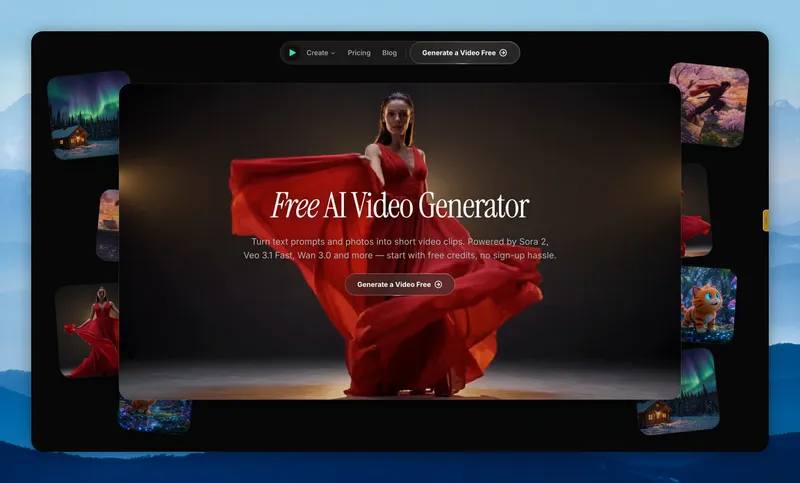
FreeVideoGenerator is a browser-based AI video generator that turns written prompts or uploaded photos into short video clips, running models from OpenAI, Google, Alibaba, ByteDance and MiniMax behind a single interface.
What is FreeVideoGenerator?
FreeVideoGenerator is a web app that converts text prompts or still images into short video clips and exports them as watermark-free MP4 files. Its inputs are a text description (up to 2000 characters) or one or more uploaded photos, and its outputs are clips of roughly 4 to 12 seconds depending on the model chosen. The site runs in a browser on desktop and mobile, requires no software install, and is operated as a multi-model front end rather than a single in-house model. New accounts receive free starter credits, and browsing every tool, gallery and sample clip is possible without signing in.
What makes FreeVideoGenerator stand out?
- Several frontier models in one place — Sora 2, Veo 3.1 Fast, Wan 3.0 and Wan 2.2, Seedance 1.0 Pro Fast, Seedance 2.0 Fast, Hailuo 02 and MiniMax H3 Max Turbo are selectable from one dropdown instead of separate subscriptions.
- Model-specific clip specs — Sora 2 renders 4 to 12 second clips at 720p in landscape or portrait with synced sound; Veo 3 outputs 4 or 8 second clips; Wan 2.2 adds first-and-last-frame control up to 1080p; Seedance, Hailuo and MiniMax presets output 5, 6 or 10 second clips.
- Text to Video and Image to Video modes — describe a scene in words, or upload photos and add an optional motion prompt for first-frame control.
- Animation Maker — produces 2D, anime and 3D-style animated clips from text or images.
- No watermark on downloads — finished clips save as clean MP4 files.
- Trend recipes — dedicated Burning Bridges party-walk and 10-second zombie love-story generators built on the same engine.
- Visible cost estimate — the generator shows duration, resolution and aspect ratio controls (for example 16:9, 5 seconds, 480p) alongside a credit figure before rendering.
Who should use FreeVideoGenerator?
- Social creators: produce vertical or landscape 5 to 10 second shorts for short-form feeds without a timeline editor.
- Product marketers: animate a single product photo into a slow camera-motion promo clip.
- Anime and fan artists: use the Animation Maker for 2D, anime or 3D-style sequences from a prompt or a character image.
- Model comparison testers: burn free starter credits comparing Sora 2, Veo 3.1 Fast and Wan 3.0 output styles before committing to a paid top-up.
What can you do with FreeVideoGenerator?
- Photo animators: upload one or more images, add a one-line motion prompt, and get a short clip with natural camera movement.
- Trend participants: generate a Burning Bridges party-walk clip or a 10-second zombie love-story video from an original photo.
- Prompt writers: turn a 2000-character scene description into a cinematic clip in landscape or portrait orientation, choosing the model by style and budget.
How does it work?
- Pick a mode — Text to Video, Image to Video or Animation Maker.
- Type a prompt or upload photos, then choose model, aspect ratio, duration and resolution.
- Review the credit estimate, render the clip, and download the MP4.
Pricing
FreeVideoGenerator uses a freemium model. Every new account receives free starter credits that cover two starter video clips; prompt editing, previews and downloads stay free. Longer clips or premium models consume site credits, which can be topped up or obtained through a subscription, and there is no forced subscription or credit card requirement at sign-up.
Alternatives
Runway, Pika, Kling AI.
FAQ
Is FreeVideoGenerator really free?
New accounts get free starter credits covering two starter video clips, and prompt editing, previews and downloads cost nothing. Larger clips or premium models such as Sora 2 consume site credits that you top up or receive with a subscription.
Do I need an account to generate videos?
You can browse every tool, gallery and sample clip without an account. Rendering requires the free starter credits that come with a free account, which takes seconds to create and never asks for a credit card.
Do downloads have a watermark?
No. Completed clips download as clean MP4 files with no watermark, and downloading is not a paid feature.
Which AI video model should I choose?
Wan 3.0 is the balanced default for both text and image modes. Sora 2 gives the most cinematic text-to-video results, Veo 3.1 Fast follows prompts closely, and Seedance and Hailuo presets are the cheapest way to test ideas. Each model page lists exact clip specs.
Can I turn a photo into a video?
Yes. Upload one or more photos in the Image to Video tool, optionally add a motion prompt, and the AI animates them into a short clip; Wan 2.2 additionally supports first-and-last-frame control up to 1080p.