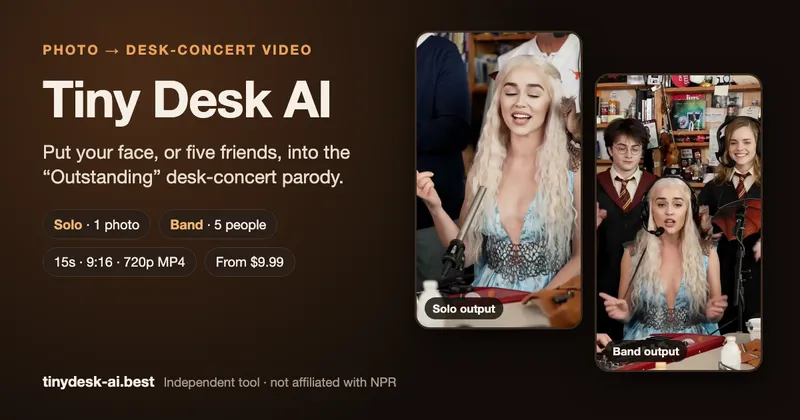
Tiny Desk AI Generator is a browser-based AI video tool that turns one portrait or up to five photos into a 15-second vertical desk-concert parody MP4 performed to Charlie Wilson's live 2023 NPR Tiny Desk rendition of "Outstanding".
What is the Tiny Desk AI Generator?
Tiny Desk AI Generator is a single-purpose web app that places uploaded faces into a recreated Tiny Desk concert scene. It takes JPG, PNG or WebP photos (up to 10 MB each, at least 320 px) and returns a watermark-free 15.0-second, 9:16 vertical 720×1280 MP4 at 24 fps with the original live concert audio already lip-synced. It runs in a browser, checks out through Stripe, and is published by an independent team that states it is not affiliated with NPR, Charlie Wilson or The Gap Band; the page credits Andy Swift as writer and maintainer.
What makes the Tiny Desk AI Generator stand out?
- Solo and Band modes — Solo casts one person at the center mic; Band fills all five seats (lead singer, keyboardist, saxophonist, two backing vocalists) from either one group photo with five visible faces or five separate photos uploaded in role order.
- Fixed output spec — every render is 15 seconds, 9:16 vertical, 720×1280, 24 fps, watermark-free, with sound, so nothing needs re-editing before posting to TikTok, Reels or Shorts.
- Pre-synced live audio — the real Charlie Wilson "Outstanding" concert audio is embedded by default; there is no soundtrack to find or upload.
- No prompts — the workflow is mode, photo, download; the page reports most renders finish in 2 to 4 minutes.
- Flat credit cost — Solo and Band both cost one credit, so adding four bandmates carries no price markup.
- Automatic failure refunds — a server glitch or face-alignment error returns the credit to the account balance without a support ticket.
- 24-hour photo purge — uploads are encrypted in transit, used only for the render, deleted within 24 hours, and never used for model training.
- Free photo pre-checks — photo quality and face-landmark audits cost nothing; only the render itself consumes a credit.
Who should use the Tiny Desk AI Generator?
- Solo short-form creators: drop one front-facing selfie into Solo mode for a ready-to-post 9:16 clip for TikTok, Reels or Shorts.
- Friend groups and group chats: upload one five-person group photo in Band mode so everyone appears on stage in a single take.
- Office teams and farewell organisers: supply five coworker photos, one per role, for a send-off or birthday clip made with each person's permission.
- Sports and meme accounts: recast coaches or players in the parody format using photos they have the rights to use, labelled as AI-generated.
What can you do with the Tiny Desk AI Generator?
- Birthday shout-outs: seat the birthday person at the lead mic in Solo mode and deliver a 15-second musical greeting with sound.
- Office farewells: cast a departing colleague plus four teammates in Band mode, ordered by role, for a group send-off video.
- Fan parody posts: recreate the desk-concert staging with your own face as a clearly labelled AI parody rather than presenting it as real footage.
How does the Tiny Desk AI Generator work?
- Pick Solo or Band mode.
- Upload one front-facing photo, or one group photo / five role-ordered photos; keep faces large and evenly lit, with no sunglasses or masks.
- Use one credit and download the finished 15-second MP4 from My Videos.
Pricing
One-time credit packs, no subscription: $9.99 for one video, $19.90 for three ($6.63 each) and $29.90 for five ($5.98 each). Credits do not expire, failed renders are refunded automatically, and the page states a 7-day refund policy for unused credits.
Alternatives
The same page benchmarks two generic alternatives: CapCut, which requires importing the source clip and masking faces manually, and Dreamina, which works from text prompts and spends credits on each attempt.