I noticed that many people online were looking for a simple and effective way to compare text. Most existing tools either felt outdated or overloaded with features, and I personally always preferred the comparison experience in IntelliJ IDEA — it’s intuitive, clean, and easy to read at a glance. That inspired me to build a web-based text comparison tool that focuses on clarity and usability. I wanted something lightweight that people could open instantly in the browser without installing heavy software.
The first version is intentionally simple and focused on plain text comparison. While building it, I realized there’s potential to expand far beyond that. My roadmap now includes support for comparing PDFs, Word documents, and other file formats, as well as advanced features like folder/directory comparison and even a desktop version for offline personal use.
Throughout the process, my approach evolved from "just building a diff tool" into creating a modern comparison workspace that balances simplicity with powerful functionality.
TextCompare.me is a powerful, free online text compare tool designed to identify differences between two blocks of text instantly. Whether you are a developer reviewing code changes, a writer checking document revisions, or anyone who needs to compare text files side by side — our tool delivers precise, visual results instantly.
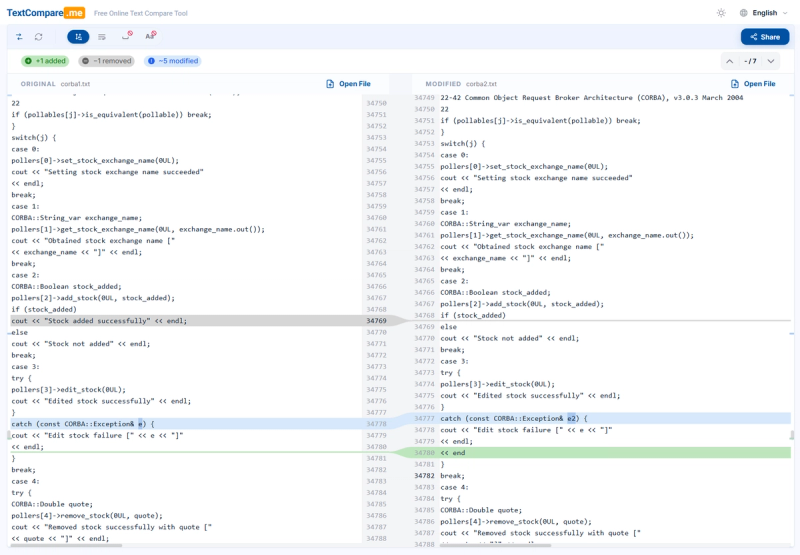
The text compare engine analyzes your content line by line and word by word, highlighting additions, deletions, and modifications with clear color coding. TextCompare.me reveals word-level differences within changed lines, so you can pinpoint exactly what was modified. The intuitive side-by-side layout with curve connectors makes it effortless to text compare even large, complex documents.
Built for speed and simplicity, the comparison starts automatically when you paste your text — no buttons to click, no accounts to create. In our tests, even a 2.3 MB file with 45,000 lines opens and compares instantly. Advanced options let you ignore whitespace or letter case during text compare. You can also share your text compare results with colleagues via a unique link. Try this powerful free online comparison tool today.TextCompare.me is a powerful, free online text compare tool designed to identify differences between two blocks of text instantly. Whether you are a developer reviewing code changes, a writer checking document revisions, or anyone who needs to compare text files side by side — our tool delivers precise, visual results instantly.
The text compare engine analyzes your content line by line and word by word, highlighting additions, deletions, and modifications with clear color coding. TextCompare.me reveals word-level differences within changed lines, so you can pinpoint exactly what was modified. The intuitive side-by-side layout with curve connectors makes it effortless to text compare even large, complex documents.
Built for speed and simplicity, the comparison starts automatically when you paste your text — no buttons to click, no accounts to create. In our tests, even a 2.3 MB file with 45,000 lines opens and compares instantly. Advanced options let you ignore whitespace or letter case during text compare. You can also share your text compare results with colleagues via a unique link. Try this powerful free online comparison tool today.