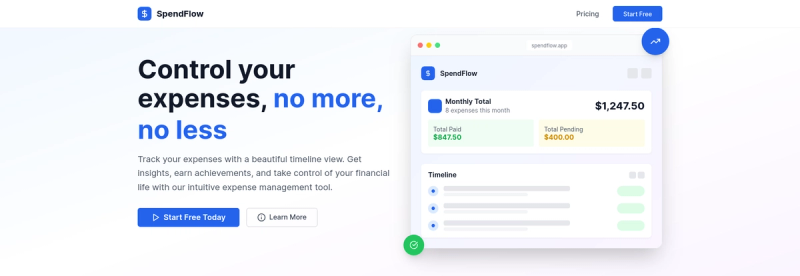
Spendflow is a minimalist web app for tracking personal expenses in a chronological timeline view, designed for simplicity and ease of use.
What is Spendflow?
Spendflow is a web-based expense tracker that lets you input your spending as a timeline of transactions. It takes manual entries of expenses (amount, category, date, recurring flag) and produces a chronological view of your month, plus a budget overview showing how much you have left. It runs entirely in the browser across devices with data syncing and backup. The app is built by a solo developer (Rodrigo R.) as a side project to solve his own frustration with complex finance apps.
Key Features
- Timeline view — Expenses are displayed chronologically like a story of your month, showing past, upcoming, and recurring transactions.
- Multi-currency support — Use any currency without conversion or hiding fees; each entry keeps its original currency.
- Recurring bills — Set up bills to repeat automatically once configured; no need to re-enter each month.
- Budget tracking — Set a monthly budget (e.g., €2,000) and see remaining balance (e.g., €753 left) updated in real time.
- Cross-device sync — Data is synced across browsers and devices and backed up automatically.
- No ads or upsells — The app has no advertisements, no "premium" upsells, and no data selling.
- Simple input — Just type in what you spent; no categories or complex forms required.
Who is it for?
- Individuals tired of overcomplicated finance apps — People who want to know where their money goes each month without dashboards, investments, or tax reporting.
- Freelancers and gig workers — Those tracking multiple income sources and expenses across different currencies without needing business accounting.
- Budget-conscious users — Anyone who wants a clear, visual overview of their monthly spending and remaining budget without financial jargon.
What can you do with Spendflow?
- Track daily expenses: Log a coffee purchase of €4.50 with date and category, then see it appear in your timeline instantly.
- Manage recurring bills: Set up Netflix at €15.99/month once; it automatically shows each month as a recurring entry.
- Monitor budget: Set a monthly budget of €2,000 and check at any time how much you have left (e.g., €753 remaining) as you add expenses.
How does Spendflow work?
- Add your expenses: Type in each expense with amount, category (optional), and date; for recurring bills, set them once.
- View your timeline: Expenses appear chronologically, showing past payments and upcoming bills.
- Stay within budget: Set a monthly budget; the app updates remaining funds automatically as you add expenses.
Pros and cons
Pros:
- Extremely simple interface focused on one job: tracking spending.
- No ads, no premium tiers, no feature gatekeeping.
- Multi-currency without forced conversion.
- Works on any device with a browser.
Cons:
- No automatic bank sync – all entries are manual.
- No mobile apps yet (web-only, mobile apps coming soon).
- Limited to personal expense tracking; no investment or tax features.
- Solo project development pace – new features may take time.
FAQ
Is Spendflow free to use?
Yes, you can start using Spendflow without a credit card. The site states "No credit card required" to get started, and there are no ads or upsells. The developer mentions "honest pricing" but no specific price is listed; it may be free or have a future paid plan.
Does Spendflow sync with my bank account?
No. Spendflow does not automatically sync with bank accounts. All expenses must be entered manually. This is intentional for simplicity and privacy.
Can I use Spendflow on my phone?
Spendflow is a web app that works in a mobile browser, but native mobile apps are "coming soon" according to the site. The interface is responsive but not yet optimized as a dedicated mobile app.
What happens to my data?
Your data is synced across devices and backed up. The developer states no data selling and no ads, so your data remains private.
Who created Spendflow?
Spendflow was built by a solo developer named Rodrigo. The site says "I'm looking for early users" and provides a direct line to him via Twitter/X (@rodrigorf). It's a side project born from personal frustration with existing expense apps.