Shipdirs is a curated web directory for discovering hand-picked AI, developer, design, productivity, marketing, and business tools, with every listing sorted into browsable categories and filterable tags.
What is Shipdirs?
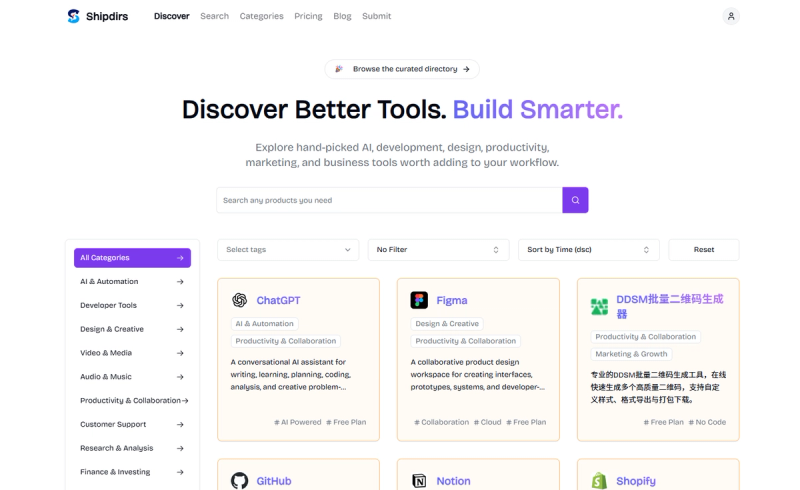
Shipdirs is a browser-based tool directory that catalogues software worth adding to a workflow, spanning AI, development, design, productivity, marketing, and business. Each entry shows a logo, the tool name, a single-sentence summary, one or more category links, and tag links such as Free Plan, AI Powered, Collaboration, Cloud, Enterprise, or No Code, and each card links to a detail page under /item/. The directory organizes listings across fifteen categories, including AI & Automation, Developer Tools, Design & Creative, Video & Media, Audio & Music, Productivity & Collaboration, Customer Support, Research & Analysis, Finance & Investing, Accessibility, Education & Learning, 3D Design, Marketing & Growth, Business & Commerce, and Travel & Lifestyle.
Key Features
- Category browsing — fifteen category pages, from AI & Automation and Developer Tools to Accessibility, 3D Design, and Travel & Lifestyle, each reachable from the main category grid.
- Tag filtering — listings carry tags such as Free Plan, AI Powered, Collaboration, Cloud, Enterprise, No Code, SEO, GEO Optimization, AI Search Visibility, Content Marketing, Marketing Analytics, AI Voice Agents, Call Center, Ecommerce, Lead Generation, Shopify, Storyboarding, Character Consistency, Text Generation, Video Generation, Music Production, Audio Tools, Image Editing, In-Image Text, OCR, Business Intelligence, and Workflow Automation.
- Search — a search field sits on the directory index for finding tools by name or description without browsing categories first.
- Sort by time (descending) and reset — results default to newest-first ordering, and a reset control clears the selected category, tags, and sort state.
- Listing cards — every result displays the tool's logo, name, one-line description, clickable category links, and clickable tags, all pointing to that tool's own page.
- Individual item pages — each tool has a stable URL, for example /item/chatgpt, /item/figma, /item/github, or /item/notion.
- Newsletter signup — an email subscribe box on the homepage for updates about new additions.
Who is it for?
- Founders and indie makers — scanning AI & Automation, Developer Tools, and Productivity & Collaboration listings for tools to assemble a product stack without evaluating dozens of sites separately.
- Marketing and growth teams — using the Marketing & Growth category and tags like SEO, GEO Optimization, and Content Marketing to find campaign, analytics, and AI-search visibility tools.
- Designers and video creators — browsing Design & Creative, Video & Media, and Audio & Music for generators such as Comic Factory or MVFlow and editors such as PicText.
- Operations and finance leads — checking Business & Commerce listings such as Subscope and Shopify for subscription-spend tracking and storefront management.
What can you do with Shipdirs?
- Build a shortlist by tag: filter the directory by attributes like Free Plan, No Code, or Collaboration to narrow hundreds of entries down to tools that match a specific constraint.
- Compare entries side by side: read one-sentence descriptions on the cards to judge what a tool does before opening its detail page.
- Catch new additions: sort by time descending to see the most recently added tools at the top of the index.
- Track a category over time: open a category page such as AI & Automation and revisit it as new listings appear.
How does Shipdirs work?
Shipdirs works as a browse-and-filter index rather than a trial environment: you open the homepage, optionally type a query into the search field, pick a category and tags, sort by time descending, then click a card to reach that tool's /item/ page. No account or installation is required to move through the directory.
FAQ
What categories does Shipdirs cover?
Shipdirs lists tools under fifteen categories: AI & Automation, Developer Tools, Design & Creative, Video & Media, Audio & Music, Productivity & Collaboration, Customer Support, Research & Analysis, Finance & Investing, Accessibility, Education & Learning, 3D Design, Marketing & Growth, Business & Commerce, and Travel & Lifestyle.
How do I filter the listings?
The directory index offers a search box, a category selector, a tag selector, a sort control set to time descending by default, and a reset button that clears your selections. Combining a category with tags is how you narrow the list to a specific kind of tool.
Does Shipdirs list free tools?
Yes. Entries carry pricing and access tags such as Free Plan, Cloud, and Enterprise, alongside capability tags like AI Powered and No Code. For example, ChatGPT, Figma, GitHub, Notion, and the DDSM batch QR code generator are all tagged Free Plan.
What information does each listing show?
Each card shows the tool's logo and name, a one-sentence description of what it does, its category links, and its tags. Clicking the card opens the tool's own page under /item/, where the same details are presented with the full description.
Can I get updates about new tools?
The homepage includes a newsletter section titled Join the Community, where you enter an email address and subscribe to receive news and updates from Shipdirs.