
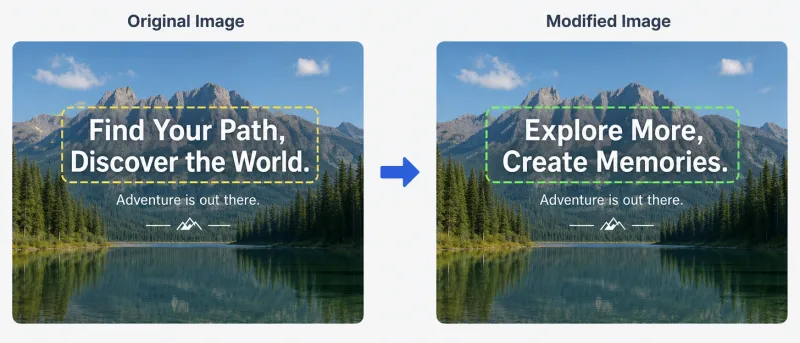
Screenshot Editor is a free online screenshot text editor that lets you erase or replace text directly in your browser without uploading images.
What is Screenshot Editor?
Screenshot Editor is a free browser-based screenshot text editor for people who need to erase or replace wording without installing desktop software. It takes a screenshot (PNG, JPG, WebP, or GIF) as input, uses local OCR to detect text, and outputs an edited PNG with erased or replaced text. Everything runs in the browser — no upload, no sign-up, no watermarks. The tool is built by an independent developer and supported by ads.
Key Features
- Local processing — OCR and editing run via WebAssembly and Canvas in your browser; images never leave your device.
- No account required — Use all features without registration, subscription, or usage caps.
- Multi-language OCR — Supports English, Simplified Chinese, Traditional Chinese, Japanese, Korean, Spanish, French, German, and Russian.
- Smart background fill — After erasing text, nearby pixels fill the gap; works best on solid or simple gradient backgrounds.
- Cross-device — Works on desktop and mobile browsers; on phones, you can take a photo and upload instantly.
- Watermark-free exports — Download edited screenshots as PNG at original resolution with no compression or watermark.
Who is it for?
- Marketers and designers — Clean product screenshots by removing test data or placeholder text before publishing.
- Customer support agents — Redact private information (phone numbers, addresses) from chat screenshots before sharing.
- Students and educators — Fix typos in slide captures or tutorial images without re-shooting.
- Anyone sharing screenshots online — Quickly erase sensitive account IDs or amounts from personal screenshots.
Use cases
- Hide sensitive info — Erase phone numbers, addresses, amounts, or account IDs from chats, orders, or dashboards before sharing.
- Fix typos in screenshots — Replace incorrect wording in slides or tutorial captures without re-taking the screenshot.
- Clean product screenshots — Remove test data, placeholder copy, or stray labels from UI shots for polished marketing assets.
How does Screenshot Editor work?
- Upload a screenshot (PNG, JPG, WebP, or GIF) from your device or photo library.
- Built-in OCR detects text lines locally; select a different OCR language if needed (default English).
- Tap a text region to erase it (background fill) or replace it with new text, then download the edited PNG.
Pros and cons
- Pros: 100% free, no account or watermarks, fully private (no server upload), supports multiple OCR languages, works on any device with a modern browser.
- Cons: Background fill works best on solid or simple gradients — busy textures may show artifacts. OCR may miss handwriting, stylized fonts, or very small text.
Pricing
Screenshot Editor is completely free with no usage limits or subscriptions. The site is supported by ads.
FAQ
Is Screenshot Editor really free?
Yes. There is no paid tier, no account required, no usage caps, and no watermarks on exports. The site is supported by ads.
Are my images uploaded to a server?
No. All processing (OCR and editing) happens locally in your browser using WebAssembly. Your images never leave your device and are cleared when you close or refresh the page.
Which image formats are supported?
Screenshot Editor supports PNG, JPG/JPEG, WebP, and GIF (first frame only). Exports are always PNG.
Why wasn't some text detected?
Handwriting, stylized fonts, or tiny/blurry text may fail OCR. Use a sharp, high-resolution screenshot and enlarge small text before uploading.
Can I replace text in a screenshot?
Yes. Select a detected text region, enter new wording, and apply the replacement. The edited area is then filled with the new text.


