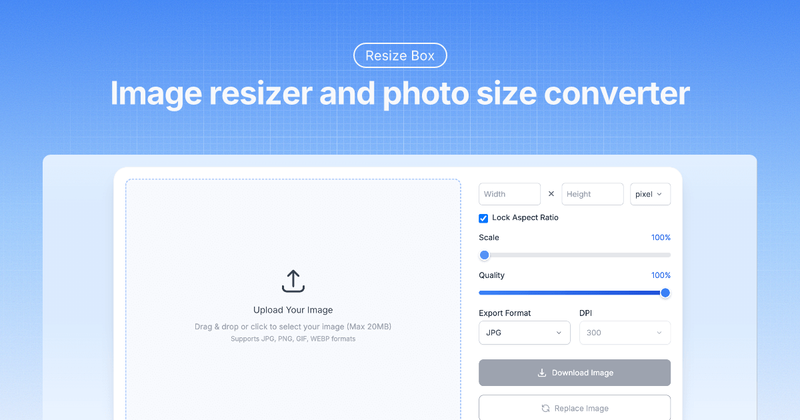
ResizeBox is a free online image resizer that lets you resize, compress, and convert images directly in your browser without uploading to any server.
What is ResizeBox?
ResizeBox is a browser-based image resizing tool that processes all image operations locally on your device—no files ever leave your computer. It accepts JPG, PNG, GIF, and WebP images up to 20 MB and outputs resized images in your choice of formats with customizable dimensions, DPI, and compression quality.
Key Features
- Smart image resizing — Intelligent algorithms preserve detail and sharpness when enlarging or reducing images, with a quality slider (1–100%) to balance file size and clarity.
- Multiple format support — Convert between JPG, PNG, WebP, and GIF; change output format during resize.
- Flexible sizing units — Set dimensions in pixels, inches, centimeters, or millimeters; lock aspect ratio to maintain proportions automatically.
- DPI control — Choose from preset DPI values (72, 96, 150, 200, 240, 300, 600, 1200, 1400) for print-ready output.
- Real-time preview — See your resized image instantly before downloading, with zoom and crop preview.
- Privacy-first processing — All image manipulation happens in your browser; nothing is uploaded to any server.
- Template presets — Over 100 predefined sizes for social media (Facebook, Instagram, YouTube, TikTok, etc.), paper sizes, and passport/visa photos.
- Bulk resizing — Process multiple images at once via the Bulk Image Resizer and download all results as a ZIP file.
Who is it for?
- Social media managers — Quickly resize images to platform-specific dimensions (e.g., Instagram 1080×1080, YouTube thumbnail 1280×720) using built-in templates.
- Photographers and designers — Adjust image size and DPI for high-quality print output (up to 1400 DPI) while preserving sharpness.
- E-commerce sellers — Resize product photos to marketplace requirements (Shopify 2048×2048, eBay 1600×1600) with bulk processing for catalogs.
- Everyone needing quick optimization — Reduce image file size for email attachments or website loading without registering or signing in.
What can you do with ResizeBox?
- Resize for social media — Choose from templates for Facebook, Instagram, YouTube, TikTok, Twitter, LinkedIn, Pinterest, and more; each has exact dimensions and aspect ratios preloaded.
- Convert formats — Change an image from JPG to PNG (or vice versa) while resizing, with format-specific quality notes (e.g., PNG does not support quality adjustment).
- Create print-ready files — Set custom DPI and dimensions in inches or centimeters; ideal for passport photos (e.g., 2×2 inch US passport), paper sizes (A4, Letter), and photo prints.
- Resize by percentage — Scale images to a custom percentage of original dimensions via the percentage resizer.
- Compress without visible loss — Lower the quality slider to reduce file size while maintaining good visual fidelity; WebP format offers optimal compression.
How does ResizeBox work?
Using ResizeBox is a three-step process: (1) upload an image by dragging and dropping or clicking the upload area (supports JPG, PNG, WebP, GIF up to 20 MB); (2) adjust dimensions using pixels, inches, centimeters, or millimeters, set quality and output format, and lock aspect ratio if desired; (3) preview the result in real time and download. No account creation is required, and all processing stays on your device.
FAQ
Is ResizeBox free?
Yes, ResizeBox is completely free to use with no watermarks, limitations, or hidden charges. You can resize unlimited images, use all features, and download results without registering or providing an email.
What image formats does ResizeBox support?
ResizeBox supports input and output in JPG, PNG, WebP, and GIF. It also accepts BMP and TIFF files for conversion. PNG is best for images requiring transparency, while JPG is ideal for photos.
Does ResizeBox upload my images to a server?
No. All image processing happens locally in your browser using JavaScript. Your images never leave your device, so your privacy is fully protected.
How can I maintain image proportions?
Enable the "Lock Aspect Ratio" toggle. When active, changing either the width or height automatically adjusts the other dimension to preserve the original proportions, preventing distortion.
What is the maximum image size I can upload?
The maximum file size is 20 MB. There is no limit on pixel dimensions, but very large files may take a few extra seconds to process.
Pricing
ResizeBox is entirely free. No premium tiers, no account required—all features are available to everyone without cost.
Pros and cons
Pros:
- Fully browser-based with no uploads, ensuring privacy.
- Extensive template library for social media and print.
- Supports multiple output formats and DPI control.
- Bulk resizing available for batch processing.
- No registration or sign-up needed.
Cons:
- Maximum file size limited to 20 MB.
- Some advanced features (e.g., compression for PNG) are limited by format constraints.
- Processing large images may be slower than server-based tools.