
QR Menu Generator is a web-based digital menu builder that turns a restaurant's dishes, photos, and prices into a mobile-friendly online menu customers open by scanning a QR code — no app installation required.
What is QR Menu Generator?
QR Menu Generator is an online tool that converts a restaurant's menu items, photos, descriptions, and prices into a digital menu customers open in their phone's browser by scanning a QR code — no app installation needed. It is built for restaurants, cafés, bars, and food trucks, and it includes features like allergen labels compliant with EU Regulation 1169/2011, real-time updates, and premium themes. The platform is accessible via a web dashboard and works on any device with a camera and browser.
Key Features
QR Menu Generator packs the tools a modern digital menu needs into one dashboard, from QR code generation to allergen labeling and analytics.
- Built-in QR code generation — Every menu gets its own QR code that customers scan with a phone camera; the code stays the same even when menu content changes.
- EU 1169/2011 allergen labels — Tag each dish with any of the 14 mandatory allergen categories (gluten, milk, eggs, nuts, soy, etc.) to help customers make safe choices and meet European food information regulations.
- Instant menu updates — Change prices, descriptions, availability, or add new items from the dashboard; the same QR code always serves the latest version.
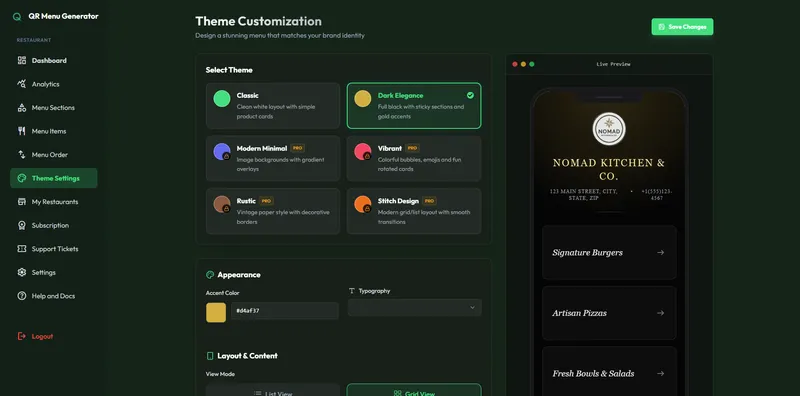
- Premium themes — Choose from professionally designed menu themes that match your restaurant's brand and look polished on mobile screens.
- Analytics — Track menu views and engagement trends to understand how customers interact with your digital menu (available on paid plans).
- Bulk price update — Update all menu item prices at once with the bulk editing tool instead of editing item by item.
- AI menu translation — Let AI translate the entire menu into multiple languages so international guests can browse in their own language; available as a paid add-on with a one-time batch of credits.
- Multi-location management — Manage one restaurant or multiple locations from a single platform on higher-tier plans.
Who is it for?
QR Menu Generator is designed for any food or drink business that serves customers face-to-face and wants to reduce printing costs while keeping menu information accurate and accessible.
- Restaurant and café owners — Replace printed menus and PDFs with a QR-code-based digital menu that can be updated instantly when prices or dishes change.
- Food trucks and pop-ups — Launch a mobile-friendly menu quickly without technical setup, and place the QR code on packaging or a counter stand.
- Bar owners — Show drink lists with clear allergen information and easy access on customer phones.
- Multi-location restaurant groups — Manage menus for every branch from one dashboard, with the ability to update all locations at once.
What can you do with it?
Beyond a simple digital menu, QR Menu Generator lets restaurant operators handle everyday tasks directly from the dashboard.
- Update menus on the fly: Change a dish's price or mark it sold out from the dashboard; the QR code on tables always shows the current version.
- Meet allergen compliance: Add 14 mandatory allergen labels per dish (gluten, milk, eggs, etc.) so inspectors and guests see the information required by EU Regulation 1169/2011.
- Translate menus automatically: Use the AI translation feature to generate a multi-language version of your menu for international guests.
- Generate WiFi QR codes (Pro plan): Let customers connect to your WiFi by scanning a QR code instead of typing a password.
How does it work?
Setting up a QR menu is a three-step process designed to take less than 15 minutes.
- Create your menu — add categories, dishes, prices, photos, and descriptions from the dashboard.
- Customize the experience — choose a theme, add allergen or dietary labels, and make the menu fit your brand.
- Share your QR code — place the generated QR code on tables, counters, or takeaway packaging; update the same menu anytime.
The entire workflow runs in a web browser — no technical setup or app installations are required.
Pricing
QR Menu Generator is freemium, with three tiers that scale from a single free restaurant to unlimited locations.
- Free — 1 restaurant, up to 5 categories, up to 20 products, and 10,000 monthly views.
- Pro — unlimited views, unlimited categories and products, allergen labels, analytics, AI translation credits, WiFi QR generator, and more.
- Pro Plus — unlimited restaurants and multi-location management.
No credit card is required to start.
FAQ
These are the questions restaurant owners most often ask about QR Menu Generator.
Is QR Menu Generator free?
Yes, there is a permanent free plan that includes up to 5 categories, 20 products, and 10,000 monthly views for a single restaurant. No credit card is required to sign up. Paid plans (Pro and Pro Plus) add unlimited products, analytics, AI translation, and multi-location support.
How do customers access my menu?
Customers scan the QR code with their phone camera and the menu opens directly in their browser — no app download is needed. The same QR code works for every menu update, so you never have to reprint.
Can I show allergen information on my digital menu?
Yes. Each menu item can carry labels for all 14 EU allergen categories required by Regulation 1169/2011. This helps guests make safe choices and helps your business stay compliant in European markets.
Can I use QR Menu Generator for multiple restaurant locations?
Yes, multi-location management is available on the Pro Plus plan. That tier supports unlimited restaurants from a single platform, so you can update each location's menu separately or apply changes across all of them.
How do I create a QR menu?
Sign up for a free account, add categories and dishes with photos, prices, and descriptions, then customize the theme and download the generated QR code. The process takes under 15 minutes and requires no design or technical skills.


