Newsletter
Join the Community
Subscribe to our newsletter for the latest news and updates
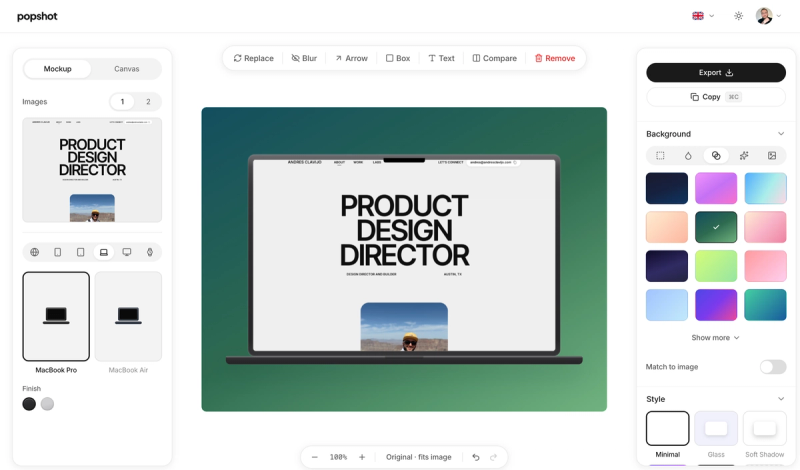
Turn any screenshot into a polished visual — device frames, backgrounds, shadows, and quick annotation (arrow, box, text, blur). Free, runs in the browser, no signup.
Submit your own product to reach creators and founders looking for the next tool to try.
Popshot is a free, browser-based screenshot beautifier that turns any screenshot into a polished, platform-ready visual with device frames, matching backgrounds, and built-in annotation. You can beautify a screenshot immediately, with no signup, and export a high-resolution PNG or JPG.
Popshot is a web app that takes a screenshot as input and produces a framed, color-matched, optionally annotated visual as output. It runs entirely in the browser, needs no installation, and its free tier covers all templates, platforms, and export sizes. Instead of opening a heavy image editor, you drop an image, pick a look, and download a final file in seconds.
Popshot makes the most useful screenshot-formatting steps available in one tap each, without forcing you through a setup wizard.
Popshot is for anyone who needs a screenshot to look good quickly — not for elaborate 3D scenes or animation.
Popshot's out-of-the-box tasks include these:
The workflow is a short paste → style → export loop.
Because everything happens client-side, the source screenshot never ships to a server — the site explicitly states the blur tool "bakes real pixelation into the exported image" and "all happens in your browser."
Here is the trade-off picture based on the feature set and pricing page.
Popshot is freemium, with a "Free" tier that costs nothing forever and a "Pro" tier at $9 per month.
Popshot is a browser-based alternative to CleanShot X, Xnapper, and Screely — other lightweight tools for making screenshots look polished. Popshot's differentiator is that it needs no install and offers a generous free tier with no signup.
Yes. All templates, platforms, solid and match-to-image backgrounds, and full-resolution export (1x/2x/3x) in PNG or JPG are free. Free exports include a small "popshot.app" badge; Pro removes it and adds gradients, premium frames, and scene effects.
No. You can use every free feature without signing in. An account is only needed if you want to purchase Pro features like gradient backgrounds, custom frames, scene effects, or badge removal.
Popshot turns a screenshot into a polished visual by automatically matching a background color, adding a browser or device frame, and letting you annotate with arrows, text, or blur. You export the final result as a PNG or JPG up to 3x resolution.
Yes. The free blur tool redacts API keys, emails, or faces. It bakes real pixelation into the exported image rather than adding a removable overlay, and because the processing happens in your browser, the original content never ships.
Yes. The free arrow and text tools let you point things out and label anything right on the canvas. You can move, resize, and restyle these annotations, and they all bake into the exported image.