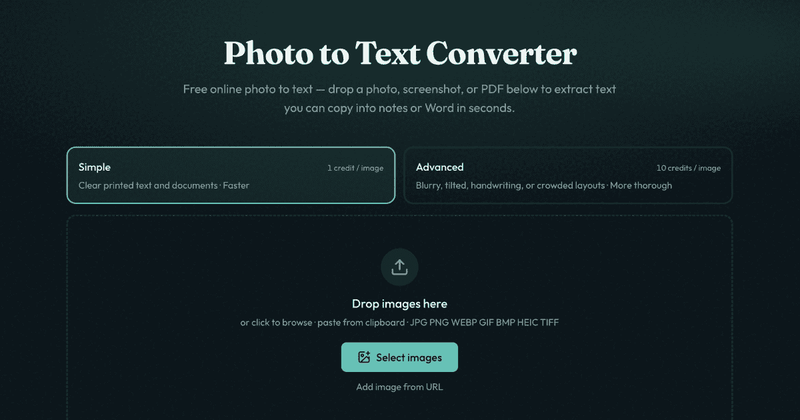
Photo to Text Converter (photototext.ai) is a free online OCR web app that extracts editable text from images and PDFs — JPG, PNG, WEBP, GIF, BMP, HEIC, TIFF, or PDF — with no sign-up required to start. It runs entirely in the browser, so you can drop a file or paste from the clipboard and copy the result into Word, notes, or a spreadsheet in seconds.
What is Photo to Text Converter?
Photo to Text Converter is a browser-based OCR tool that takes an image or PDF as input and returns selectable text as output. It supports common formats including JPG, PNG, WEBP, GIF, BMP, HEIC, TIFF, and PDF. The tool offers two OCR modes — Simple and Advanced — and also links to dedicated JPG-to-Word and JPG-to-Excel converters for turning document photos into editable files.
Key Features
- Multiple input formats — Accepts JPG, PNG, WEBP, GIF, BMP, HEIC, TIFF, and PDF files through drag-and-drop, file browsing, paste from clipboard, or by adding a URL.
- Two OCR modes — Simple mode handles clear screenshots and printed pages; Advanced mode is built for blurry photos, tilted pages, handwriting, and crowded layouts or table images.
- Copy or download output — After OCR, you can copy the extracted text with formatting, or download the result as DOCX, Markdown, or TXT.
- Credit-based pricing — Simple costs 1 credit per page; Advanced costs 10 credits per page. The service is free to start, with credits and plans for more volume.
- Privacy-friendly guest mode — Guest conversions are not stored or kept as account history; if you sign in, saved Results can be deleted anytime and unused results are cleared automatically after about 14 days.
- Tied-in document converters — Dedicated pages for JPG to Word and JPG to Excel let you insert images, keep Markdown styles, or download XLSX, CSV, or TSV from table photos.
- OCR model experiments — The site links to DeepSeek OCR and GLM OCR model converters for layout-aware extraction on hard documents.
Who should use Photo to Text Converter?
- Students and professionals who need to copy text from printed worksheets, locked screenshots, or scanned PDFs into notes or documents without retyping.
- Office workers handling receipts and invoices who want to pull line items and totals from a photo into an editable Excel spreadsheet instead of typing them by hand.
- People scanning documents at home who have PDF scans or camera photos of pages and need searchable, reusable text for email, Word, or Drive.
- Anyone who regularly screenshots content where text selection is disabled — this tool converts those image-only words back into selectable text.
What can you do with Photo to Text Converter?
- Turn a screenshot into copyable text — When an app locks text selection and you just want the words, upload the screenshot, run Simple OCR, and copy the result.
- Convert a document photo to Word — Use the JPG to Word converter to pull text from a scanned page or worksheet into an editable .docx, with options to insert images or keep Markdown styles.
- Extract table data from a receipt — Use the JPG to Excel converter to turn a receipt, screenshot grid, or paper table into rows and columns, then download as XLSX, CSV, or TSV.
- Try layout-aware OCR models — For hard documents with complex structure, the site provides direct access to DeepSeek OCR and GLM OCR converters, with export to Word when structure matters.
How does the photo to text extraction work?
The workflow is a three-step online process. First, you add a photo or PDF by dropping it into the converter, clicking to browse, pasting from clipboard, or adding a URL. Second, the built-in OCR engine extracts text — with Advanced mode available for trickier shots. Third, you copy the extracted text into Word, notes, or email, or continue to a dedicated JPG to Word / JPG to Excel converter when you need a file.