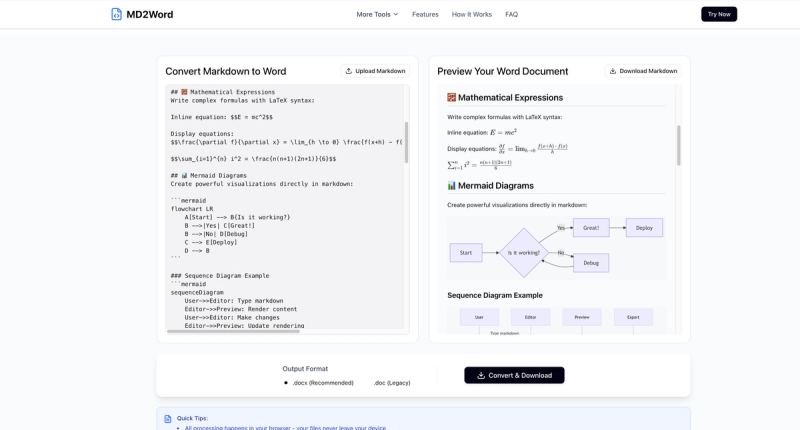
Markdown to Word (markdowntoword.pro) is a free, browser-based online tool that converts Markdown (.md) files into Word documents (.docx/.doc) instantly, preserving full GitHub Flavored Markdown (GFM) including tables, LaTeX math, Mermaid diagrams, code blocks, footnotes, and GitHub alerts.
What is Markdown to Word?
Markdown to Word is a fully client-side web application that transforms Markdown content into professionally formatted Word documents. It accepts input via file upload (.md or .markdown) or direct text paste, and outputs either .docx or .doc files. The entire conversion runs in the browser, so no data is ever sent to a server — all processing stays on the user's device.
Key Features
- Instant conversion — Paste Markdown or upload a file and download the Word document in under 2 seconds; no waiting, no queues.
- Real-time live preview — See exactly how tables, math equations, diagrams, and code blocks will appear in the final Word file before downloading.
- Full GFM support — Preserves headings, nested lists, tables, emojis, images (embedded as base64), LaTeX math (inline
$...$and display$$...$$), Mermaid diagrams (rendered as PNG), syntax-highlighted code blocks, footnotes, and GitHub alerts. - Multiple output formats — Choose between modern .docx and legacy .doc to match any Word version or compatibility requirement.
- Browser-only privacy — All conversion logic runs locally; files are never uploaded, stored, or shared — nothing leaves your device.
- Drag-and-drop upload — Supports .md and .markdown files up to 10 MB, with easy drag-and-drop or click-to-upload interface.
- Cross-platform — Works on any device with a modern browser: Windows, macOS, Linux, iOS, and Android.
Who is it for?
- Developers and technical writers — Convert API docs, README files, and technical guides into polished Word documents for client delivery or internal use.
- Academics and researchers — Prepare papers, theses, and lab reports containing LaTeX equations and tables in Word format for journal submission.
- Content creators and bloggers — Export Markdown drafts from editors like Typora or Obsidian into Word files for publishing teams or collaboration.
- Teams using collaborative workflows — Convert Notion exports or GitHub wiki pages into .docx for team review and editing in Microsoft Word or Google Docs.
What can you do with Markdown to Word?
- Export ChatGPT or AI outputs: Paste AI-generated Markdown (including tables and code) and download a clean Word document with all formatting intact.
- Convert Notion pages: Export a Notion page as Markdown, then convert to Word preserving images, code blocks, and nested lists.
- Generate print-ready documents: Use the live preview to adjust formatting, then download a self-contained .docx with embedded fonts and images for printing.
- Create academic submissions: Write in Markdown with LaTeX math and Mermaid diagrams, then convert to Word for journals that require .docx format.
How does Markdown to Word work?
- Paste or upload your Markdown content — either drag a .md file onto the upload area or type/paste directly into the editor.
- Preview the live rendering, inspecting tables, math, and diagrams as they will appear in Word.
- Select output format (.docx or .doc) and click "Convert & Download" to receive the Word file instantly.
Pricing
Markdown to Word is completely free — no sign-up, no usage limits, no watermark. All features including LaTeX and Mermaid diagram support are available at no cost.
Alternatives
- Pandoc — A command-line tool that converts Markdown to Word via
pandoc input.md -o output.docx; powerful for batch processing but lacks Mermaid diagram support out of the box. - VS Code extensions (e.g., Markdown All in One) — Allow export directly from the editor, but offer limited formatting options and no built-in Mermaid or LaTeX rendering.
FAQ
Is Markdown to Word free?
Yes, it is 100% free with no sign-up, no hidden fees, and no usage caps. There is no premium tier.
Are my files safe?
Conversion happens entirely in your browser; files are never uploaded, stored, or shared. Your Markdown content never leaves your device.
Can I preview before downloading?
Yes, a live preview panel shows the exact Word output — including tables, math, and diagrams — so you can verify formatting before conversion.
What file formats are supported for input and output?
Input: .md and .markdown files up to 10 MB. Output: .docx (modern) and .doc (legacy) Word formats.
How are Mermaid diagrams handled?
Mermaid code blocks are rendered as high-quality PNG images and embedded directly into the Word document, preserving flowcharts, sequence diagrams, Gantt charts, and class diagrams.