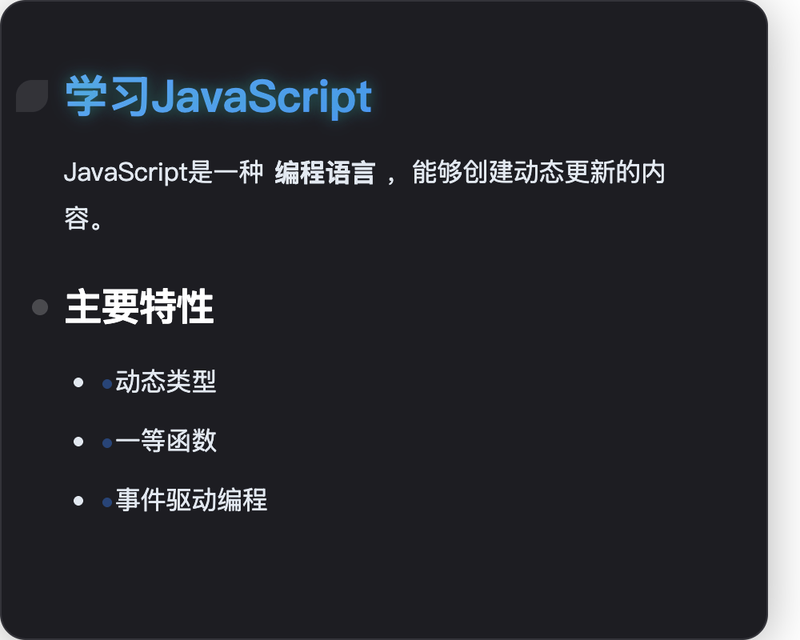
MD2Card is an AI-powered online tool that converts Markdown text into visually formatted knowledge cards, offering 30+ themes, real-time preview, and multi-format export.
What is MD2Card?
MD2Card is a web-based platform that takes Markdown input (from text, topics, or long articles) and produces styled visual cards for sharing or presentation. It runs entirely in the browser, with no installation required, and is developed by an independent team focused on content creation tools.
Key Features
- AI Magic Cards — Enter any topic; MD2Card automatically generates a beautifully designed knowledge card with unique layouts, powered by AI (Claude 4.0). Quota: 10 cards per month on free tier.
- AI Text Conversion — Paste long articles or URLs; the AI extracts key information and outputs structured Markdown ready for card formatting. Quota: 30 conversions per month on free tier.
- 30+ Beautiful Themes — Includes styles like Pop Art, ByteDance Business, Apple Notes, Glassmorphism, and Oriental Classic. New themes are regularly added.
- Full Markdown Support — Headings, lists, code syntax highlighting, LaTeX math formulas, tables, images, and custom colored text (e.g.,
:red{red text}). Use three dashes (---) to split content into multiple cards. - Real-time Preview & Multi-Format Export — Preview updates instantly while editing. Export as PNG, SVG, JPEG, or PDF; one-click copy to clipboard.
- Multi-language Support — Interface and content available in 8 languages, including English and Chinese, with RTL and font optimization.
Who is it for?
- Students — Convert study notes and research into visual flashcards or summary cards.
- Educators — Turn lesson plans and handouts into engaging teaching materials.
- Content Creators — Transform blog posts or social media content into shareable card graphics.
- Developers — Document technical concepts, code examples, or API docs as professional cards.
Use Cases
- Study Flashcards — Input a topic like "Quantum Computing" to get a structured, visually appealing card summarizing core concepts.
- Social Media Cards — Convert a Markdown blog excerpt into a branded image for Twitter, Instagram, or LinkedIn.
- Technical Documentation — Create cheat sheets or code snippet cards with syntax highlighting and export as SVG for embedding.
- Educational Handouts — Design class materials with themes like "Notebook" or "Apple Notes" for a natural look.
How does it work?
Follow a simple 4-step workflow: (1) Write or paste Markdown in the editor, (2) Choose a theme from 30+ options, (3) Preview and edit in real time, (4) Export as PNG, SVG, JPEG, or PDF and share.
Pricing
MD2Card operates on a freemium model with monthly quotas. Free tier: 10 AI Magic Cards and 30 Text Conversions. Paid plans unlock higher quotas: Basic ($4.99/mo, 100 Magic Cards, 200 Text Conversions), Pro ($9.99/mo, 250/500), and Ultimate ($19.99/mo, 600/1000). All plans include all themes and export formats.
FAQ
What Markdown syntax does MD2Card support?
MD2Card supports headings (H1–H6), bold, italic, strikethrough, highlight, links, images, ordered/unordered lists, code blocks with syntax highlighting, tables, blockquotes, LaTeX math formulas, and custom colored text.
Can I customize the appearance of cards?
Yes, you can choose from over 30 professionally designed themes. Additional customization is available through theme variants and layout options within each theme.
How do I export my Markdown cards?
After previewing, use the export button to save as PNG, SVG, JPEG, or PDF. You can also copy the card to clipboard for quick pasting.
Is MD2Card free?
Yes, there is a free tier with limited monthly usage (10 AI Magic Cards, 30 Text Conversions). Paid plans start at $4.99 per month for higher quotas.
Does MD2Card work on mobile devices?
Yes, the web interface is fully responsive and works on mobile browsers, though the editor is optimized for desktop use.